NETGEAR is aware of a growing number of phone and online scams. To learn how to stay safe click here.
Forum Discussion

Therobotman80
Jan 11, 2024Aspirant
Can someone tell me why my downstream channel just flashes
Can someone tell me why my downstream channel just flashes. I have had the cable company out and all they did was added another filter to the outside box. Now it has 2 of them. One inside connected t...
Therobotman80
Jan 11, 2024Aspirant
I just did a factory reset and for now everything seems to be normal. I will update if something changes. Thanks!

FURRYe38
Jan 11, 2024Guru - Experienced User
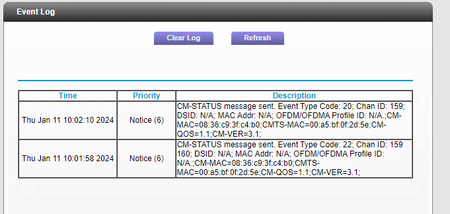
Since you FR, please post the events and cable connections page data again.
Your first post shows power levels are TOO high and all over the place.
https://kb.netgear.com/24311/Power-level-guidelines-for-a-NETGEAR-cable-modem-router
Lets make sure there with in specs.
Also have correctables and un-correctables that should be zeros across the board.
There should be more events log data as well.
- Therobotman80Jan 11, 2024Aspirant
- FURRYe38Jan 12, 2024Guru - Experienced User
Power levels are TOO high on most of the channels. Need to bring them down and into spec:
https://kb.netgear.com/24311/Power-level-guidelines-for-a-NETGEAR-cable-modem-router
Will eventually burn out the modem if those are not lowered. Ask the ISP about this or get you a 3 or 6db attenuator on the line soon.
Most channels need to all be down in the same power range as well and not all over the place.
ISP should look at those Warnings in the event log. Something maybe out of tune on the ISP signal up to the modem.
- Therobotman80Jan 12, 2024Aspirant
There is one 6db on the cable before the modem. The guy installed one on the outside of the cable as well not sure what db that one is I will have to check. Thank you for your help.