NETGEAR is aware of a growing number of phone and online scams. To learn how to stay safe click here.
Forum Discussion

cmerc
Feb 08, 2022Tutor
CAX80 – Issues with Downstream
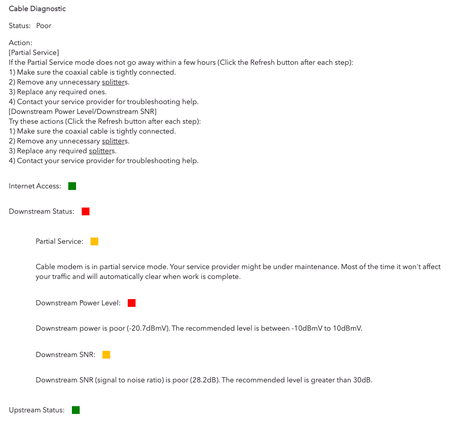
Hi, I recently purchased a CAX80 from Netgear (Oct 2021). It's been great. I bought it due to some research and customer reviews on several consumer retail sites. Over the last 3-4 weeks, our int...
- Feb 09, 2022
Yeah they'll need to check the line

plemans
Feb 08, 2022Guru - Experienced User
Your power levels are way out of spec, you have a ton of errors, and your logs show it.
Check your line for kinks, damage, old/bad/cheap/loose/corroded connectors and replace them if you do.
Remove any splitters, amplifiers, or signal attenutors from your line.
preferably, move the modem to right where the coax comes into the home and direct connect it.
If that doesn't help (you can repost the pics after changes/checks made) then the isp will need to check the line.
cmerc
Feb 08, 2022Tutor
I have the device plugged in right where the coax comes in. I'm in a condo complex and the cable comes in from the closet ceiling, so probably not direct from outside. I may need to have the ISP tech come out to figure out all of the wiring. Thanks for the suggestions.
- cmercFeb 09, 2022Tutor
Here's an update. I plugged in my previous modem (MB7621) and received similar numbers — the power is far too low. I'm having my ISP tech come out tomorrow morning to help troubleshoot this. My assumption is this is an issue with the cable that comes into the house. I've am told I'm provisioned at 500mbps, which is what I'm paying for. Currently getting about 30-35mbps.