NETGEAR is aware of a growing number of phone and online scams. To learn how to stay safe click here.
Forum Discussion

jwconner87
Mar 17, 2023Aspirant
CAX80 Connectivity
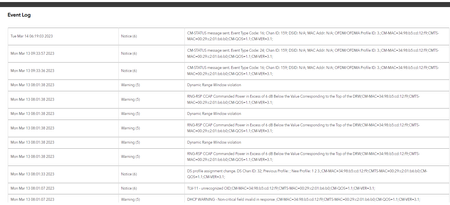
Here is what I have for my error logs. I have been having issues with Cox Internet where the Wifi cycles off for a few moments then reboots. Cabled connections don't seem to have the same issue.
...

FURRYe38
Mar 18, 2023Guru - Experienced User
What FW is loaded on the CAX modem?
Please post a copy and paste of the modems connection status page.
https://kb.netgear.com/30007/How-do-I-obtain-the-cable-connection-information-from-a-NETGEAR-cable-modem-modem-router
Events logs show a line issue. You need to have the ISP review and resolve any Errors, Criticals and Warnings.
Have the ISP check the signal and line quality UP to the modem. Be sure the ISP provisions the modem correctly.
Be sure there are no coax cable line splitters in the between the modem and ISP service box.
Be sure your using good quality RG6 coax cable up to the modem.
Start with removing any amplifiers, signal attenuators, or splitters from the coax.
From there check the line for kinks, damage, moisture in the line.
Check the connectors for improperly made ends, foil touching the copper coax line, loose connections, bad/old/cheap connectors, or corroded connections. Replace them if you do.
Be sure to power OFF the modem for 1 minute then back ON.
https://community.netgear.com/t5/Cable-Modems-Routers/General-info-and-Troubleshooting-for-Cable-Modems/m-p/1530376#M12853
jwconner87
Mar 21, 2023Aspirant
FW is set at v2.1.5.2 for the router
Cable FW version is V1.02.08
Here's the Cable Connection Status
I'll discuss with the ISP. The weird thing is that I work remotely all day with a cabled connection with no issue or interruption of service, even if the Wifi goes down. It's only the wireless internet that cuts in and out.
- FURRYe38Mar 21, 2023Guru - Experienced User
Need to see the full cable connection status page. Scroll down to reveal the rest of the page.
How is Basic and Advanced wireless setting configured on the modem?
Smart Connect and AX mode enabled?
What channels are you using? Auto? Try setting manual channel 1, 6 or 11 on 2.4Ghz and 40 to 48 channel on 5Ghz.
Any Wifi Neighbors near by? If so, how many?- jwconner87Mar 21, 2023Aspirant
Sorry about that. Here you go:
I did not have Smart Connect on, but I've changed that. My router is now acting weird and won't let me open the router page since making this change. I'll try to get around to the settings I've got on the Basic and Advanced Wireless pages as soon as possible.
Before I made the Smart Connect change, I also updated the Channels for 2.4GHz and 5GHz
Quite a few Wifi neighbors right now. They're all fairly weak though.
- FURRYe38Mar 21, 2023Guru - Experienced User
Power levels are ok.
Every channel has correctables that should be mostly zeros like the un-correctables column.
Be sure there are no coax cable line splitters in the between the modem and ISP service box.
Be sure your using good quality RG6 coax cable up to the modem.
Start with removing any amplifiers, signal attenuators, or splitters from the coax.
From there check the line for kinks, damage, moisture in the line.
Check the connectors for improperly made ends, foil touching the copper coax line, loose connections, bad/old/cheap connectors, or corroded connections. Replace them if you do.Need to have the ISP review all Criticals, Errors and Warnings seen in the Events logs page and resolve them.
I use channel 1 and 40 on my CAX80 when in gateway mode.
Smart Connect should not change the behavior of the WEB UI and access. I use MS Edge and Opera here for accessing the web page. Also OFDMA and AX mode is enabled on mine however you can disable this as a test to see if anything changes. I set 40Mhz only on 2.4Ghz as well.