Forum Discussion

MrFlish
Feb 23, 2021Aspirant
CM 1200 Event Logs and Channels
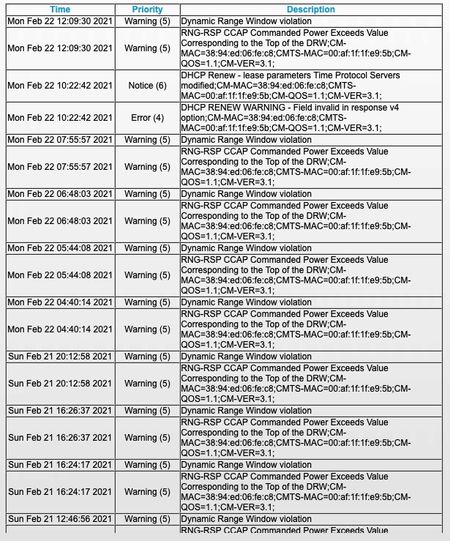
Need some help understanding what issues my log and channels are trying to tell me. The modem DS light is flashing and but everything else seems to be operating. The network is working but I'm not su...
- Feb 23, 2021
You have a ton of errors in your line, your power is out of spec, and your log indicates a line issue.
This all tends to point to problems with the line.
remove any splitters, attenuators, or amplifiers from the line. Check for kinks, damage, loose/old/bad/corroded/connections. Replace them if there are. check the cable to ensure its good quality rg6.
Also, try moving the modem to right where the coax enters the home. Maybe wiring within the walls is bad.
Then try using it for a bit and getting the screen snips of the logs/connections again. If they're the same, your isp needs to check the line.
MrFlish
Feb 23, 2021Aspirant
Hope this works....


plemans
Feb 23, 2021Guru - Experienced User
You have a ton of errors in your line, your power is out of spec, and your log indicates a line issue.
This all tends to point to problems with the line.
remove any splitters, attenuators, or amplifiers from the line. Check for kinks, damage, loose/old/bad/corroded/connections. Replace them if there are. check the cable to ensure its good quality rg6.
Also, try moving the modem to right where the coax enters the home. Maybe wiring within the walls is bad.
Then try using it for a bit and getting the screen snips of the logs/connections again. If they're the same, your isp needs to check the line.