NETGEAR is aware of a growing number of phone and online scams. To learn how to stay safe click here.
Forum Discussion

tim614
Jul 29, 2019Aspirant
CM1000 + WOW Cable, Very Slow Upload Speeds
I've had a weird issue with my CM1000 the past few days. Occasionally my speeds will stick where they are supposed to be (500/50), but occasionally the download declines a bit and the upload drops to near 0. I pulled a number of like 280/0 speed tests.
- I've reset, rebooted, button rest/factory reset, and reseated the coax.
- Packet loss has increased significantly too.
- This happens during peak hours and non-peak hours.
- This didn't happen prior to Saturday night.
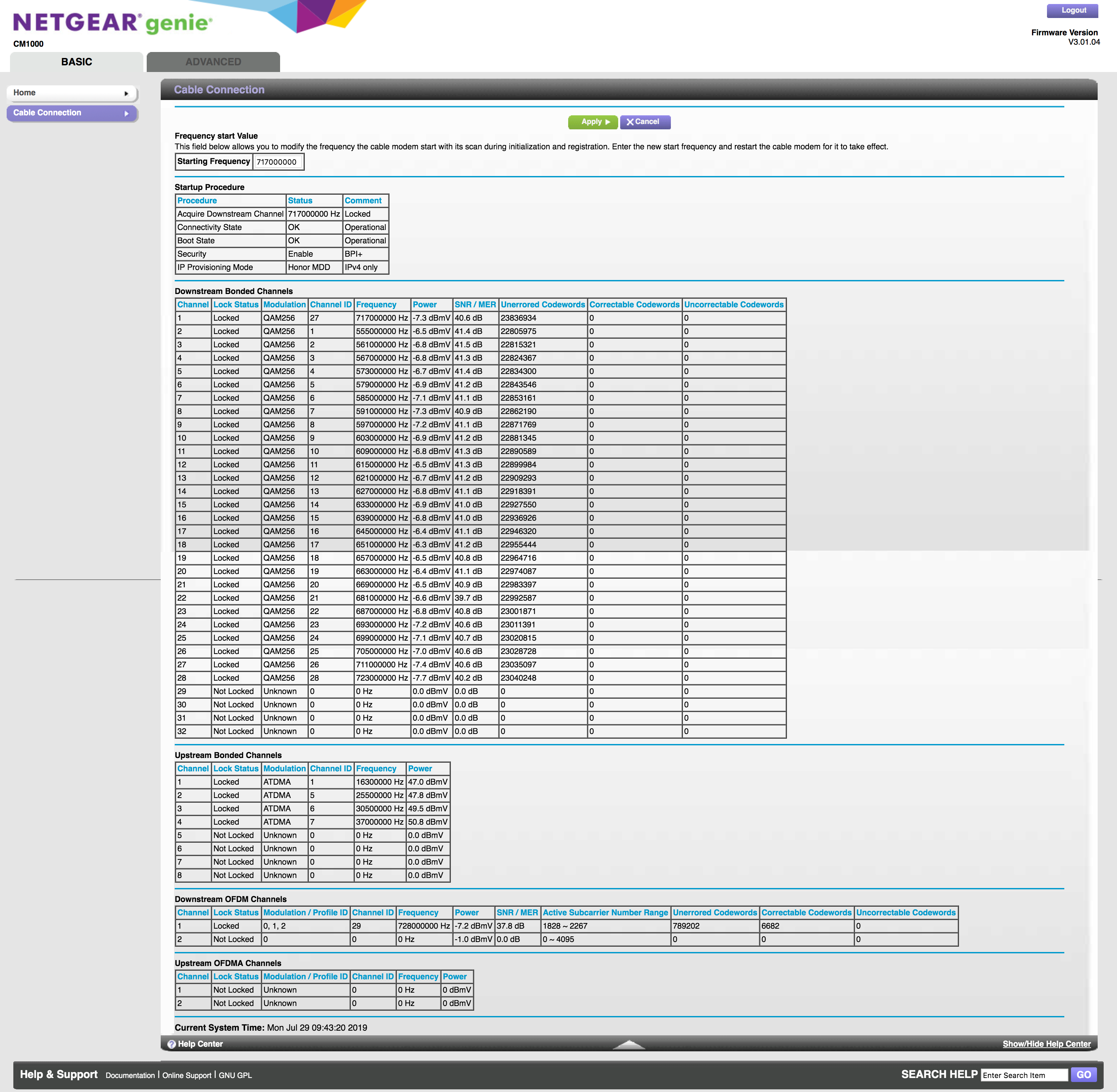
Here is my cable connection table. Can anyone help me make sense of this to pinpoint the problem? WOW is all to happy to blame the customer owned modem.
Thanks in advance!
Hardware Version 2.02
Firmware Version V3.01.04
Frequency start Value This field below allows you to modify the frequency the cable modem start with its scan during initialization and registration. Enter the new start frequency and restart the cable modem for it to take effect. Starting Frequency
<tabindex=-1>Startup Procedure</tabindex=-1> Procedure Status Comment Acquire Downstream Channel 717000000 Hz Locked Connectivity State OK Operational Boot State OK Operational Security Enable BPI+ IP Provisioning Mode Honor MDD IPv4 only
<tabindex=-1>Downstream Bonded Channels</tabindex=-1>
Channel Lock Status Modulation Channel ID Frequency Power SNR / MER Unerrored Codewords Correctable Codewords Uncorrectable Codewords 1 Locked QAM256 27 717000000 Hz -7.3 dBmV 40.5 dB 13678681 0 0 2 Locked QAM256 1 555000000 Hz -6.6 dBmV 41.2 dB 12643907 0 0 3 Locked QAM256 2 561000000 Hz -6.8 dBmV 41.4 dB 12653198 0 0 4 Locked QAM256 3 567000000 Hz -6.8 dBmV 41.4 dB 12662399 0 0 5 Locked QAM256 4 573000000 Hz -6.6 dBmV 41.5 dB 12672298 0 0 6 Locked QAM256 5 579000000 Hz -7.0 dBmV 41.2 dB 12681437 0 0 7 Locked QAM256 6 585000000 Hz -7.1 dBmV 41.1 dB 12691063 0 0 8 Locked QAM256 7 591000000 Hz -7.3 dBmV 41.0 dB 12700286 0 0 9 Locked QAM256 8 597000000 Hz -7.1 dBmV 41.0 dB 12709649 0 0 10 Locked QAM256 9 603000000 Hz -6.9 dBmV 41.2 dB 12719225 0 0 11 Locked QAM256 10 609000000 Hz -6.8 dBmV 41.2 dB 12728581 0 0 12 Locked QAM256 11 615000000 Hz -6.5 dBmV 41.4 dB 12737914 0 0 13 Locked QAM256 12 621000000 Hz -6.8 dBmV 40.8 dB 12747122 0 0 14 Locked QAM256 13 627000000 Hz -6.8 dBmV 41.0 dB 12756284 0 0 15 Locked QAM256 14 633000000 Hz -6.9 dBmV 41.0 dB 12774693 0 0 16 Locked QAM256 15 639000000 Hz -6.8 dBmV 41.0 dB 12784081 0 0 17 Locked QAM256 16 645000000 Hz -6.4 dBmV 41.1 dB 12793484 0 0 18 Locked QAM256 17 651000000 Hz -6.3 dBmV 41.1 dB 12802665 0 0 19 Locked QAM256 18 657000000 Hz -6.5 dBmV 40.9 dB 12811985 0 0 20 Locked QAM256 19 663000000 Hz -6.4 dBmV 41.0 dB 12821225 0 0 21 Locked QAM256 20 669000000 Hz -6.5 dBmV 40.8 dB 12830465 0 0 22 Locked QAM256 21 681000000 Hz -6.6 dBmV 40.0 dB 12839842 0 0 23 Locked QAM256 22 687000000 Hz -6.8 dBmV 40.8 dB 12849006 0 0 24 Locked QAM256 23 693000000 Hz -7.2 dBmV 40.6 dB 12858117 0 0 25 Locked QAM256 24 699000000 Hz -7.1 dBmV 40.6 dB 12867392 0 0 26 Locked QAM256 25 705000000 Hz -7.0 dBmV 40.7 dB 12875462 0 0 27 Locked QAM256 26 711000000 Hz -7.4 dBmV 40.6 dB 12881788 0 0 28 Locked QAM256 28 723000000 Hz -7.7 dBmV 40.1 dB 12886862 0 0 29 Not Locked Unknown 0 0 Hz 0.0 dBmV 0.0 dB 0 0 0 30 Not Locked Unknown 0 0 Hz 0.0 dBmV 0.0 dB 0 0 0 31 Not Locked Unknown 0 0 Hz 0.0 dBmV 0.0 dB 0 0 0 32 Not Locked Unknown 0 0 Hz 0.0 dBmV 0.0 dB 0 0 0
<tabindex=-1>Upstream Bonded Channels</tabindex=-1>
Channel Lock Status Modulation Channel ID Frequency Power 1 Locked ATDMA 1 16300000 Hz 47.0 dBmV 2 Locked ATDMA 5 25500000 Hz 47.8 dBmV 3 Locked ATDMA 6 30500000 Hz 49.5 dBmV 4 Locked ATDMA 7 37000000 Hz 50.8 dBmV 5 Not Locked Unknown 0 0 Hz 0.0 dBmV 6 Not Locked Unknown 0 0 Hz 0.0 dBmV 7 Not Locked Unknown 0 0 Hz 0.0 dBmV 8 Not Locked Unknown 0 0 Hz 0.0 dBmV
<tabindex=-1>Downstream OFDM Channels</tabindex=-1>
Channel Lock Status Modulation / Profile ID Channel ID Frequency Power SNR / MER Active Subcarrier Number Range Unerrored Codewords Correctable Codewords Uncorrectable Codewords 1 Locked 0, 1, 2 29 728000000 Hz -7.3 dBmV 38.0 dB 1828 ~ 2267 433185 3780 0 2 Not Locked 0 0 0 Hz -0.9 dBmV 0.0 dB 0 ~ 4095 0 0 0
<tabindex=-1>Upstream OFDMA Channels</tabindex=-1>
Channel Lock Status Modulation / Profile ID Channel ID Frequency Power 1 Not Locked Unknown 0 0 Hz 0 dBmV 2 Not Locked Unknown 0 0 Hz 0 dBmV
7 Replies
- tim614Aspirant
- plemansGuru - Experienced User
Your signal is borderline low. Its technically within spec but boarder line.
https://pickmymodem.com/signal-levels-docsis-3-03-1-cable-modem/
What router are you using? If you directly connect a computer to the modem and use it, does your speed decrease?
When the speeds drop, do they resolve on their own or what do you do to fix it?
When the speeds drop, what do the logs show?
- tim614Aspirant
Thanks for your reply.
What router are you using? If you directly connect a computer to the modem and use it, does your speed decrease?
- I tested it out on my PS4 Pro, none of my laptops have ethernet ports unfortunately.
- Plugging directly into the modem produces the same speeds as the router. It's a Linksys Router (AC1750)
When the speeds drop, do they resolve on their own or what do you do to fix it?
- I went to sleep one night and it was better in the morning (so I assumed an outage), but down again at night. I haven't found a workaround that works yet.
When the speeds drop, what do the logs show?
- This log was a speed drop one.
- FURRYe38Guru - Experienced User
Have your ISP check the signal and quality up to the modem.
Be sure there are no coax cable line splitters between the modem and ISP service box. These can cause noise and reduce line signal.
tim614 wrote:I've had a weird issue with my CM1000 the past few days. Occasionally my speeds will stick where they are supposed to be (500/50), but occasionally the download declines a bit and the upload drops to near 0. I pulled a number of like 280/0 speed tests.
- I've reset, rebooted, button rest/factory reset, and reseated the coax.
- Packet loss has increased significantly too.
- This happens during peak hours and non-peak hours.
- This didn't happen prior to Saturday night.