NETGEAR is aware of a growing number of phone and online scams. To learn how to stay safe click here.
Forum Discussion

BennyBenX
Aug 03, 2020Aspirant
CM1000 How to stop daily reboot
Hello I need help troubleshooting why my modem restarts itself every day at a specific time. I'm not sure if it's because of a DHCP lease time or something else. Here are some log messages on my mod...
BennyBenX
Aug 03, 2020Aspirant
BennyBenX
Aug 04, 2020Aspirant
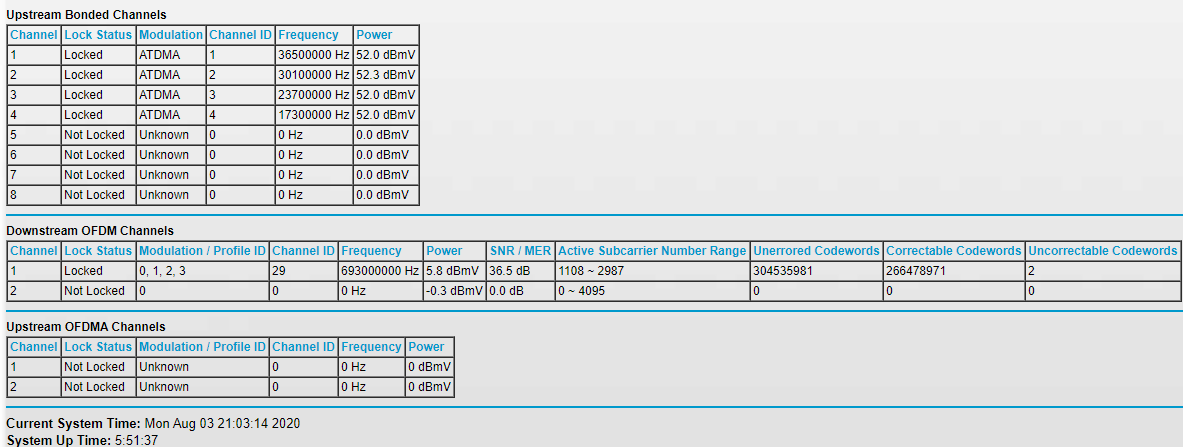
I was finally told by my ISP that I have a weak upstream signal which is why I'm receiving a time sync issue on my Modem.
- FURRYe38Aug 04, 2020Guru - Experienced User
Hopefully they can get that fixed.
- fletchownsAug 04, 2020Aspirant
I was facing the same issue with Comcast and my CM1000. Every night internet will go down from 1:20AM to ~1:25AM. Traced it back to the modem as being the culprit, and my event log looks just like the one you posted. Factory reset did not resolve the issue.
I have been using this modem and ISP for years and only started having this problem recently, as far as I can tell.
I replaced the Netgear with an Arris SB8200 a few days ago, and I am no longer experiencing the issue. Replacing the modem seemed like an easier first step than calling Comcast and getting the runaround.
A friend that lives 15 minutes away from me is also experiencing the same issue with the CM1000, similar event log, etc.
- GuoJingAug 04, 2020Aspirant
Been having the same issue. Here in PST though. My reset happens at 1:21 AM (PST). So same as you. However on the modem's website I noticed the firmware reverts back to v6 when the reset happens. On the eventlog it shows 'SW Download INIT - Via Config file d11_m_cm1000_gigabit_c01.cm'. Then it goes back to v7.
The log disappears after the connection works again.
- FURRYe38Aug 04, 2020Guru - Experienced User
Contact the ISP to ensure there configuration file is sent correcly and any FW that needs to be applied by them.
Have the ISP check the signal and line quality UP to the modem.
Be sure there are no coax cable line splitters in the between the modem and ISP service box.
Be sure your using good quality RG6 coax cable up to the modem.
Be sure to power OFF the modem for 1 minute them back ON.
GuoJing wrote:Been having the same issue. Here in PST though. My reset happens at 1:21 AM (PST). So same as you. However on the modem's website I noticed the firmware reverts back to v6 when the reset happens. On the eventlog it shows 'SW Download INIT - Via Config file d11_m_cm1000_gigabit_c01.cm'. Then it goes back to v7.
The log disappears after the connection works again.
- BennyBenXAug 07, 2020Aspirant
Here is information I received from Netgear Support.
The firmware on your device needs to be downgraded because it not as per the Netgear guidelines.
I am also sharing the link below for your reference:
https://kb.netgear.com/000036375/What-s-the-latest-firmware-version-of-my-NETGEAR-cable-modem-or-modem-router
Please give a call to Xfinity and tell them to downgrade the firmware on your modem.
Firmware version has to be V6.01.02.
Please do let us know the results.
Thanks,
Ahmad
Netgear Support - BennyBenXAug 07, 2020Aspirant
I was just informed by Xfinity that they cannot downgrade my firmware. Any ideas now?
- fletchownsAug 07, 2020Aspirant
Ahmad, why wouldn't Netgear work with Xfinity to resolve this?
Having customers calling Xfinity to resolve it case by case seems like a giant waste of everyones time. Surely the number of users impacted by this is a huge number. Not to mention that the previous reply indicates they won't even downgrade the firmware for us.
- FURRYe38Aug 07, 2020Guru - Experienced User
Keep in contact with NG support. Nothing that can be done from a forum standpoint.
Good Luck.
- fletchownsAug 09, 2020Aspirant
I submitted a case to Netgear support today (#43198232) and gave them a call.
Since my modem was purchased two years ago, they were not willing to issue an RMA for the device.
So now I have this modem that was working fine for years, then somebody somewhere broke it, and I have no recourse to fix it without spending money.
I could maybe understand if I had deliberately done something to upgrade the firmware on this device myself, but I don't have any ability to control the version of the firmware on this device.
This seems like a class action lawsuit waiting to happen.
- FURRYe38Aug 09, 2020Guru - Experienced User
Nobody has the option or control over cable modem FW updates. That always has been controlled by ISPs.
I would ask the ISP to resend there configuration file after a reset to see if the modem can be recovered. If not, then you'll need to get into a new modem.
 vkdeltaAug 10, 2020NETGEAR Employee Retired
your US power is too high and modem is blasting at 52dBmV which is quite high.
ISP needs to modify and reduce the attenuators outside your home or in the node.
If you have splitters in your house, please remove it.
also. there may be noise on the US causing issues.