NETGEAR is aware of a growing number of phone and online scams. To learn how to stay safe click here.
Forum Discussion

stonedoughnut5
Sep 02, 2021Aspirant
CM1000 RNG-RSP Issues
So for the past few months my family and I have been having some issues with the internet dropping for about a minute. During these times the ammout of packets that drop is around 75%. Looking into t...

plemans
Sep 03, 2021Guru - Experienced User
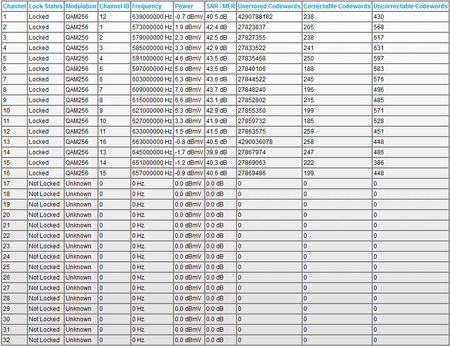
you have a bunch of channels that aren't locking and your power levels are out of spec. They should be within 3.5dbmv of each other. And you're going from -1.7 to 7dbmv. Way out of spec.
Remove any splitters, amplifiers, or signal attenautors in your coax line.
Check the line for kinks, damage, old/bad/loose/corroded connections and replace them if you have them.
preferably, move the modem to right where the coax enters the home to prevent wiring in the walls/floors from being the issue.
stonedoughnut5
Sep 03, 2021Aspirant
I see, I just had a tech out and they replaced literally everything outside the house. maybe they gave a bad splitter?
But on the channel side of things, is it normal to only have 16 of them locked? ive never had more than that.
- FURRYe38Sep 03, 2021Guru - Experienced User
Who is your ISP?
Usually for higher speeds, like 1Gb, all 32 channels are usually locked in for the download.
Ask the ISP what they use for channels and how many they have locked in for there cablem modems?
- stonedoughnut5Sep 03, 2021Aspirant
My ISP is Mediacom.
My speed is only 200Mbps.
- plemansSep 03, 2021Guru - Experienced User
stonedoughnut5 wrote:
I see, I just had a tech out and they replaced literally everything outside the house. maybe they gave a bad splitter?
But on the channel side of things, is it normal to only have 16 of them locked? ive never had more than that.
Potentially a bad splitter. but even so, your power is out of spec with the channels that are locked.
Try moving it right to where the modem enters the home and test it.
Get screen snips/logs and post them back here
- stonedoughnut5Sep 03, 2021Aspirant
So i was able to check on the upstream when the issue started to happen and my upstream powers were all about 57 DBmv! I'm guessing that that would be the issue but the upstream DBmv went back down after a few seconds. Its hard to get a tech to understand my issue due to the fact that this spike is happening totally randomly.
- plemansSep 03, 2021Guru - Experienced User
when the upstream is increasing, its meaning that suddenly the modem is having to increase its power to the cmts to get its signal through.
And with your downstream levels, its indicating either a line issue or a modem issue. It could be a hardware issue with the modem. Can't fully rule that out either unless you have a backup modem you can test it with

