NETGEAR is aware of a growing number of phone and online scams. To learn how to stay safe click here.
Forum Discussion

sleeplessInMN
Jan 04, 2022Tutor
CM1000 Xfinity - random intermittent slowdown then return to normal
Hi, hope someone can help me out here as to what to do, or where to start. I have a CM1000 with an Orbi RBR50 for wireless. We've been getting random drops in speed, where its 200Mbps, then when ...

FURRYe38
Jan 04, 2022Guru - Experienced User
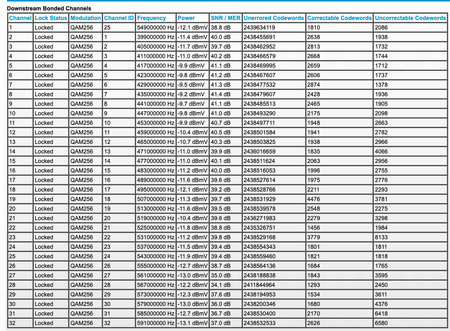
Your power is a bit too high.
https://kb.netgear.com/24311/Power-level-guidelines-for-a-NETGEAR-cable-modem-router?article=24311
You have lots of correctables and un-correctables as well. Something your ISP needs to look into.
Have the ISP check the signal and line quality UP to the modem. Be sure the ISP provisions the modem correctly.
Be sure there are no coax cable line splitters in the between the modem and ISP service box.
Be sure your using good quality RG6 coax cable up to the modem.
Be sure to power OFF the modem for 1 minute then back ON.
https://community.netgear.com/t5/Cable-Modems-Routers/General-info-and-Troubleshooting-for-Cable-Modems/m-p/1530376#M12853
https://www.duckware.com/tech/solving-intermittent-cable-modem-issues.html
https://highspeed.tips/docsis-events/