NETGEAR is aware of a growing number of phone and online scams. To learn how to stay safe click here.
Forum Discussion

sleeplessInMN
Jan 04, 2022Tutor
CM1000 Xfinity - random intermittent slowdown then return to normal
Hi, hope someone can help me out here as to what to do, or where to start. I have a CM1000 with an Orbi RBR50 for wireless. We've been getting random drops in speed, where its 200Mbps, then when ...

FURRYe38
Jan 04, 2022Guru - Experienced User
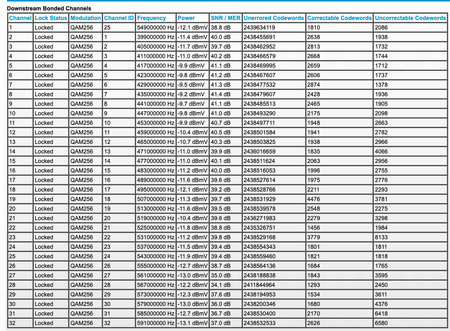
Your power is a bit too high.
https://kb.netgear.com/24311/Power-level-guidelines-for-a-NETGEAR-cable-modem-router?article=24311
You have lots of correctables and un-correctables as well. Something your ISP needs to look into.
Have the ISP check the signal and line quality UP to the modem. Be sure the ISP provisions the modem correctly.
Be sure there are no coax cable line splitters in the between the modem and ISP service box.
Be sure your using good quality RG6 coax cable up to the modem.
Be sure to power OFF the modem for 1 minute then back ON.
https://community.netgear.com/t5/Cable-Modems-Routers/General-info-and-Troubleshooting-for-Cable-Modems/m-p/1530376#M12853
https://www.duckware.com/tech/solving-intermittent-cable-modem-issues.html
https://highspeed.tips/docsis-events/
sleeplessInMN
Jan 04, 2022Tutor
Thanks for answering so quickly!
I did see a splitter in between the cable that goes in the house and the router so I took that out (because it wasn't used) and plugged straight into the modem and restarted. All values look good so far with no correctable and uncorrectables, and power values within range (expected I guess since it's only been an hour) so I'll observe it for the next day or so. I just restarted the modem last night and it acted up when I woke up so we'll see how it goes tonight.
Will keep this updated with my observations.
- plemansJan 04, 2022Guru - Experienced User
got a screen snip of them? I could give you a rough guess at how the values are. Time will tell on the errors though.
Hope it works!
- sleeplessInMNJan 04, 2022Tutor
Here are the current values after the restart and splitter removal.
I wonder why some log entries were removed after the restart though.
Will paste new screenshots in next post, not sure why its not uploading
- sleeplessInMNJan 04, 2022Tutor
- plemansJan 04, 2022Guru - Experienced User
Better, but you still might have some issue.
Your channels should be within 3.5dbmv of each other. Your range is around 5.5dbmv. You can be a bit outside of it but the 5.5 might be a bit to far. And the log is still showing some issues.
So see how it goes.
Check the rest of your connections as well. A loose, corroded, bad, cheap connection can cause variations/issues as well.
