NETGEAR is aware of a growing number of phone and online scams. To learn how to stay safe click here.
Forum Discussion

CHICAGOMIKE2000
Nov 02, 2020Aspirant
CM1000v2 - Interent Periodically Drops - Modem Critical Errors
Hi everyone, In August, I changed ISP's (to RCN Chicago), bumped up my speed to a gig, and got a new modem CM1000v2. Through these past couple of months though, I have been having intermittment c...

FURRYe38
Nov 02, 2020Guru - Experienced User
Anything is possible. The ISP needs to check the service lines up to the building and up to the modem you use.
CHICAGOMIKE2000
Nov 13, 2020Aspirant
Update:
Someone came out last week and after a couple hours of diagnosis suspected a cable issue for my building. After he tightened some cables and did whatever he had to do for our building, he came back and tested. There was a new error message this time using the ISP's disagnostics tool. My modem was partially operational, "OFDM impairment. Channel disabled by modem." He initially thought my modem was busted, but after contacting his own support team found out that multiple people were having this exact same issue in my building, not just me. That's when he concluded that it's probably a cabling issue and sent an internal request for a fix. Another team would have to come out and try fix the cables.
Here we are a week later. Throughout the week, I have seen perhaps an hour or two of gig speeds (for the first time ever!!), but for the most part it's been the same old slow speed. I reached out to my ISP again today, and for some stupid reason, they have no way of knowing if the cable team has done anything to my building. They also have no idea if they will contact me once it has been done or leave a note in my account or anything. They have 0 information. The person I was talking to did say that he thinks it's my modem, based on I don't know what information??? Obviously, not satified with this response, I requested another tech to come out.
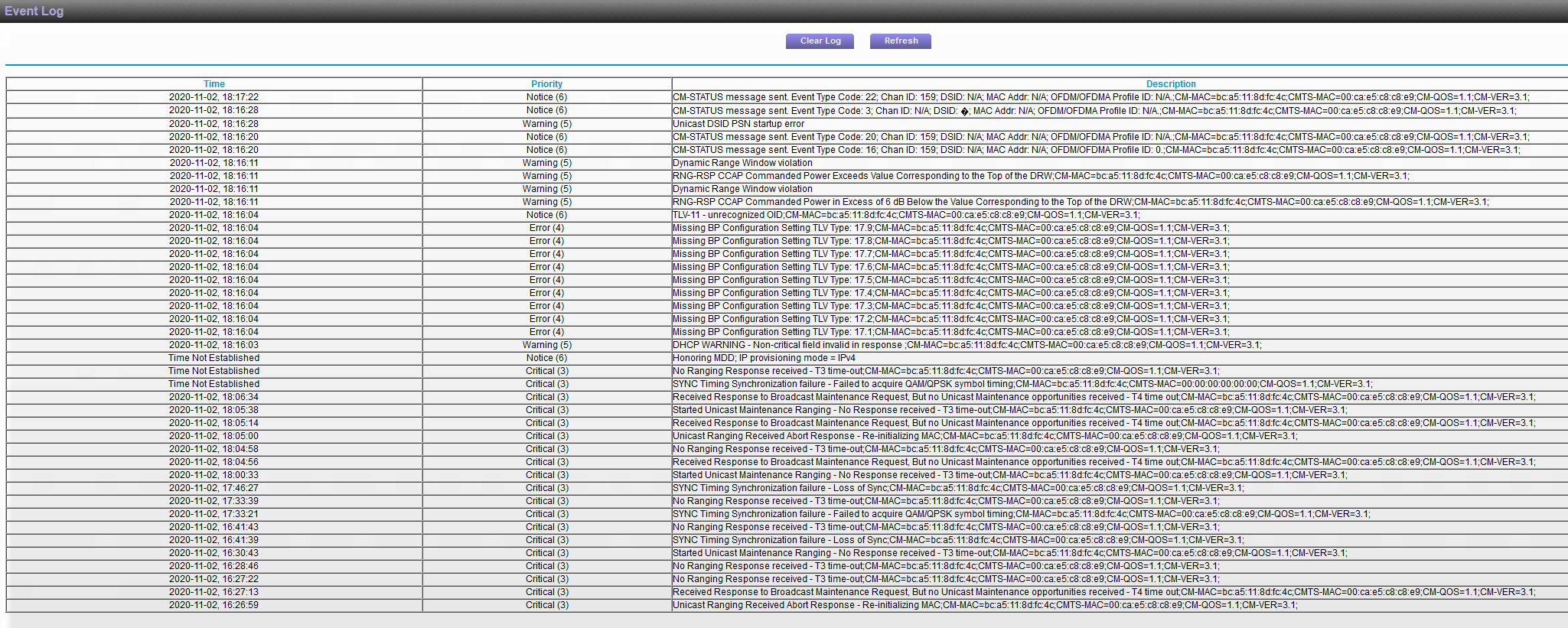
I am inclined to think the cable team did come out to my building because I am now recieving new error messages about the downstream power levels (attached screenshot) and the modem is also showing new errors in regards to these levels.
If anyone has any information relevant to me, happy to hear it!! I am so very tired of these issues and my ISP having no clue what to do about it. I just need them to figure out if it is my modem or their own cabling so I can submit a warranty claim if I need to.

- FURRYe38Nov 13, 2020Guru - Experienced User
I would do this, ask the tech to bring you one of there modems to barrow for say a week or two. This would help check to see if there modem does same thing or not. If it does, then the issue is on there side. If not, then your CM modem maybe fautly. Check to see if your ISP updates user owned modems as well...
- CHICAGOMIKE2000Nov 22, 2020Aspirant
Another update, they brought their own modem and it is working fine for me. I am keeping it temporarily until I get Netgear figured out.
I called Netgear to order a replacement after telling them about the partial operation mode and they immediately tell me it's not broken. They say my ISP needs to make sure all channels are being locked and reassure me I will be working properly after that. I triple confirm that telling my ISP 'we need to manually lock all the channels' is going to make sense to them and they confirmed that yes it should. I have another tech (approaching the 10th tech that has been out here) coming out later today, but needless to say, I am skeptical.
One last note. The current rental modem, although supporting my gig speeds, is only showing 16 locked channels, so this rental isn't proof that my modem is busted either. At least not based on what Netgear told me.
- FURRYe38Nov 22, 2020Guru - Experienced User
Sounds good. Ensure the channels are all locked in. 32 is needed for 1Gb services.