NETGEAR is aware of a growing number of phone and online scams. To learn how to stay safe click here.
Forum Discussion

Rydaquin
Nov 05, 2024Aspirant
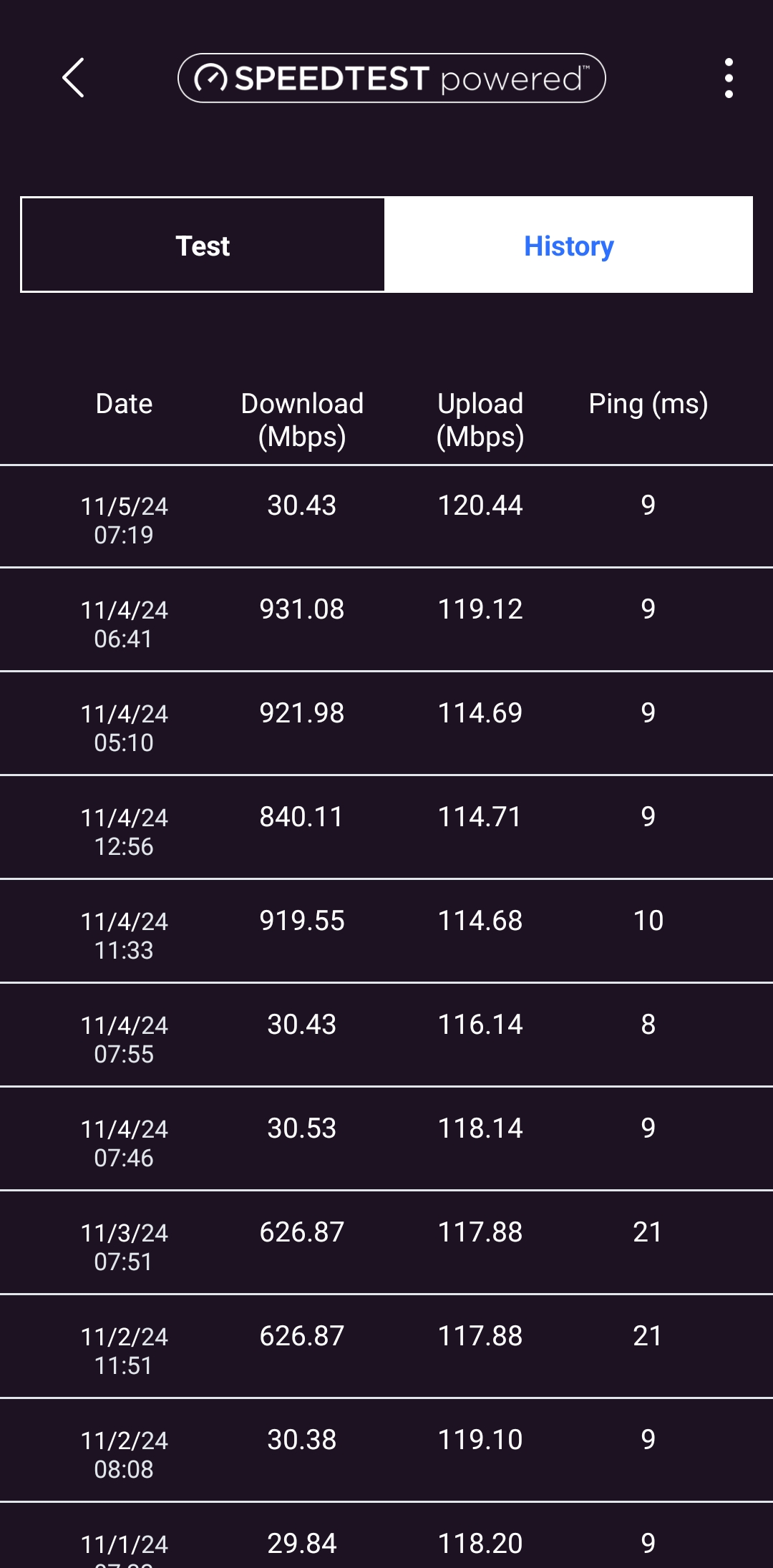
CM1000v2 and RAX54v2 fluctuating download speeds. I go from 900mbps to 30mbps randomly.
I've already contacted my ISP and was told that everything is fine on their end. I've switched out all the ethernet cords to no avail. Any help would be much appreciated.
- Nov 07, 2024
Thanks for the info. I had my ISP come out and they checked and changed the COAX cables. Said I wasn't getting any power and that one of the cables was dead. So far it seems to be working. I'll watch it for 24hr to see if it dips back down or not.
Rydaquin
Nov 06, 2024Aspirant
| Frequency start Value | |
| This field below allows you to modify the frequency the cable modem start with its scan during initialization and registration. Enter the new start frequency and restart the cable modem for it to take effect. | |
|
<tabindex=-1>Startup Procedure</tabindex=-1>
| Procedure | Status | Comment |
| Acquire Downstream Channel | 807000000 Hz | Locked |
| Connectivity State | OK | Operational |
| Boot State | OK | Operational |
| Security | Enable | BPI+ |
| IP Provisioning Mode | Honor MDD | IPv4 only |
<tabindex=-1>Downstream Bonded Channels (Partial Service)</tabindex=-1>
| Channel | Lock Status | Modulation | Channel ID | Frequency | Power | SNR / MER | Unerrored Codewords | Correctable Codewords | Uncorrectable Codewords |
| 1 | Locked | QAM256 | 13 | 807000000 Hz | -2.2 dBmV | 43.7 dB | 2998066901 | 5 | 0 |
| 2 | Locked | QAM256 | 5 | 759000000 Hz | -2.2 dBmV | 38.8 dB | 2997269794 | 4561 | 0 |
| 3 | Locked | QAM256 | 17 | 831000000 Hz | -2.5 dBmV | 43.7 dB | 2997277909 | 5 | 0 |
| 4 | Locked | QAM256 | 18 | 837000000 Hz | -3.3 dBmV | 43.2 dB | 2997282472 | 102 | 59 |
| 5 | Locked | QAM256 | 19 | 843000000 Hz | -3.0 dBmV | 43.3 dB | 2997293133 | 4 | 0 |
| 6 | Locked | QAM256 | 20 | 849000000 Hz | -2.7 dBmV | 42.5 dB | 2997296715 | 9 | 0 |
| 7 | Locked | QAM256 | 21 | 855000000 Hz | -2.2 dBmV | 43.0 dB | 2997300212 | 9 | 0 |
| 8 | Locked | QAM256 | 22 | 861000000 Hz | -2.7 dBmV | 43.3 dB | 2997303494 | 7 | 0 |
| 9 | Locked | QAM256 | 23 | 867000000 Hz | -3.7 dBmV | 42.9 dB | 2997307598 | 12 | 0 |
| 10 | Locked | QAM256 | 24 | 873000000 Hz | -3.4 dBmV | 41.1 dB | 2997310730 | 5 | 0 |
| 11 | Locked | QAM256 | 25 | 117000000 Hz | -2.6 dBmV | 35.8 dB | 2614510233 | 112353068 | 132308 |
| 12 | Locked | QAM256 | 26 | 123000000 Hz | -0.8 dBmV | 38.2 dB | 2996852417 | 461175 | 3830 |
| 13 | Locked | QAM256 | 27 | 129000000 Hz | -2.4 dBmV | 36.9 dB | 2083398003 | 318137 | 15789 |
| 14 | Locked | QAM256 | 28 | 135000000 Hz | -2.4 dBmV | 40.3 dB | 1208724908 | 7816 | 7543 |
| 15 | Locked | QAM256 | 30 | 147000000 Hz | -2.9 dBmV | 38.5 dB | 2997275732 | 50798 | 2343 |
| 16 | Locked | QAM256 | 31 | 153000000 Hz | -2.3 dBmV | 41.4 dB | 2681530003 | 1456822 | 2069914 |
| 17 | Locked | QAM256 | 32 | 159000000 Hz | -1.6 dBmV | 42.6 dB | 2997317400 | 17666 | 957 |
| 18 | Locked | QAM256 | 33 | 165000000 Hz | -2.9 dBmV | 35.9 dB | 2997111841 | 224596 | 2991 |
| 19 | Locked | QAM256 | 34 | 171000000 Hz | -1.7 dBmV | 41.9 dB | 2862125081 | 143510 | 639 |
| 20 | Not Locked | Unknown | 0 | 0 Hz | 0.0 dBmV | 0.0 dB | 0 | 0 | 0 |
| 21 | Locked | QAM256 | 36 | 183000000 Hz | -1.9 dBmV | 42.9 dB | 2997256860 | 87242 | 2342 |
| 22 | Not Locked | Unknown | 0 | 0 Hz | 0.0 dBmV | 0.0 dB | 0 | 0 | 0 |
| 23 | Locked | QAM256 | 38 | 195000000 Hz | -3.2 dBmV | 42.4 dB | 2997325652 | 23723 | 1746 |
| 24 | Not Locked | Unknown | 0 | 0 Hz | 0.0 dBmV | 0.0 dB | 0 | 0 | 0 |
| 25 | Locked | QAM256 | 40 | 207000000 Hz | -1.9 dBmV | 27.0 dB | 980369586 | 537877504 | 103330156 |
| 26 | Not Locked | Unknown | 0 | 0 Hz | 0.0 dBmV | 0.0 dB | 0 | 0 | 0 |
| 27 | Locked | QAM256 | 42 | 219000000 Hz | -0.5 dBmV | 44.1 dB | 2997353549 | 1784 | 516 |
| 28 | Locked | QAM256 | 43 | 225000000 Hz | -1.9 dBmV | 42.8 dB | 2997352023 | 4486 | 1564 |
| 29 | Locked | QAM256 | 44 | 231000000 Hz | -2.8 dBmV | 42.7 dB | 2997360305 | 2788 | 689 |
| 30 | Locked | QAM256 | 46 | 243000000 Hz | -2.9 dBmV | 42.8 dB | 2997360903 | 3172 | 273 |
| 31 | Locked | QAM256 | 47 | 249000000 Hz | -2.1 dBmV | 42.6 dB | 2997355541 | 2969 | 651 |
| 32 | Locked | QAM256 | 48 | 255000000 Hz | -0.8 dBmV | 43.2 dB | 2997358556 | 1796 | 307 |
<tabindex=-1>Upstream Bonded Channels</tabindex=-1>
| Channel | Lock Status | Modulation | Channel ID | Frequency | Power |
| 1 | Locked | ATDMA | 1 | 16900000 Hz | 43.3 dBmV |
| 2 | Locked | ATDMA | 2 | 23500000 Hz | 45.0 dBmV |
| 3 | Locked | ATDMA | 3 | 29900000 Hz | 44.5 dBmV |
| 4 | Locked | ATDMA | 4 | 36300000 Hz | 43.8 dBmV |
| 5 | Not Locked | Unknown | 0 | 0 Hz | 0.0 dBmV |
| 6 | Not Locked | Unknown | 0 | 0 Hz | 0.0 dBmV |
| 7 | Not Locked | Unknown | 0 | 0 Hz | 0.0 dBmV |
| 8 | Not Locked | Unknown | 0 | 0 Hz | 0.0 dBmV |
<tabindex=-1>Downstream OFDM Channels</tabindex=-1>
| Channel | Lock Status | Modulation / Profile ID | Channel ID | Frequency | Power | SNR / MER | Active Subcarrier Number Range | Unerrored Codewords | Correctable Codewords | Uncorrectable Codewords |
| 1 | Locked | 0, 1, 2, 3 | 159 | 300000000 Hz | -0.8 dBmV | 36.5 dB | 296 ~ 7895 | 12383236359 | 2300343409 | 41554 |
| 2 | Locked | 0, 1, 2, 3 | 160 | 918000000 Hz | -3.4 dBmV | 38.3 dB | 2216 ~ 5975 | 6155632788 | 1469665015 | 26 |
<tabindex=-1>Upstream OFDMA Channels</tabindex=-1>
| Channel | Lock Status | Modulation / Profile ID | Channel ID | Frequency | Power |
| 1 | Locked | 3, 4, 9, 10, 11, 12, 13 | 6 | 36800000 Hz | 38.5 dBmV |
| 2 | Not Locked | 3, 4, 9, 10, 11, 12, 13 | 0 | 0 Hz | 0.0 dBmV |
Current System Time: Wed Nov 06 16:47:02 2024System Up Time: 18:19:52

FURRYe38
Nov 07, 2024Guru - Experienced User
Ok. You have tons of Correctables and Un-correctables that should be mostly zeros across all channels.
Any Criticals, Errors or Warnings seen in the event logs needs to be reviewed and resolved by the ISP. Indicates a signal issue on the ISP line up to the modem.
Have the ISP check the signal and line quality UP to the modem. Be sure the ISP provisions the modem correctly.
Be sure there are no coax cable line splitters in the between the modem and ISP service box.
Be sure your using good quality RG6 coax cable up to the modem.
Start with removing any amplifiers, signal attenuators, or splitters from the coax.
From there check the line for kinks, damage, moisture in the line.
Check the connectors for improperly made ends, foil touching the copper coax line, loose connections, bad/old/cheap connectors, or corroded connections. Replace them if you do.
Be sure to power OFF the modem for 1 minute then back ON.
https://community.netgear.com/t5/Cable-Modems-Routers/General-info-and-Troubleshooting-for-Cable-Modems/m-p/1530376#M12853
https://kb.netgear.com/24311/Power-level-guidelines-for-a-NETGEAR-cable-modem-router
https://www.duckware.com/tech/solving-intermittent-cable-modem-issues.html
https://highspeed.tips/docsis-events/
- RydaquinNov 07, 2024Aspirant
Thanks for the info. I had my ISP come out and they checked and changed the COAX cables. Said I wasn't getting any power and that one of the cables was dead. So far it seems to be working. I'll watch it for 24hr to see if it dips back down or not.
- FURRYe38Nov 08, 2024Guru - Experienced User
Let us know how it goes. Hopefully good to go now.
- RydaquinNov 09, 2024Aspirant
Thank you for the help. Looks like it's all good now, haven't had any drops in speed.
- FURRYe38Nov 10, 2024Guru - Experienced User
Glad you got it working. Please mark your thread as solved so others will know. Be sure to save off a back up configuration to file for safe keeping. Saves time if a reset is needed.
https://kb.netgear.com/24231/How-do-I-back-up-the-router-configuration-settings-on-my-Nighthawk-router
Enjoy. 📡