NETGEAR is aware of a growing number of phone and online scams. To learn how to stay safe click here.
Forum Discussion

rekorx
Nov 08, 2021Initiate
CM1000v2: Dynamic Range Window Violation, RNG-RSP CCAP & NO RANGING RESPONSE
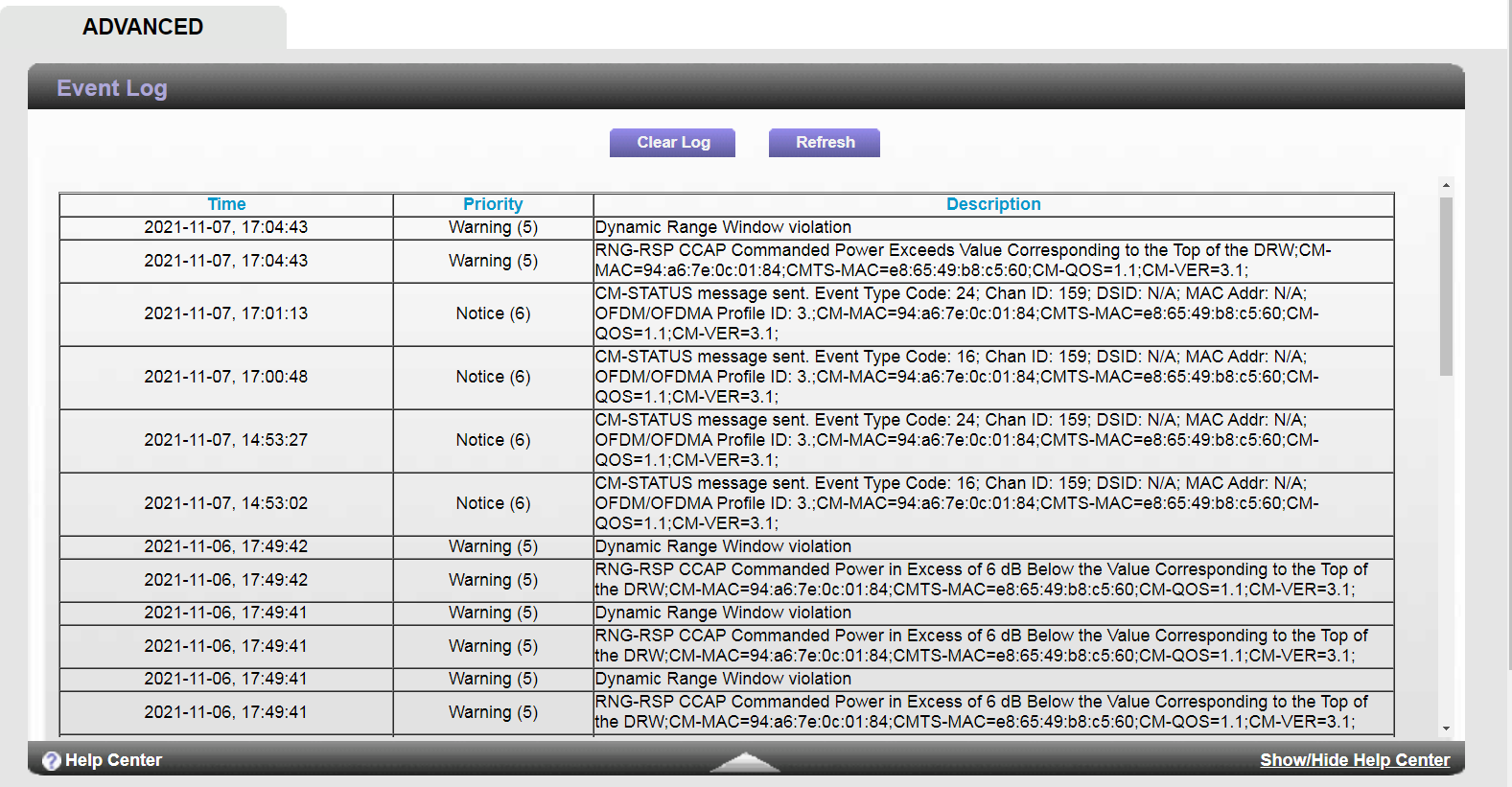
Hello, I recently came across these logs on my modem I'd appreciate it if someone could advise me on what they mean and if they relate to my problem or not. I tried searching but the only thing i...

plemans
Nov 08, 2021Guru - Experienced User
the the cable connections page just takes a screen snip of the connected channels at the time you load them.
Dynamic range window violations in the log indicate that your power is going out of spec at times.
The rest of your log supports that.
What you can try doing?
Remove any splitters, amplifiers, or signal attenuators going to the modem.
Check the link for kinks, damage, loose/old/bad/cheap/poor connectors and replace them if you do.
Preferably, move the modem to right where the coax enters the home. That way it prevents wiring within the home from being the issue.
then use it for a bit and recheck the logs/cable connections page and post them back here.