NETGEAR is aware of a growing number of phone and online scams. To learn how to stay safe click here.
Forum Discussion

brian_woodley
Aug 08, 2021Guide
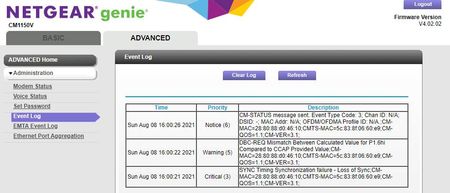
CM1150V Critical(3), Warning (5) and Notice(6) ongoing random service drop outs.
I've read a number of articles in the group forum, none exactly like mine with my model (CM1150V) but many that are very smiliar but not a huge understanding of what these errors mean. When I call Co...
- Sep 05, 2021
Now that's what I'm talking about!!
THANK YOU!!
brian_woodley
Aug 08, 2021Guide
Just so we're on the same page; we're both talking about the device in the picture attached? Correct?


plemans
Aug 09, 2021Guru - Experienced User
That devices isn't a signal attenuator. Its a moca filter.
https://www.amazon.com/Antronix-Filter-GLF-1002-Coaxial-Networking/dp/B01EXRMIIC
If its bad though, it could be causing issues. do you use moca adapters in your home?
- brian_woodleyAug 13, 2021Guide
I don't know what a moca filter is.
This is core of my issue. I don't know what any of this means other than what you tell me it means. That was the root issue in my original post. I would like to understand what these terms and error codes mean and what the technical reference is. A bonus would be able to cite the technical specifications for both my device and what the 'standard' is supposed to be by these franchise service providers. I call these people on the phone and they want to play reboot my modem games over the phone.
They're holding all the cards - what they say, goes and there isn't crap I can do about it because knowledge is power and they hold all of it. Been puttin up with this garbage for over two months now.
Finally had a technician come to the house yesterday. He put a line monitor on our drop coming into the house and found that it was 'low'. Again, what is 'low'? I use specific terms like -dbi, etc. He went to the neighbors house, knocked the on the door and dammit if they weren't having the same issues too. Turns out the whole damn line on the street needs to be replaced because the signal dropout is 'low' where the line comes in from the street 7 houses down.
So now there is ticket open for a crew to come out 'some day' to replace the whole line on the street. Fiber optic can't get here fast enough to make me happy.
- brian_woodleySep 04, 2021Guide
So two more visits from Comcast 'contractors' and a third visit from a real Comcast Technician. Dozens of emails between me and Executive Customer Support and the end result was that the wasp nest in the distribution box on the pole was erradicated, the problems at the neighbors house were cleared up and my drop from the pole to the house was replaced. Signal level at the pole was measured at about +6. Just inside my house from the old drop was about -7db went up to a +1db with the new line. The signal to noise was 'acceptable' at the modem. Thanked the real Comcast Technician for his time and understood what needed to be done next.
After a couple days, different problems started occurring now. After systematically eliminating branches within the home I now have just one digital box (just swapped out 3 weeks ago as being suspected bad of course) and the NetGear Night Hawk CM1150V on the system inside my house. I've turned off the old Comscope Amp as I was informed they're obsoleting them due to 'problems' and I've isolated off any of the other room drops from the line.
The drops are still continuing with a Warning (5) RNG-RSP CCAP Commanded Power Exceeds Value Corresponding to the Top of the DRW. Happens every couple minutes. Attached is a picture of the Errors, Down and Upstream Levels.
Can anyone direct me to a technical reference of what this means? Thanks.
- plemansSep 04, 2021Guru - Experienced User
those errors are the power going in and out of spec.
- brian_woodleySep 04, 2021Guide
Ok.. again, what power are we talking about? Is this the 120vac to the modem, is this the Tx side of the modem or the Rx side of the modem and what is the specification that the power level should be at and is that the 'Power' in the Downstream column or the upstream column?
- plemansSep 05, 2021Guru - Experienced User
The "power levels' are the upstream/downstream dbmv.
The downstream is the power the cmts/hub is sending to the modem.
the upstream is the modem sending ot the cmts/hub.
When the power is increasing out of the specs, you get the dynamic range window violations.
- brian_woodleySep 05, 2021Guide
That is excellent... sorry to keep asking questions. Can you tell me what the upstream specification is and if there is a cited reference for it?
Again, if I had the technical information to be informed as to what is in spec and what isn't I wouldn't be asking so many questions.
- plemansSep 05, 2021Guru - Experienced User
here's a good guide
Signal levels on a DOCSIS 3.0/3.1 Cable Modem - Pick My Modem
- brian_woodleySep 05, 2021Guide
Now that's what I'm talking about!!
THANK YOU!!
