NETGEAR is aware of a growing number of phone and online scams. To learn how to stay safe click here.
Forum Discussion

kenb129
Aug 15, 2022Guide
CM1150V Slow download with xfinity
Firmware Version V4.12.04 Our service is 1200 down and we typically get about 950 down, but I don't have a network card that can do higher. Saturday our download speeds dropped to about 95 and e...
- Aug 18, 2022
A full reset of your MX4000 is most likely your best option. You may or may not need to reset the satellites.
After the router reset, a careful methodical restart of your network is called for.
Power down (remove the power cord) on your modem and disconnect the Ethernet cord to your router base.
Go to the manufacturer's to the manual to find the steps to reset the MX4000. Recommend you not be connected to the internet to do this. When complete, power it down and remove the power cord.
Power up your modem and give it plenty of time to boot and stabilize.
Connect the Ethernet cable between your router and your modem. Then power up your router. Give it plenty of time to boot and stabilize. The DHCP servers at your ISP may need a few minutes to establish a WAN IP address for your router. Remember, it is now different hardware than the last time the address was established with your computer connected direct to the modem.
Run your capacity tests from the PC direct connected to the router.
There may or may not be a firmware update available for your MX4000. I am not familiar with the Linksys approach to updates.


plemans
Aug 15, 2022Guru - Experienced User
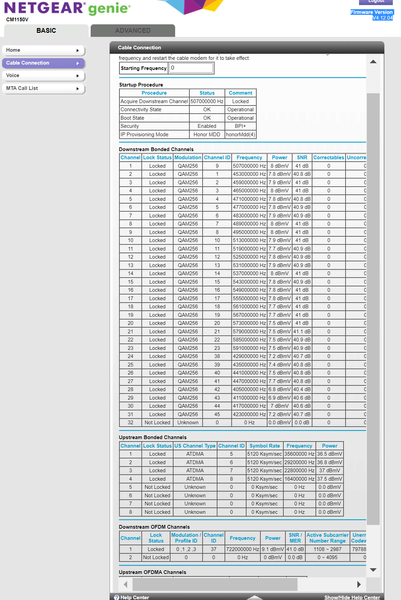
Power levels look pretty good.
Do you have your logs?
What router do you have?
Reason I ask is it sounds more like your connection dropped from gigabit to 10/100mbps.
That can happen with lower quality cables. Make sure you have a good quality cat 5e or cat 6 cable between modem---router and then router---device your testing on.
netgears routers have a page you can check (wan port statistics page) that'll tell you connection link on the wan and lan ports.