NETGEAR is aware of a growing number of phone and online scams. To learn how to stay safe click here.
Forum Discussion

kenb129
Aug 15, 2022Guide
CM1150V Slow download with xfinity
Firmware Version V4.12.04 Our service is 1200 down and we typically get about 950 down, but I don't have a network card that can do higher. Saturday our download speeds dropped to about 95 and e...
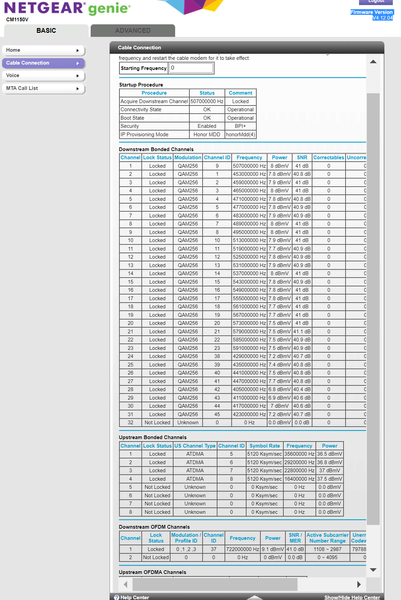
- Aug 18, 2022
A full reset of your MX4000 is most likely your best option. You may or may not need to reset the satellites.
After the router reset, a careful methodical restart of your network is called for.
Power down (remove the power cord) on your modem and disconnect the Ethernet cord to your router base.
Go to the manufacturer's to the manual to find the steps to reset the MX4000. Recommend you not be connected to the internet to do this. When complete, power it down and remove the power cord.
Power up your modem and give it plenty of time to boot and stabilize.
Connect the Ethernet cable between your router and your modem. Then power up your router. Give it plenty of time to boot and stabilize. The DHCP servers at your ISP may need a few minutes to establish a WAN IP address for your router. Remember, it is now different hardware than the last time the address was established with your computer connected direct to the modem.
Run your capacity tests from the PC direct connected to the router.
There may or may not be a firmware update available for your MX4000. I am not familiar with the Linksys approach to updates.

kenb129
Aug 16, 2022Guide
5e is going to the router, but I noticed the plastic covering is split at the connector by the router, but no time to swap with a known good cable right now.
If cable replacement doesn't work I will try the other steps and see what happens.
Is there a way to run a cable from modem straight to PC? I unplugged router cable from modem and hooked up PC and I get "unknown network" with no internet.

plemans
Aug 16, 2022Guru - Experienced User
the CM1150v might have more than 1 ethernet port but the majority of ISP's only support 1 connected device.
So if you want to direct connect your pc, you'll have to power the modem and pc off. then power the modem on with nothing connected and give it 2 minutes. Then power the pc on.
What router is it? Again, I'd see if it has something in its settings to check the connection speeds. That'll help determine what cable is the issue.
- kenb129Aug 17, 2022Guide
I substituted another 5e cable between modem and router and same result. I had no other time to troubleshoot last night.
I can't find anything in the Linksys app to show connection speed to see if it dropped from GB to 10/100.
I will try again to connect ethernet straight to modem, but when I did it last time PC showed "unknown network" and no internet. This is the first modem I've used that had this issue. Is there some setting that needs to be changed on modem or PC? I can try other ports on modem but I think I did that when new and same but will verify.
- plemansAug 17, 2022Guru - Experienced User
1. what router is it? you still haven't given us a model
2. the issue might be between router-device
3. again, if you direct connect a pc to the modem, you have to power off the modem and the device. ONLY have the pc connected to the modem as most isp's only support 1 device connected to the modem. Then power the modem on and wait 2 minutes, then power the computer on.