NETGEAR is aware of a growing number of phone and online scams. To learn how to stay safe click here.
Forum Discussion

markweiz
Apr 12, 2021Star
CM1200 Dropping connection intermittently - SYNC Timing Synchronization failure
Bought the CM1200 about a month ago and since it was setup by RCN(isp) I have had it seemingly randomly dropping internet connection. When it drops connection the downstream light will be blinking an...

markweiz
Apr 13, 2021Star
Ok so it happened 2 more times today and I just took a screenshot of the event log before restarting the modem to fix the issue and I noticed some different messages. After the modem had restarted I looked at the log again and these messages were missing so maybe I have been missing these. One of the new ones is "MDD message timeout" (i attached the logs). Also during this failure both the upstream and downstream lights were blinking.


plemans
Apr 13, 2021Guru - Experienced User
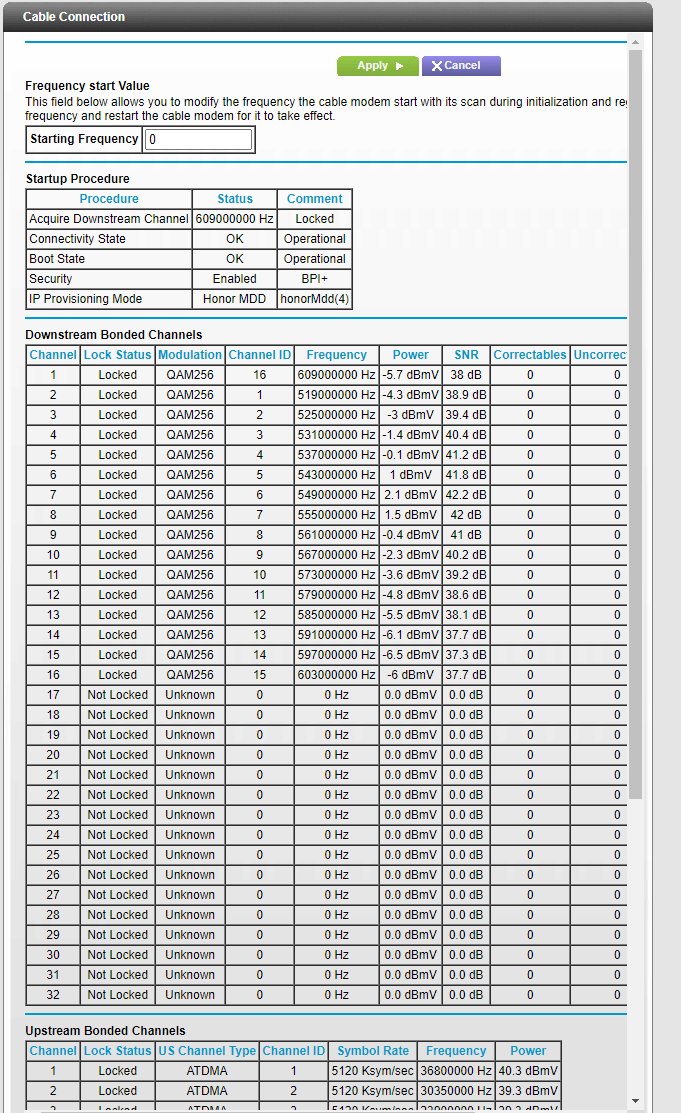
Your modem power levels are all over the place. the downstream channels should be within 3.5dbmv of each other. Yours are way out of this. Did rcn check the line?
Did you remove any splitters, amplifiers, or attenuators?
check the line for damage, kinks, old/bad/cheap connectors and cables.
- markweizApr 13, 2021Star
RCN did check the line and they said they didn't see any issues with the power levels, but they seemed to just reference the levels on this page http://ny.speedtest.rcn.net// which just shows one number for each FwdSNR, Channel Pwr, and Transmit Pwr (not sure where it gets the number for these since there are multiple channels. Maybe its just the average). I did remember when internet was initially set up in my apartment the technician opened a panel in my closet that had some cables behind it specifically the line for my unit then a female to female connector that connects that line to the main room wall jack and another unused line that goes to the master bedroom jack. So I went ahead and connected the modem to the mainline coming into the unit (still using the female to female connector since the line in the wall doesn't go far enough). Power levels look marginally better (See attached) still not within 3.5dbmv. Will try connecting without female to female connector as well to see if that changes the power levels at all. Appreciate all the help.
- plemansApr 13, 2021Guru - Experienced User
Its getting better. MIght check further back up the line if possible to see if any other splitters/juntions. Or even take a look at the coax line ends to see quality. I've seen some pretty sketchy ones on apartment terminates.
- markweizApr 15, 2021Star
Well the disconnect has happened a couple more times with the same errors since moving the modem to the line coming into the unit. I took a look at the coax end and it looked fine. At least no obvious signs of damage or corrosion. There aren't any other splitters or junctions that I can see and this is the line coming into my apartment so this is as far as I can test. RCN did test the line up until this point when they initially set up the service and didn't say there were any issues. The power levels still range from -5.5 to 3.3 which is quite a bit more than the 3.5dbmv range you had previously stated. Is there anything else I can do to improve the levels or do I need to go back to RCN with this info?
- plemansApr 16, 2021Guru - Experienced User
so you're caught in a catch-22. they've already inspected the line and you're using 3rd party equipment (not from rcn).
So they might charge you to check it again. And the cost of it might be almost the cost of a new modem (unsure how much they charge).
In my area, comcast bills if the issue is within the home or if its a 3rd party modem.
So I'd check with rcn to see if they do or don't.
If they do, and its a higher cost, I'd try buying another modem. Because it could always be the modem but its tough to prove.
If it turns out to not be the modem, then you can always return it or use it for a backup but it gives you something to tell rcn in that "I've tried 2 different modems and its still giving the same bad data".
If you do buy a new modem, I'd look at the cm1000 or cm1100 and not the cm1200. I seem to see more issues with the cm1200 on here versus the other 2
- markweizApr 16, 2021Star
Instead of buying a new modem. I am going to get the RCN rental one and see if that has the same issues. Then if it does RCN should be able to better troubleshoot the issue. Will update after I have tested the RCN modem.
- plemansApr 19, 2021Guru - Experienced User
I've done something similar before. Spectrum wouldn't check the line because I was using 3rd party equipment and they kept saying it wasn't the line. So I rented a modem from them for a month to prove it wasn't a modem issue. So they fixed the line and I went back to my device.
Not saying that'll happen for you.