NETGEAR is aware of a growing number of phone and online scams. To learn how to stay safe click here.
Forum Discussion

technicaljunky
Jul 27, 2022Aspirant
CM1200 Speed drops down to 12mbps reboot fixes it for a while
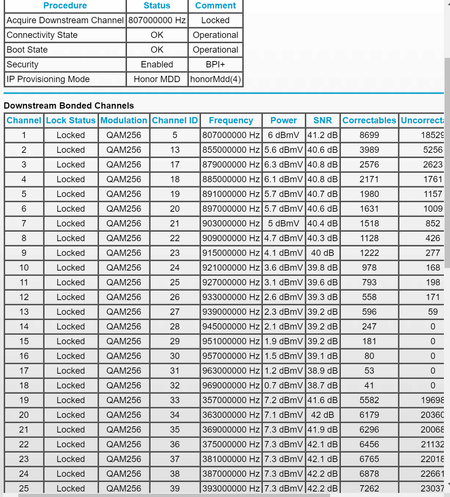
Hi all, I just bought this CM1200 and it was working fine but all of a sudden now after a while the connection drops to like 12mbps we are supposed to have gigablast (COX) service. If we reboot the ...

FURRYe38
Jul 28, 2022Guru - Experienced User
Your power levels are border on a bit too high.
https://kb.netgear.com/24311/Power-level-guidelines-for-a-NETGEAR-cable-modem-router?article=24311
Have the ISP check the signal and line quality UP to the modem. Be sure the ISP provisions the modem correctly.
Lots of correct and uncorrectables that should be zero.
Be sure there are no coax cable line splitters in the between the modem and ISP service box.
Be sure your using good quality RG6 coax cable up to the modem. Check for kinks and ensure fittings are correct and snug.
Be sure to power OFF the modem for 1 minute then back ON.
https://community.netgear.com/t5/Cable-Modems-Routers/General-info-and-Troubleshooting-for-Cable-Modems/m-p/1530376#M12853
https://www.duckware.com/tech/solving-intermittent-cable-modem-issues.html
Be sure your using a good quality LAN cable between the modem and router. CAT6 is recommended.
What is the brand and model of the host wifi router connected to the modem?
technicaljunky
Jul 28, 2022Aspirant
Thanks all, the router we have is unifi dream machine