NETGEAR is aware of a growing number of phone and online scams. To learn how to stay safe click here.
Forum Discussion

Jayboy2008
Feb 03, 2023Aspirant
CM2000 - Won't reach maximum speeds.
Hello Netgear Community, I'm not so experience in troubleshooting modems/routers/networking, but I having trouble figuring out why my modem won't reach max speeds. Speeds test from multiple w...

Kitsap
Feb 04, 2023Master
Jayboy2008 wrote:Hello Netgear Community,
I'm not so experience in troubleshooting modems/routers/networking, but I having trouble figuring out why my modem won't reach max speeds.
Speeds test from multiple websites average 540 - 560 MBps; I am paying for 800 MBps
1. I have tried wireless/wired connections to router and/or modem with the same speeds (
2. I have also tried directly connecting to the modem, but in order to do I always need to powercycle the modem, which is annoying, My PC will pull a 169 address.
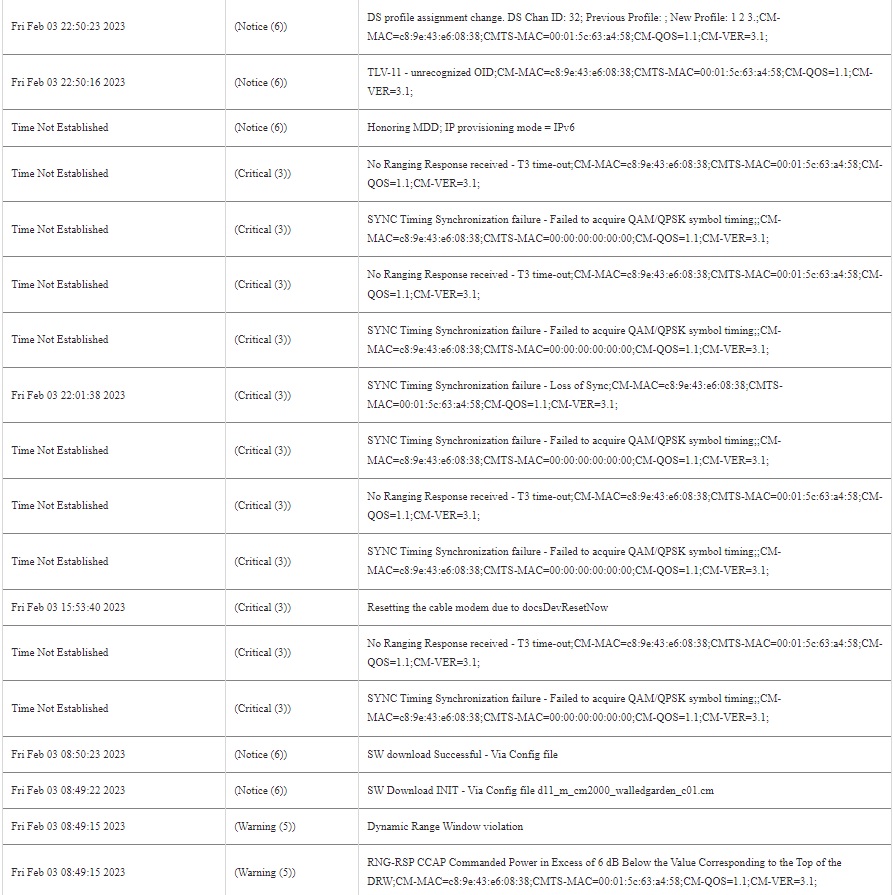
I have uploaded my log file, please help me! Thank you all!
Make sure your Ethernet cables are good. Cat 6 or better is recommended.
With your computer connected direct to your modem, use the Ookla native application to test throughput capacity. This application bypasses the web browsers. If your throughput does not compare favorably with what you purchase from your ISP, check for updates to the OEM drivers for the Ethernet port on your computer.
In general, your Wi-Fi throughput is more tied to the client device or other devices on your LAN downstream of your modem.
Jayboy2008
Feb 04, 2023Aspirant
Thanks for the advice, ordered some CAT6 cables! Will provide update with speed test from Ookla when it arrives.
- FURRYe38Feb 04, 2023Guru - Experienced User
CAT6A STP cabling is recommended between the modem and your router or device you have connected to it. Not UTP.