NETGEAR is aware of a growing number of phone and online scams. To learn how to stay safe click here.
Forum Discussion

Omega553
Jul 14, 2022Aspirant
CM400 slowed from 160 mbps to 5 mbps
This randomly started happening where my internet speed has dropped from the usual expected 160 mbps down to 5 mbps. I know the issue is with the CM400 and not my router because I get those speeds ev...
Omega553
Jul 14, 2022Aspirant
A very interesting and unusual development...
I am still getting slow speeds when testing at speedtest.net but when I download a game from Steam I'm getting about 140-150 mbps. Why is that download speed fast but everything else is so slow?
- KitsapJul 14, 2022Master
Sometimes capacity testing through a web browser can yield irregular results.
Have you tried the Ookla native applications from the Windows Store or Android Play Store?
- Omega553Jul 15, 2022Aspirant
Yes. When performing the speed test via the app on my cell phone I get the same slow results as the web browser version on my PC.
- plemansJul 15, 2022Guru - Experienced User
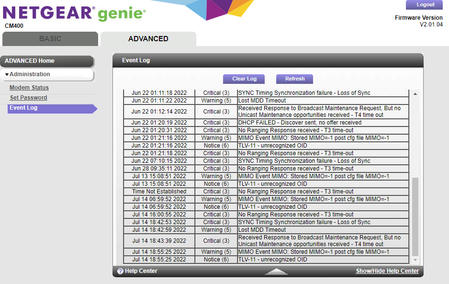
Your logs are indicating a line issue.
Do you have a screensnip of the cable connections page?
Start with removing any amplifiers, signal attenuators, or splitters from the coax.
From there check the line for kinks, damage, moisture in the line.
Check the connectors for improperly made ends, foil touching the copper coax line, bad/old/cheap connectors, or corroded connections. Replace them if you do.
If you can, simply connect the modem right where the coax comes into the home. This prevents wiring in the home from being the issue. And some ISP’s charge if the wiring issue is in the home. So this helps prevent this.Might also be time to watch out for any sales on modems as thats a pretty base model device and some ISP's aren't supporting it anymore.

