Forum Discussion

jc107
Nov 23, 2022Aspirant
CM500 Modem Keeps Restarting
I have had this modem for a year and half and had no issues. For about a week now, the modem keeps restarting - all the lights on the modem turn off. Sometimes this is for 1 minutes, other times its ...

FURRYe38
Nov 23, 2022Guru - Experienced User
Please post a copy and paste of the modems connection status page.
https://kb.netgear.com/30007/How-do-I-obtain-the-cable-connection-information-from-a-NETGEAR-cable-modem-modem-router
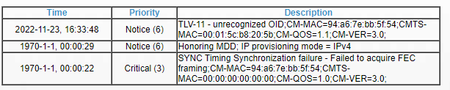
I see a critical that the ISP should review and resolve.
Be sure your using a good quality LAN cable between the modem and router. CAT6 is recommended.
What is the brand and model of the host wifi router connected to the modem?
Have the ISP check the signal and line quality UP to the modem. Be sure the ISP provisions the modem correctly.
Be sure there are no coax cable line splitters in the between the modem and ISP service box.
Be sure your using good quality RG6 coax cable up to the modem.
Start with removing any amplifiers, signal attenuators, or splitters from the coax.
From there check the line for kinks, damage, moisture in the line.
Check the connectors for improperly made ends, foil touching the copper coax line, loose connections, bad/old/cheap connectors, or corroded connections. Replace them if you do.
Be sure to power OFF the modem for 1 minute then back ON.
https://community.netgear.com/t5/Cable-Modems-Routers/General-info-and-Troubleshooting-for-Cable-Modems/m-p/1530376#M12853
https://kb.netgear.com/24311/Power-level-guidelines-for-a-NETGEAR-cable-modem-router
- jc107Nov 23, 2022Aspirant
Startup Procedure Procedure Status Comment Acquire Downstream Channel 747000000 Hz Locked Connectivity State OK Operational Boot State OK Operational Security Enabled BPI+ IP Provisioning Mode Honor MDD honorMdd(4) Downstream Bonded Channels Channel Lock Status Modulation Channel ID Frequency Power SNR Correctables Uncorrectables 1 Locked QAM256 31 747000000 Hz 0.8 dBmV 42.2 dB 0 0 2 Locked QAM256 1 561000000 Hz 4.2 dBmV 43.9 dB 0 0 3 Locked QAM256 4 579000000 Hz 6.1 dBmV 44.7 dB 0 0 4 Locked QAM256 5 585000000 Hz 6 dBmV 44.7 dB 0 0 5 Locked QAM256 7 597000000 Hz 6.6 dBmV 44.7 dB 0 0 6 Locked QAM256 10 615000000 Hz 6.4 dBmV 45 dB 0 0 7 Locked QAM256 14 639000000 Hz 0.3 dBmV 41.4 dB 0 0 8 Locked QAM256 17 657000000 Hz -1 dBmV 40.8 dB 0 0 9 Locked QAM256 21 687000000 Hz -0.2 dBmV 41.9 dB 0 0 10 Locked QAM256 23 699000000 Hz 0.3 dBmV 42.4 dB 0 0 11 Locked QAM256 24 705000000 Hz 0.3 dBmV 42.4 dB 0 0 12 Locked QAM256 25 711000000 Hz -0.1 dBmV 42.1 dB 0 0 13 Locked QAM256 26 717000000 Hz 0.1 dBmV 42.3 dB 0 0 14 Locked QAM256 27 723000000 Hz 0.4 dBmV 42.5 dB 0 0 15 Locked QAM256 28 729000000 Hz 0.2 dBmV 42.2 dB 0 0 16 Locked QAM256 29 735000000 Hz -0.1 dBmV 42 dB 0 0 Upstream Bonded Channels Channel Lock Status US Channel Type Channel ID Symbol Rate Frequency Power 1 Locked ATDMA 3 5120 Ksym/sec 31000000 Hz 45.8 dBmV 2 Locked ATDMA 1 2560 Ksym/sec 18000000 Hz 45 dBmV 3 Locked ATDMA 2 5120 Ksym/sec 24600000 Hz 45.5 dBmV 4 Locked ATDMA 4 5120 Ksym/sec 37400000 Hz 45.5 dBmV Extended Upstream Transmit Power Enable Extended Upstream Transmit Power Current System Time:Wed Nov 23 18:05:14 2022 System Up Time:00:03:01 My router is Google Wifi model: AC-1304There are no splitters between the modem and the cable box that I am aware of.What do I need to tell my ISP to look into exactly?- FURRYe38Nov 23, 2022Guru - Experienced User
Any Errors or Critical seen in the Events Log page needs to be reviewed by the ISP and resolved by them.
You have a couple of channels that are running near High power levels and some that are running at negative power levels. There all over the place. All channel needs to be around the same power level across the board and not all over the place.
https://kb.netgear.com/24311/Power-level-guidelines-for-a-NETGEAR-cable-modem-router
The ISP needs to check this out. A tech visit maybe needed.
- jc107Nov 23, 2022Aspirant
When I called my ISP originally, they said it was my modems problem since it kept completely powering off and they couldnt do anything about it since it isnt their modem and I need to contact Neatgear. What should I tell them they need to do exactly? Sorry, I dont know much about networking.
The link you posted said they should all be between -7 and +7, which they are. But should they be closer? How do I fix that?
Thank you!