NETGEAR is aware of a growing number of phone and online scams. To learn how to stay safe click here.
Forum Discussion

jc107
Nov 23, 2022Aspirant
CM500 Modem Keeps Restarting
I have had this modem for a year and half and had no issues. For about a week now, the modem keeps restarting - all the lights on the modem turn off. Sometimes this is for 1 minutes, other times its ...

FURRYe38
Nov 23, 2022Guru - Experienced User
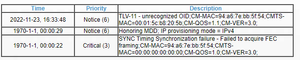
Any Errors or Critical seen in the Events Log page needs to be reviewed by the ISP and resolved by them.
You have a couple of channels that are running near High power levels and some that are running at negative power levels. There all over the place. All channel needs to be around the same power level across the board and not all over the place.
https://kb.netgear.com/24311/Power-level-guidelines-for-a-NETGEAR-cable-modem-router
The ISP needs to check this out. A tech visit maybe needed.
jc107
Nov 24, 2022Aspirant
When I called my ISP originally, they said it was my modems problem since it kept completely powering off and they couldnt do anything about it since it isnt their modem and I need to contact Neatgear. What should I tell them they need to do exactly? Sorry, I dont know much about networking.
The link you posted said they should all be between -7 and +7, which they are. But should they be closer? How do I fix that?
Thank you!