NETGEAR is aware of a growing number of phone and online scams. To learn how to stay safe click here.
Forum Discussion

Gilyem
Mar 03, 2022Guide
CM500 slow internet and my phone wouldn't connect
I have been having issues with my connection lately. I have rebooted both my modem and router. I have connection on my desktop, but not on my S9 phone (says connected without internet). Below is the ...
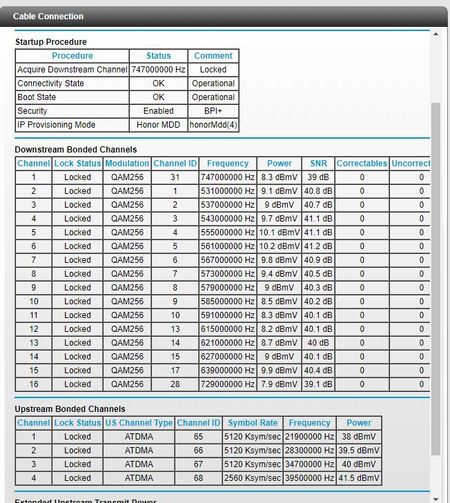
- Mar 05, 2022
I managed to fix the problem, everything is working as it is again. I was able to contact ISP and they rebooted signals and I relocated my modem and router. All devices are back to normal. Thank you for helping out.
Gilyem
Mar 03, 2022Guide
The status page is up and loaded. I use TP Link Archer C80. I have checked with the ISP yesterday and they have rebooted on their end and told me everything is working. I do not use coax cable splitters. I may have to replace the coax cable since it hasn't been replaced for years.

FURRYe38
Mar 03, 2022Guru - Experienced User
What speeds do you pay for UP and down?
Disconnect the router from the modem and connect up 1 wired PC to the back of the modem. Power OFF the modem for 30 seconds then back ON. What for it to be ready then run a speed test on the PC.
- GilyemMar 03, 2022Guide
200mbps down and 10mbps up
I will do that and keep you posted once I have a PC to connect for wired (not until the weekend). I can only do wireless atm.- FURRYe38Mar 03, 2022Guru - Experienced User
👍
- GilyemMar 05, 2022Guide
Here's an update:
1. I replaced the coax cable.
2. Rebooted modem and connected wired to a computer.Below is the new status page and event log of the modem:
- plemansMar 03, 2022Guru - Experienced User
Your power levels are just a touch high but you don't have any errors and your logs look amazing.
I wouldn't be checking the modem.
I'd be looking at these things:
- router
- maybe the cable from modem to router.
otherwise the modem looks great.
