NETGEAR is aware of a growing number of phone and online scams. To learn how to stay safe click here.
Forum Discussion

Duke95
Jul 23, 2016Follower
CM500/Time Warner
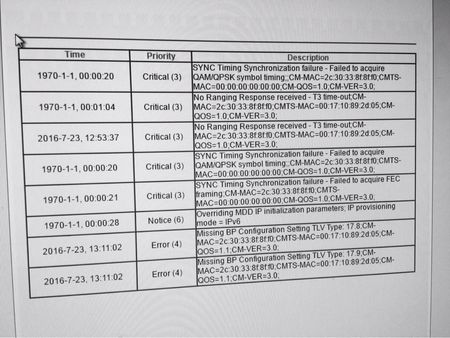
Can I get some help with an event log please? Had time warner for a few months now without any problems. I noticed the last few evenings that we had been having intermittent service. Last night...

TheEther
Jul 24, 2016Guru
Those messages are indications that the modem is having difficulty connecting to the ISP's CMTS (Cable Modem Termination System). If you have splitters installed between your modem and the cable into the house, then remove as many of them as possible. Otherwise, call Time Warner and ask them to send a tech out to inspect the connection. It's possible that a connection has corroded.

cyl
Sep 12, 2016Aspirant
I am a Time Warner Cable customer in San Diego. I purchased and installed a CM500 last week. The performance was fantastic at all the wired and wireless access points in my home.
However, this weekend. Everything fell apart. I noticed the firmware version of the CM500 -- it's now V1.1.2.12
On the Netgear website, the recommended firmware version for the CM500 on TWC is V1.01.04
Is there any way to downgrade the CM500 myself? Suggestions appreicated on how to resolve this firmware mismatch.