NETGEAR is aware of a growing number of phone and online scams. To learn how to stay safe click here.
Forum Discussion

zattack8203
Jul 13, 2022Aspirant
Docis 3.1 Netgear Modem Randomly Drops Connection
Hi there, I have a NetGear CM1000v2 with firmware V10.01.07. This past week the modem has been dropping the coax cable line repeatedly and is starting to get annoying. We had this modem for abou...

plemans
Jul 14, 2022Guru - Experienced User
You didn't include all your channels from from the ones you did, you have line issues.
Start with removing any amplifiers, signal attenuators, or splitters from the coax.
From there check the line for kinks, damage, moisture in the line.
Check the connectors for improperly made ends, foil touching the copper coax line, bad/old/cheap connectors, or corroded connections. Replace them if you do.
If you can, simply connect the modem right where the coax comes into the home. This prevents wiring in the home from being the issue. And some ISP’s charge if the wiring issue is in the home. So this helps prevent this.
If you can, include the full cable connections page and the event logs from after checking the lines highlighted above.
- zattack8203Jul 14, 2022Aspirant
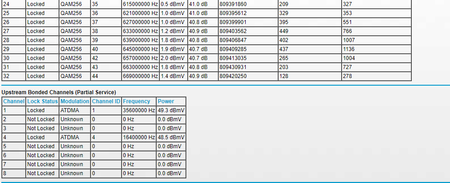
Well it did it again 2 times so far. Here is a list of the download and upload channels
As for the coax line, I have check all the cord and there is no kinks, damage, or moisture anywhere that I can tell. But as for the outside, this line has been like this for maybe 4 years ish and this line has been connected since the house was built.
The only other thing here is the splitter but this splitter was bought from Best Buy about a year ago when troubles happened with random connection drops.
- zattack8203Jul 14, 2022Aspirant
Here is also the log
- plemansJul 15, 2022Guru - Experienced User
Try disconnecting the splitter.
Your upstream levels are high meaning the router is having to increase its output power just to communicate with the cmts. You also have range window violations which are power levels that are going outside of parameters.
Try to connect right where it comes into the home and not with any splitters or adding extra cabling to the line.