NETGEAR is aware of a growing number of phone and online scams. To learn how to stay safe click here.
Forum Discussion

Strikersfan
Oct 23, 2020Tutor
Help Please! CM1200 Downstream Light Blinking
Been surfing through the forum posts, and seen some isues similar to mine, so I'm hoping someone can point me at a solution. My CM1200 downstream light blinks continuously, and I randomly drop my con...
Strikersfan
Oct 24, 2020Tutor
plemans wrote:comcast has docsis 3.1. You don't have the downstream channel bonded.
Have you noticed when the modem rebooting or were you rebooting it during the logs?
Thanks for the reply! Sorry, not sure I understand what you're asking. I did notice the OFDM downstream channel wasn't locking, but my service isn't gigabit, so wasn't sure if it was supposed to or not. I have their blast plan which says 200 for download, but I regularly get around 240. I don't reboot the modem until the connection drops, then I manually reboot it (unplug, wait a minute, plug back in). I don't know how to tell from the event log if it is trying to reboot on its own inbetween.

plemans
Oct 24, 2020Guru - Experienced User
Even when I was on 100mbps plan, the docsis 3.1 locked. I'm on gigabit now and it locks.
How frequently is it dropping?
When it drops, what are the lights on the modem indicating?
Next time it drops, then log into the modem and get the screen snip of the cable connections page and logs. With netgear modems, the logs/connections pages clear on reboot.
- StrikersfanOct 24, 2020Tutor
plemans wrote:Even when I was on 100mbps plan, the docsis 3.1 locked. I'm on gigabit now and it locks.
How frequently is it dropping?
When it drops, what are the lights on the modem indicating?
Next time it drops, then log into the modem and get the screen snip of the cable connections page and logs. With netgear modems, the logs/connections pages clear on reboot.
The frequency of the drops is completely random to me. Sometimes it stays connected for a couple of hours, but sometimes it will drop over and over again in a 30 minute period until I get tired of rebooting it. It's funny, the modem lights never change when the connection drops. My power, upstream, and internet lights stay lit, and the downstream keeps on blinking. That part baffles me. I didn't think I could log into the modem if there was no internet connection, but next tmie it drops I will go in and see if I can capture all the stats and the logs again. I appreciate the responses!
- StrikersfanOct 24, 2020Tutor
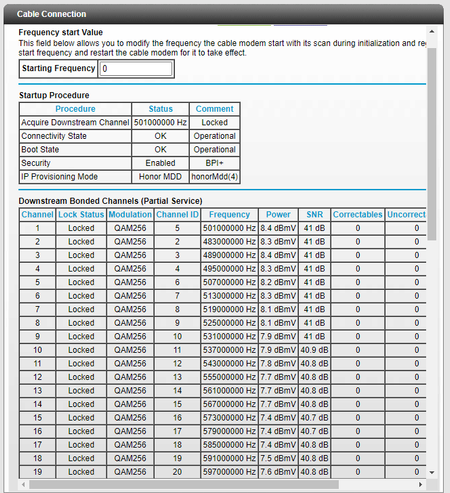
Was out for awhile tonight and when I came back of course the signal had dropped again. I tried to log into the modem interface, but without an active connection it would not let me. However, it doesn't appear the logs get wiped upon reboot. Here are the most recent logs. Before my issues started the OFDM channel 1 always used to lock, so it would seem it not locking is my issue now. I just can't undersand what the issue could be. All wiring and all hardware in my house has been replaced by Comcast thsi week. The power and SNR levels look fine for downstream. All I can figure is there is a problem with the line somewhere leading to my house, or twice now Comcast has fouled up the provisioning on the modem. Unless something in the logs points to something else?
- plemansOct 25, 2020Guru - Experienced User
I still can't see the the photo's because they're not approved yet.
It could be the comcast cmts or it could be the modem. There's always the chance that its the modem
- StrikersfanOct 25, 2020Tutor
So Comcast was back this morning for the 4th time in 6 days. The tech checked the signal levels of every line in the house, and actually removed one of the two power amplifiers the previous techs had installed. This resulted in no change other than my power levels which came down a bit on the downstream side (still betweeen 1 and 4 on all channels though) and coming up on the upstream side (42). But still my downstream light blinks, my downstream bonded channels still say partial service, and my OFDM Downstream channel still isn't locking. Comcast swears that when they connect with their meter ALL channels lock, even the docsys 3.1 that isn't locking on my modem, and that the issue has to be my modem. After going through all the hoops with Netgear they insist the modem is good, it has to be an issue with the lines coming into my house from Comcast or an issue with how they have provisioned my modem. I'm frustrated beyond words. As soon as the tech left and I reconnected my modem (he had his meter on that line before leaving) it connected and then dropped right away after 1 minute. I rebotted and it has stayed connected since, but still same issues show. Just have no idea what to do anymore. All I can think of is to ask Comcast to loan me one of their modems to see if the issue still happens. If it does, then it seems like the problem has to be on their end. If it doesn't, then all I can figure is it is my modem I guess, even though I've gone through all the checks with Netgear, and despite the fact it worked perfectly before COmcast's first trip to my house this week to switch the lines over to fiber.
- plemansOct 25, 2020Guru - Experienced User
I've had to cave before and rent a modem for a month. If it works, then it is indeed a modem issue. If the issue re-occurs than comcast can't blame the modem.
- StrikersfanOct 26, 2020Tutor
plemans wrote:I've had to cave before and rent a modem for a month. If it works, then it is indeed a modem issue. If the issue re-occurs than comcast can't blame the modem.
I have to be honest, I don't consider myself to be a conspiracy theory guy....but Comcast might just change my mind on this. So I go to Comcast and they give me a modem/router combo device. I Google the model and immediately my doubts start to creep in....Arris TG1682G. It's obviously used, and from what I can find online, is a model that came out 4 - 6 years ago, and is pretty universally panend as a piece of crap. The most positive reviews I can find say it's an "adequate" modem, but a real **bleep**eshow of a router. But being boxed into a corner needing to get online for work and my son's school, on it goes. After another hour of being on the phone with Comcast getting it set up, it's working and hasn't dropped my connection in over 6 hours. However, I had periods that lasted that long occasionally with my own modem not dropping so I'm not convinced yet. Plus it already dropped the wifi signal but not the internet signal once for a few minutes when only two devices were connecetd to it. But also I am now keenly aware this is not the apples to apples comparison I was looking for to get a real answer to my issue. This is not a Docsys 3.1 modem like mine, it is a Docsys 3.0. I am certain my connectivity issue was with the OFDM downstream channel not locking. This modem won't have that problem because it doesn't have that channel. It's no wonder they were convinced this crap device they gave me would "solve my problem" and they could now say, see, told you it was your modem. I can try to get my modem replaced with Netgear. But I am 100% convinced I could plug in a brand new CM1200 into my line and I would have the exact same issues of partial service and my connection dropping over and over because that channel won't lock. I just don't know what my recourse is at this point....
- plemansOct 26, 2020Guru - Experienced Userthere isn't a good one. You can get it replaced and see what happens. Maybe it was the device. If it doesn't, it points more at it being a comcast issue.