NETGEAR is aware of a growing number of phone and online scams. To learn how to stay safe click here.
Forum Discussion

panthrosan
Jul 02, 2023Aspirant
Help With XFinity Problems
So a month or so back the Motorola modem from Xfinity just stopped working as Xfinity was "Working in the area to bring 10G to the region(DC/DMV)" Sent us a new X7 modem/wireless router combo and th...

FURRYe38
Jul 03, 2023Guru - Experienced User
Has the ISP made any changes on there part? Last year XF stopped supporting there 1Gb speed tier and changes to having a 800Mpbs and a 1.2Gb speed plans. The CM series modem would no be supporting of the 1.2Gb plan.
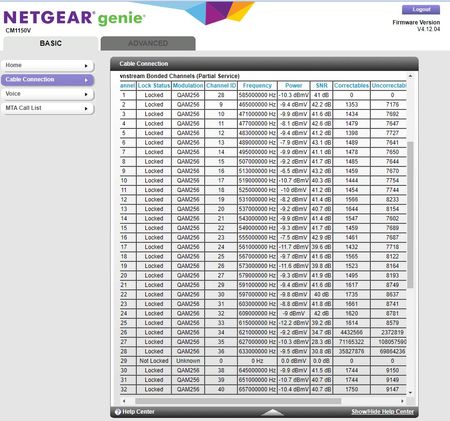
Power on the modem from the ISP is TOO HIGH LOW. Needs to be turned UP:
https://kb.netgear.com/24311/Power-level-guidelines-for-a-NETGEAR-cable-modem-router
You have a ton of Correctables and Un-Correctables that should be zero.
Any Criticals, Errors or Warnings seen in the Event logs needs to be reviewed by the ISP and resolved. These indicate a signal issue on the ISP line up to the modem.
Have the ISP check the signal and line quality UP to the modem. Be sure the ISP provisions the modem correctly.
Be sure there are no coax cable line splitters in the between the modem and ISP service box.
Be sure your using good quality RG6 coax cable up to the modem.
Start with removing any amplifiers, signal attenuators, or splitters from the coax.
From there check the line for kinks, damage, moisture in the line.
Check the connectors for improperly made ends, foil touching the copper coax line, loose connections, bad/old/cheap connectors, or corroded connections. Replace them if you do.
Be sure to power OFF the modem for 1 minute then back ON.
https://community.netgear.com/t5/Cable-Modems-Routers/General-info-and-Troubleshooting-for-Cable-Modems/m-p/1530376#M12853
https://www.duckware.com/tech/solving-intermittent-cable-modem-issues.html

Kitsap
Jul 03, 2023Master
FURRYe38 wrote:
Power on the modem from the ISP is TOO HIGH. Needs to be turned down:
https://kb.netgear.com/24311/Power-level-guidelines-for-a-NETGEAR-cable-modem-router
When I look at the power levels posted above, it appears they are less than the minimum specification level of -7 dBmV and should be turned up and not down. A task for the ISP.
- FURRYe38Jul 03, 2023Guru - Experienced User
Thanks for the catch on that. Ya posted before not getting enough coffee today. The dash was't seen like it should have been. 🙄
Corrected.
Thank you Sir.
- panthrosanJul 03, 2023Aspirant
I ran a brand new Quad Shielded Cable from the outside connection straight to the Modem and now I am getting 45-46 DB Down and 39.5-41 DB Up so modem traffic looks good but still getting Critical "SYNC Timing Synchronization failure - Failed to acquire QAM/QPSK symbol timing" and Warning "MDD message timeout" in my event log and an unstable connection. Been on hold for 30 minutes waiting to talk to a human at Xfinity to ask them to ping the modem and tell them it 100% is on their end as it is a brand new Quad Shielded cable run from their termination to my brand new Modem.
- FURRYe38Jul 04, 2023Guru - Experienced User
And still have lots of Correctables and Un-correctables as well.
Keep on them.