NETGEAR is aware of a growing number of phone and online scams. To learn how to stay safe click here.
Forum Discussion

MS70
Jan 17, 2024Star
I think the the CM1200 has fallen off their list
With Comcast anything is possible… I think the the CM1200 has fallen off their list. I’ve been struggling to get connection back to where it was. While they say everything looks fine on their end and...
MS70
Jan 17, 2024Star
Xbox wired to Modem... Not sure what ”dead beef” is doing in the gateway name???

FURRYe38
Jan 18, 2024Guru - Experienced User
Lots of Criticals in the logs. Any Criticals, Errors or Warnings seen in the event logs needs to be reviewed and resolved by the ISP. Indicates a signal issue on the ISP line up to the modem.
Have the ISP check the signal and line quality UP to the modem. Be sure the ISP provisions the modem correctly.
Be sure there are no coax cable line splitters in the between the modem and ISP service box.
Be sure your using good quality RG6 coax cable up to the modem.
Start with removing any amplifiers, signal attenuators, or splitters from the coax.
From there check the line for kinks, damage, moisture in the line.
Check the connectors for improperly made ends, foil touching the copper coax line, loose connections, bad/old/cheap connectors, or corroded connections. Replace them if you do.
Be sure to power OFF the modem for 1 minute then back ON.
https://community.netgear.com/t5/Cable-Modems-Routers/General-info-and-Troubleshooting-for-Cable-Modems/m-p/1530376#M12853
https://kb.netgear.com/24311/Power-level-guidelines-for-a-NETGEAR-cable-modem-router
https://www.duckware.com/tech/solving-intermittent-cable-modem-issues.html
https://highspeed.tips/docsis-events/
For IPv6, be sure to test this here:
- MS70Jan 19, 2024Star
Thanks for the help & info... Yeah the Xfinity Status for the modem fluctuates. Yesterday it actually recognized it and had a green light. We had a better connectivity day with our VPN and the Arlo camera actually worked again. By evening it was back to showing not connected while I did run Netflix with no picture issues.
I put in for tech appt to have someone come out and/or call from tech support to look in to the modem errors.
I ran that IPV6 test. I also did some pings using Apple Network Utility to Google & XBox and they show 60-70% packet loss. I'll try it again later with laptop direct to modem and see what that shows.
- FURRYe38Jan 19, 2024Guru - Experienced User
Have the ISP tech review all the information post there. Hopefully they can get it working better.
Seems that IPv6 is working for the most part.
- MS70Jan 21, 2024Star
I talked with tech... should get a call back in a day or two as he's going to do some work on his end. I let him know about the packet loss issues.
It's very confusing how some things are working and check out but the laptop and Xbox both wired are still showing packet loss. Half when directly connected to modem. Netflix is playing with a good picture. Also getting a better live feed on Arlo camera with less lag and audio working (still need to test it remotely).
Xbox I had to get the router set right to solve the Teredo issue. Deleted the Xbox ports forwarding so UPnP could do its thing. Set IPv6 to Auto Config, DHCP on the LAN side, Google DNS, open filtering. It logged in fine upon startup with controller as opposed to getting the “Connect to Xbox Network tab” and struggling with NAT & IPV6. Showed both working, open NAT, all services available. The network diagnostic tool actually completed it's tests with speeds showing correct, 900 dn, 15 up but latency lower (23) or higher (67) than normal (32-35) and the packet loss ranging from 20-40%.
The IPV6 test on the laptop checks out and the Nighthawk Router app speedtest on phone shows fine at 941 Dn, 19 up and 18 ping. Speedtest.net on wired laptop shows usually 600-650 dn, 15-18 up, ping in the teens up to 30s. (Ethernet cable connector to USBc may be preventing higher speeds.)
But all ping tests on the laptop network utility are showing 20-40% packet loss to Google, Xbox, Cloudflare. Ping to the gateway IP address has 100% packet loss. Have to ask about that on the call back.
I turned off the ethernet flow control... didn't make any difference.
I'm baffled... Got connectivity, seems a bit more stable and things are working for the most part but no idea where the packet loss is coming from. Going to check my work VPN/laptop next to see how that does as that's a WiFi connection.
- MS70Jan 24, 2024Star
Tested Work VPN... Took at least 5 tries to finally authenticate and connect. Slow server connection. Functional but nothing like it was prior to all this mess.
Xbox on start up is back to same issue with Terredo... won't completely log in. ALways have to go into advanced network settings... it hangs for a second then loads all data and then resolves iPV6 & NAT. Will look like a normal connection but xbox speed test will still fail on some values or show good speeds, latency but a consistent 40% packet loss. Can clear mac address and reboot and then it might log right in. Packet loss still there at 23%.
Netflix does the same... LG TV will show as connected to WiFi then Not Connected back & forth while streaming is playing usually with pixels. Then it might be ok after reboot.
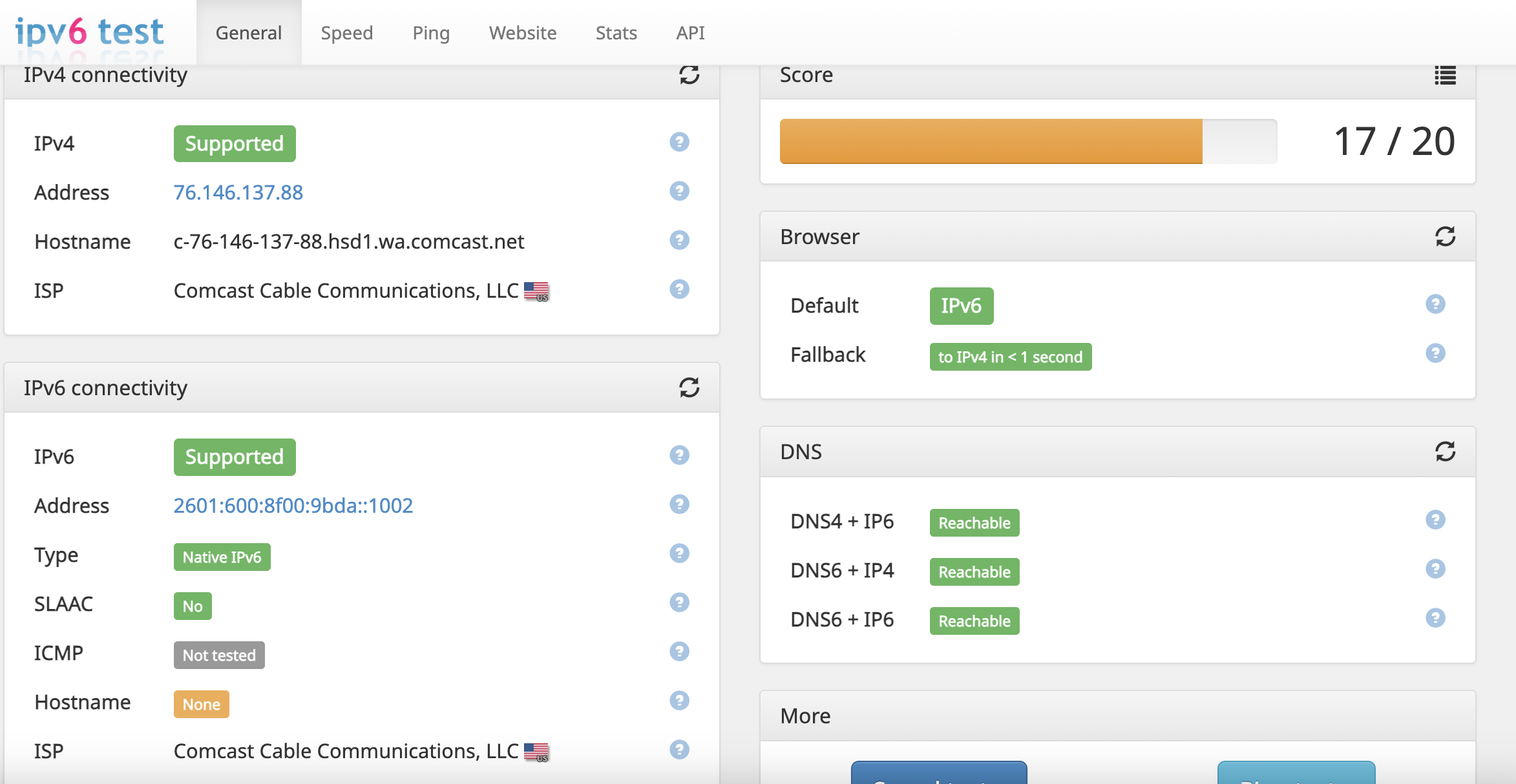
IPV6 test without router is 19/20 and shows ICMP reachable. WIth router its 17/20 and ICMP is not tested. So that's another issues... All my ping tests show consistent packet loss from 10 -40% with and without the router, Pings to Xfinity.com, Comcast.net and the gateway address all give 100% packet loss.
Also this looks like something else Comcast is dropping the ball on...
There is no reverse DNS record to associate your IPv6 address with a host name. Reverse DNS records are required by some Internet protocols and are usually managed at the ISP level.
I did a try a remote modem restart from the Xfi assistant that came through... so signal is there but then it will say it't not getting signal and still show as disconnected.
I bet this CM1200 modem needs a firmware update to get in sync with whatever Comcast is doing.
No word back from them yet... I'm sure they'll blame the router.
- FURRYe38Jan 24, 2024Guru - Experienced User
Good luck with all that. Keep on them.
- MS70Jan 27, 2024Star
Ok all's good now... Tech came out and he replaced both splitters including one in the home center box, fixed a loose connection on the wall jack and replaced the outside fittings. I had picked up a CM2000 which I couldn't get swapped out so he was able to take care of that since he mentioned the CM1200 would not work with my speed tier. Everything is new and working again! YAY!
No more packet loss on the Xbox etc. So if you have the CM1200 and the Xfinity 1200MB tier apparently that won't work. CM2000 is good to go.
- MS70Jan 27, 2024Star
May have spoke too soon on the Xbox... While I did get a successful diagnostic test that showed 0 packet loss its still having trouble connecting properly on restart when the contoller should log it in.
It will show IPV 4 and getting info on services but not resolving IPV6 and NAT. If I goto advanced network settings it hangs for half second then all the info loads in and appears to resolve the IPV6 and NAT... At least it did last night...I had to switch IPV6 LAN Setup to Auto Config and set the IPV6 filtering to OPEN to get it to work. Now it's doing this No Internet Connection again which is oddly similar to the same issue my wife's PC Windows laptop is having... connected but not getting full internet connection, What is it with this crap now?!
I've tried hard resets, clearing the MAC Address etc. and nothing is fixing the issue. It's showing this Teredo BS again with moderate NAT ad UPnP not successful. So fed up with this nonsense.
It shows IPV4 & 6, NAT flipping between moderate, getting info or unavailable, UPnP unsuccessful but router shows the correct port of 3074.
- FURRYe38Jan 29, 2024Guru - Experienced User
How do you have the wifi router configured for IPv4 and IPv6 for the xbox?
Is the xbox wireless or ethernet connected to the router?
- KitsapJan 29, 2024Master
MS70 wrote:Ok all's good now... Tech came out and he replaced both splitters including one in the home center box, fixed a loose connection on the wall jack and replaced the outside fittings. I had picked up a CM2000 which I couldn't get swapped out so he was able to take care of that since he mentioned the CM1200 would not work with my speed tier. Everything is new and working again! YAY!
No more packet loss on the Xbox etc. So if you have the CM1200 and the Xfinity 1200MB tier apparently that won't work. CM2000 is good to go.
Definitely some serious upsell BS from the tech. The CM1200 will work fine with the Comcast network. It will have some throughput limits depending on the speed tier you subscribe to. Upload throughput will be limited to around 35 Mbps due to the standard network firmware Comcast has pushed. The download throughput will be limited to your output connection. With a single Ethernet connection, the limit will be 1 Mbps. With a dual Ethernet aggregate connection, the limit will be 2 Mbps. Having throughput limitations is a significant difference from would not work!
- MS70Jan 29, 2024Star
Xbox is ethernet wired... I set the IPV6 back to DHCP (how it was always set on the old router, DNS to auto get from ISP, Use DHCP server on the LAN setup. NAT filtering open.
That sorted it out... Problem is come back later in the day or next day and it can't log in again... Got a new message that said “Can't get a Teredo IP Address”. Did a hard reset and it logged in fine. Just tested again this evening and it logged in fine... so hopefully it's good now. Shouldn't need to be doing hard resets or clearing Mac address constantly for it to log in.
- FURRYe38Jan 30, 2024Guru - Experienced User
Is the RAXE300 router the only router you have on hand by chance?
Please post a new copy and paste of the modems connection status and event log page.
https://kb.netgear.com/30007/How-do-I-obtain-the-cable-connection-information-from-a-NETGEAR-cable-modem-modem-router
https://kb.netgear.com/30008/How-do-I-view-or-clear-the-event-logs-on-my-NETGEAR-cable-modem-or-modem-router - MS70Feb 01, 2024Star
So Xbox started up fine for two nights then try to get it going after logging off work VPN and it's the same thing again... Shows IPV4 & 6 but can't resolve the NAT/Teredo stuff.
Only other router I have is the older NightHawk R7800.
Had to reboot the modem and hook up laptop directly to get access to modem admin page. The diagnostic was all green. Modem log in next post.
- MS70Feb 01, 2024Star
Modem log. Similar errors as the other one. To be honest every modem I've ever owned, Netgeat and going back to the Motorolla Surfboards has ALWAYS had errors galore with Comcast. At least this one is showing up on the Xfinity app as connected.
Why can't Netgear and Xfinity get their act together??? They sell these products as “compatible with Xfinity”. I'm not buying it anymore. $600 in and it's still nothing but problems. Stockholder too and I'm fed up with this company... Stock has been garbage for 5 years. Used to be a good brand, now not so much.
- MS70Feb 03, 2024Star
This stupid router probably needs another firmware update because it's not doing what it should with regard to UPnP/Teredo and NAT. It gets Moderate NAT. Clear MAC Addy and restart... the same again. Check NAT and Xbox suggests making sure UDP Port 3544 isn't blocked. Open port forwarding on UDP 3544, still no improvement. RAXE300 Piece of junk!
[UPnP set event: add_nat_rule] from source: 192.168.1.200, Saturday, February 03, 2024 21:43:41
[UPnP set event: GetExternalIPAddress] from source: 192.168.1.200, Saturday, February 03, 2024 21:43:41
[DHCP IP: (192.168.1.200)] to MAC address d8:e2:df:4c:c3:0d, Saturday, February 03, 2024 21:43:30
[DHCP IP: (192.168.1.200)] to MAC address d8:e2:df:4c:c3:0d, Saturday, February 03, 2024 21:42:11
[UPnP set event: GetExternalIPAddress] from source: 192.168.1.200, Saturday, February 03, 2024 21:41:10
[UPnP set event: GetExternalIPAddress] from source: 192.168.1.200, Saturday, February 03, 2024 21:41:06
[LAN access from remote] from 40.81.122.229:3544 to 192.168.1.200:3074, Saturday, February 03, 2024 21:40:49
[UPnP set event: add_nat_rule] from source: 192.168.1.200, Saturday, February 03, 2024 21:40:43
[UPnP set event: GetExternalIPAddress] from source: 192.168.1.200, Saturday, February 03, 2024 21:40:27
[UPnP set event: add_nat_rule] from source: 192.168.1.200, Saturday, February 03, 2024 21:39:05
[UPnP set event: GetExternalIPAddress] from source: 192.168.1.200, Saturday, February 03, 2024 21:39:05
[DHCP IP: (192.168.1.11)] to MAC address 8c:85:90:1d:5f:fb, Saturday, February 03, 2024 21:37:20
[UPnP set event: DeletePortMapping] from source: 192.168.1.200, Saturday, February 03, 2024 21:36:03
[UPnP set event: GetExternalIPAddress] from source: 192.168.1.200, Saturday, February 03, 2024 21:36:03
[UPnP set event: add_nat_rule] from source: 192.168.1.200, Saturday, February 03, 2024 21:34:57
[UPnP set event: GetExternalIPAddress] from source: 192.168.1.200, Saturday, February 03, 2024 21:34:57
[UPnP set event: DeletePortMapping] from source: 192.168.1.200, Saturday, February 03, 2024 21:34:48
[UPnP set event: GetExternalIPAddress] from source: 192.168.1.200, Saturday, February 03, 2024 21:34:48
[LAN access from remote] from 40.81.122.229:3544 to 192.168.1.200:3074, Saturday, February 03, 2024 21:33:43
[UPnP set event: add_nat_rule] from source: 192.168.1.200, Saturday, February 03, 2024 21:33:39
[UPnP set event: GetExternalIPAddress] from source: 192.168.1.200, Saturday, February 03, 2024 21:33:39
[DHCP IP: (192.168.1.200)] to MAC address d8:e2:df:4c:c3:0d, Saturday, February 03, 2024 21:33:36
[DHCP IP: (192.168.1.200)] to MAC address d8:e2:df:4c:c3:0d,