NETGEAR is aware of a growing number of phone and online scams. To learn how to stay safe click here.
Forum Discussion

ETermin
May 20, 2022Aspirant
Intermittent connection cm1200
Hey all, I'm a bit of a loss so I figured I would ask here. I'm losing downstream connectivity intermittently. My isp (mediacom) is blaming the modem which is less than a year old. I had no issues unt...

FURRYe38
May 20, 2022Guru - Experienced User
What is the brand and model of the host wifi router connected to the modem?
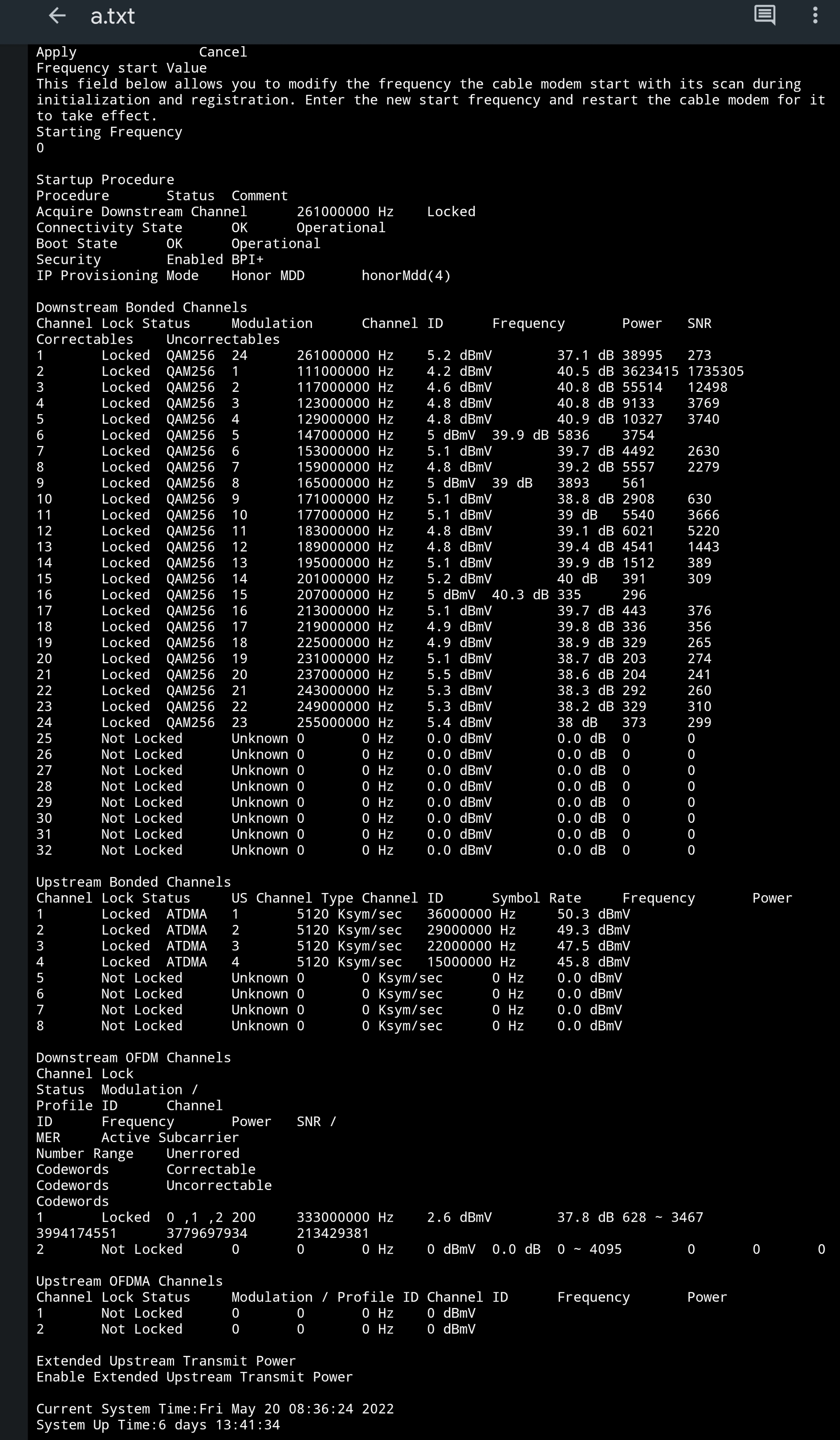
Please post a copy and paste of the modems connection status page.
Have the ISP check the signal and line quality UP to the modem. Be sure the ISP provisions the modem correctly.
Be sure there are no coax cable line splitters in the between the modem and ISP service box.
Be sure your using good quality RG6 coax cable up to the modem.
Be sure to power OFF the modem for 1 minute then back ON.
https://community.netgear.com/t5/Cable-Modems-Routers/General-info-and-Troubleshooting-for-Cable-Modems/m-p/1530376#M12853
https://kb.netgear.com/24311/Power-level-guidelines-for-a-NETGEAR-cable-modem-router?article=24311
https://www.duckware.com/tech/solving-intermittent-cable-modem-issues.html
- ETerminMay 20, 2022AspirantI'm sorry the upload was being a bit finicky. I uploaded it to the image below from my phone. I don't know why it wouldn't let me post directly.
- FURRYe38May 20, 2022Guru - Experienced User
Power levels are ok, however you have correct and un-correctables that should be zeros.
Check all of the coax line connections and jack fittings. Remove any coax line splitters to test.
What is your ISP speeds UP and Down that you pay for?
- ETerminMay 20, 2022Aspirant
I pay for 400D/30U and im getting 494D/41D. As for the uncorrectables Im not sure what is causing them i can double check all the connections. This just started a few months again and has slowly become more of a nuisance.