NETGEAR is aware of a growing number of phone and online scams. To learn how to stay safe click here.
Forum Discussion

Abdurahmanbana
Sep 13, 2019Aspirant
Issue With My Netgear CM500 Modem
Hi, I've been having a huge issue with my modem for a year. Every night at around 8 - 11pm EST or on random parts of the day, my internet connection suddenly cuts out for 20 seconds. I managed to get...

plemans
Sep 14, 2019Guru - Experienced User
So basically we're trying to determine what is causing the issue. If you remove the splitter and the issue resolves, then a new splitter might be needed. If you add a new splitter and the issue returns then its probably the signal coming in. Reason why is a 2x splitter typically reduces your signal strength by -3.5dB.
We're not saying you'll have to leave it out permanantly but for troubleshooting its a good idea. The more variables you can remove from a problem the easier it is to figure out where its coming from.
Abdurahmanbana
Sep 15, 2019Aspirant
So I have removed my splitter, and this is what all of my channels look like now. Should it be good at the moment or are there still problems?
- plemansSep 15, 2019Guru - Experienced UserI would run it for a bit. See how stable it is.
- AbdurahmanbanaSep 16, 2019Aspirant
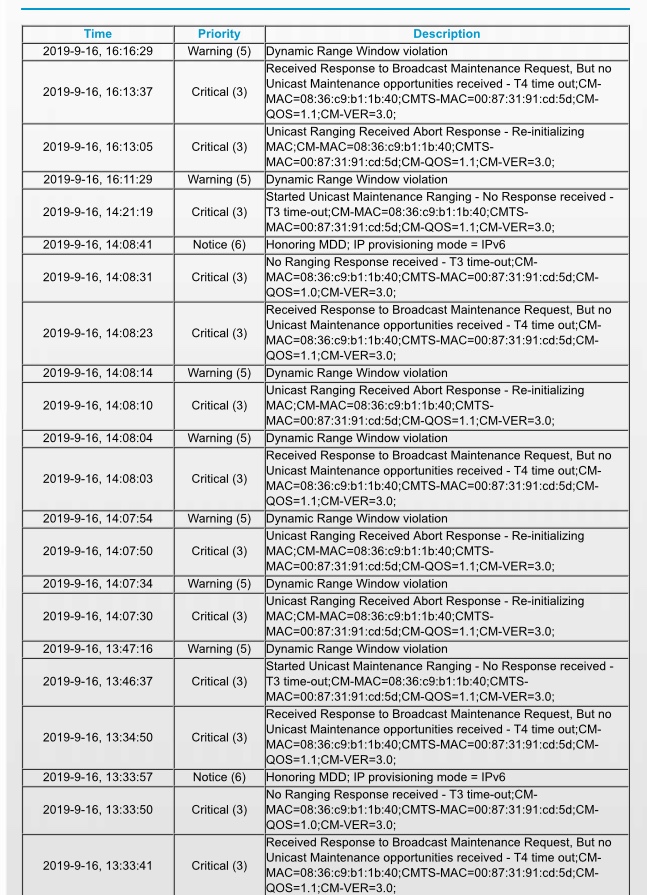
Sowhen I was removing my splitter, I had multiple corretables and uncorrectables. So I put back the splitter and tightened all the cables. After, all my channels were locked and I had little correctables(Like the one I sent earlier). Wifi preformance looked good but I still recieved T3 and T4 timeouts like this. Does this mean I have to get a technician?
- plemansSep 17, 2019Guru - Experienced User
Abdurahmanbana wrote:Sowhen I was removing my splitter, I had multiple corretables and uncorrectables. So I put back the splitter and tightened all the cables. After, all my channels were locked and I had little correctables(Like the one I sent earlier). Wifi preformance looked good but I still recieved T3 and T4 timeouts like this. Does this mean I have to get a technician?
I would base if off your performance. If everything is functioning as it should, aka no dropped connections, slowed speeds, and its working fine, then I wouldn't worry about it. if you continue to get slowed speeds, drops, having issues, then I'd look at having the line checked or checking your router to see if that's where the issues are stemming from.
- FURRYe38Sep 17, 2019Guru - Experienced User
I would talk to your ISP about these T3 and T4 timeouts to see if they are something they need to review or send a Tech out to check.
Abdurahmanbana wrote:Sowhen I was removing my splitter, I had multiple corretables and uncorrectables. So I put back the splitter and tightened all the cables. After, all my channels were locked and I had little correctables(Like the one I sent earlier). Wifi preformance looked good but I still recieved T3 and T4 timeouts like this. Does this mean I have to get a technician?