NETGEAR is aware of a growing number of phone and online scams. To learn how to stay safe click here.
Forum Discussion

regalvoid
Dec 29, 2023Aspirant
Multiple DoS Attacks in Logs!
I know there are often false flags in regards to DoS Attacks but networking is outside my area of expertise and I have lost service a few times so I'd rather be safe than sorry. I have a CAX30S m...
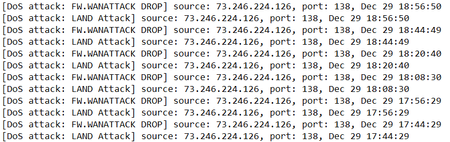
- Dec 29, 2023
regalvoid wrote:
I know there are often false flags in regards to DoS Attacks but networking is outside my area of expertise and I have lost service a few times so I'd rather be safe than sorry.
First read what microchip8 says.
Then look into why you have "lost service".
That almost certainly has nothing to do with DoS Attacks.
My wifi vanishes (as in it is not listed as an option from any of my devices) but none of the lights on the modem change.To deal with this symptom, start with the usual troubleshooting. First move, apply the latest firmware to the router bit of your modem router.
I have a CAX30S modem/router running firmware V2.1.6.2That's not a firmware version in Netgear's library for the CAX30S. Maybe they withdrew it.
CAX30S | Cable Modems and Routers | NETGEAR Support
That directs you here:
CAX30 Firmware Version 2.2.1.12 - NETGEAR Support
For more help check the section for your hardware. This place is for routers. You own a "gateway".
Cable Modems & Gateways - NETGEAR Communities
You might find something useful there.


FURRYe38
Dec 29, 2023Guru - Experienced User
Please post a copy and paste of the modems connection status and event log page.
https://kb.netgear.com/30007/How-do-I-obtain-the-cable-connection-information-from-a-NETGEAR-cable-modem-modem-router
https://kb.netgear.com/30008/How-do-I-view-or-clear-the-event-logs-on-my-NETGEAR-cable-modem-or-modem-router
regalvoid wrote:
I know there are often false flags in regards to DoS Attacks but networking is outside my area of expertise and I have lost service a few times so I'd rather be safe than sorry.
I have a CAX30S modem/router running firmware V2.1.6.2 and the logs show a large amount of DoS Attacks each day coming from my public IP. (Attached is a screenshot of a recent batch). I wouldn't be concerned but the time on the logs is six hours ahead of what the modem is set on and I have briefly lost service twice in the last few weeks. My wifi vanishes (as in it is not listed as an option from any of my devices) but none of the lights on the modem change.