NETGEAR is aware of a growing number of phone and online scams. To learn how to stay safe click here.
Forum Discussion

AstralSayian
May 05, 2023Aspirant
Netgear C7000V2 recently started disconnecting randomly.
Recently my device has been dropping connection for some reason and I am not sure why. My ISP is RCN and we have contacted them about it. Netgear says that the newest Firmware for this device should ...

FURRYe38
May 05, 2023Guru - Experienced User
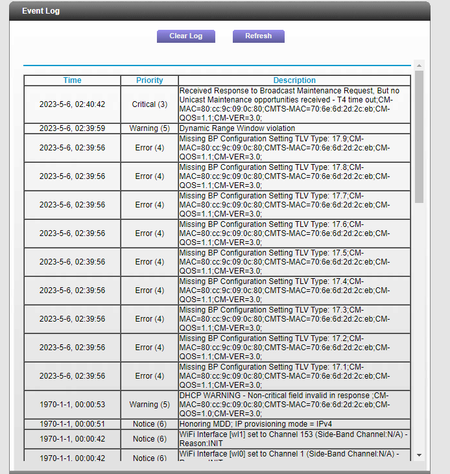
Lots of Errors in the logs. Any Critical, Errors or Warnings needs to be reviewed and resolved by the ISP.
Have the ISP check the signal and line quality UP to the modem. Be sure the ISP provisions the modem correctly.
Be sure there are no coax cable line splitters in the between the modem and ISP service box.
Be sure your using good quality RG6 coax cable up to the modem.
Start with removing any amplifiers, signal attenuators, or splitters from the coax.
From there check the line for kinks, damage, moisture in the line.
Check the connectors for improperly made ends, foil touching the copper coax line, loose connections, bad/old/cheap connectors, or corroded connections. Replace them if you do.
Be sure to power OFF the modem for 1 minute then back ON.
https://community.netgear.com/t5/Cable-Modems-Routers/General-info-and-Troubleshooting-for-Cable-Modems/m-p/1530376#M12853
https://kb.netgear.com/24311/Power-level-guidelines-for-a-NETGEAR-cable-modem-router
https://www.duckware.com/tech/solving-intermittent-cable-modem-issues.html
- AstralSayianMay 06, 2023Aspirant
So exactly what would it be on the ISP end that they need to fix?
- FURRYe38May 07, 2023Guru - Experienced User
Ask the ISP that.
Info has been posted as well. Have this review this.
- AstralSayianMay 07, 2023Aspirant
So I called my ISP and told them everything. They said everything looks fine on there end and that they don't see any issues. Could it be the router itself? Is there a way to manually update the Firmware? The ISP says they cant update that.