NETGEAR is aware of a growing number of phone and online scams. To learn how to stay safe click here.
Forum Discussion

Cerick895
May 01, 2023Aspirant
Netgear CAX80 cable modem router
To piggy back off this. Where is the setting to disable firmware updates? I downgraded mine and it auto updates. I looked everywhere online on how to disable it.
Cerick895
May 02, 2023Aspirant
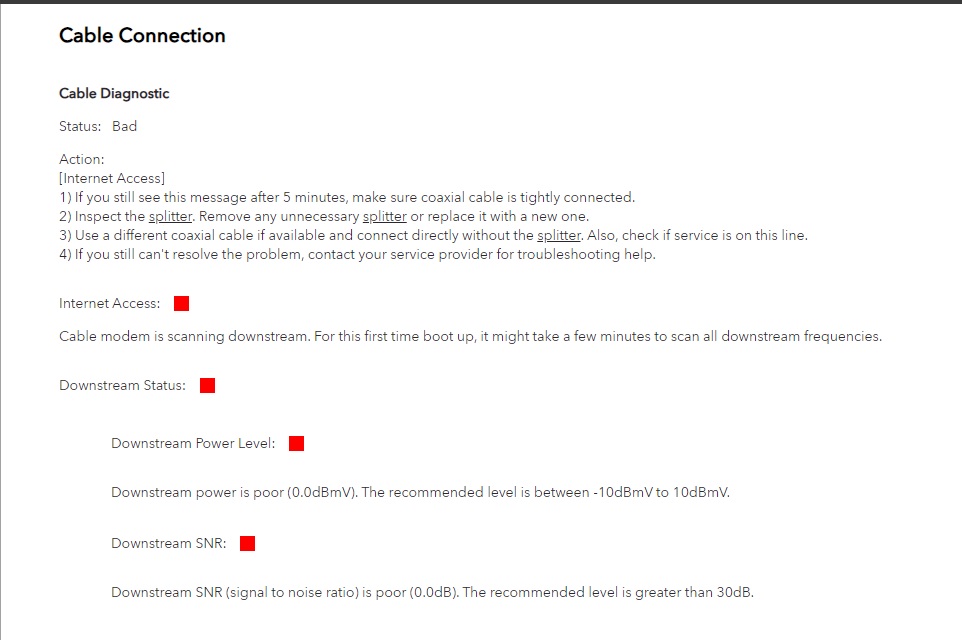
Cable Diagnostic
Status: Good
Action: Your setup looks fine. If you are still experience an internet issue, the Netgear Cable Knowledge Base can provide additional troubleshooting info.
Internet Access: Good
Downstream Status: Good
Downstream Power Level: Good
Downstream SNR: Good
Upstream Status: Good
Upstream Power Level: Good
Current time: Tue May 02 09:21:26 2023
Startup Procedure
Acquire Downstream Channel: 213 MHz Locked
Connectivity State: OK Operational
Boot State: OK Operational
Security: Enabled BPI+
Cerick895
May 02, 2023Aspirant
This is too big of a pita to deal with.I mainly wanted to know if you can prevent firmware updates and that's not the case. I am pretty confident that its the firmware or the router part on its way out. Silly to have the feature to downgrade but then force update anyways.
I'll just deal with it and toss it when it gives up and avoid netgear. Thanks.
- FURRYe38May 02, 2023Guru - Experienced User
If you pass me the serial number of the modem, we can ask NG to stop the auto update on this modem...
- FURRYe38May 02, 2023Guru - Experienced User
With out more information we asked you for and details, hard to tell if the modem is faulty or FW is faulty.
I had mine CAX80 online up until Feb of this year using same v2.1.5.2 FW and worked well. I'm currently helping test NG CAX30 and is working well. A lot depends on ISP signal and such that can effect other areas of the modem. Configuration also can effect how the modem works.
- Cerick895May 02, 2023Aspirant
Got it.
- michaelkenwardMay 02, 2023Guru - Experienced User
Cerick895 wrote:
This is too big of a pita to deal with.I mainly wanted to know if you can prevent firmware updates and that's not the case.
Yes. You should have that option.
It seems to have been a lapse in thinking when they made it possible to update the router firmware on modem/routers.
Other routers and DSL modem/routers have a "disable" option. Experienced users like to turn it off because those overnight updates have been known to brick devices.
I suppose there is no hidden switch on the debug.htm page.
http://routerlogin.com/debug.htm
I'll just deal with it and toss it when it gives up and avoid netgear.
Sadly, no brand is defect free, but when you do look for a replacement, you could consider having a separate standalone modem. These are cheaper and give you a better choice of routers.
- Cerick895May 02, 2023Aspirant
I think this will post. Sorry. I had to retype my message 3 times. It wasn't showing it posted until after the fact. Very irritating. See if PDF works.
- Cerick895May 02, 2023Aspirant
Yeah no option in the debug menu.
I mainly was trying to avoid having to manage two devices. I heard the stories of the issues gateway but wanted to give it an honest shot and up until just recently it was doing good enough.
Agreed no brand is without faults but netgear was all I was seeing in what to avoid. I've had old netgear stuff in the past but never had issues so I wanted to give it a go. Shame on me apparently 🙂
- FURRYe38May 02, 2023Guru - Experienced User
Who is your ISP and what speeds UP and Down do you pay for?
I see the power is kinda low going into the modem however with in spec. https://kb.netgear.com/24311/Power-level-guidelines-for-a-NETGEAR-cable-modem-router
Most of the channels should be locked in however depending on ISP or Speed tier package, maybe some are not being used. Something to ask the ISP about. Most 800Mpbs or higher speed package use all 32 channels on the down.
I see lots of Criticals and warnings that the ISP needs to review and resolve. Criticals reporting some power problems.
https://highspeed.tips/docsis-events/
I've asked NG to block the modems serial number from there AU system so maybe downgrading back to what was working for you will help in meantime. I feel if the ISP can do there part in checking there line and signal up to the modem side, will be a good start.
Cerick895 wrote:
I think this will post. Sorry. I had to retype my message 3 times. It wasn't showing it posted until after the fact. Very irritating. See if PDF works.
- Cerick895May 02, 2023Aspirant
Mediacom Internet 200 - 1000 GB
- FURRYe38May 02, 2023Guru - Experienced User
So do you pay for up to 1Gb? If so, I would think that all channels should be used on the down, which there not on your modem. I have 1Gb here and all 32 channels are used and locked in.
- Cerick895May 02, 2023Aspirant
Might be something with Mediacom or the area I am in since I am pretty rural the lines are old. Not familiar with cable channel stuff. And its "up to 1GB" with a hard emphasis on up.
Its the only thing out here unfortunately so its what I am stuck with unless I go starlink as even the cell reception is spotty.
- FURRYe38May 02, 2023Guru - Experienced User
Ok. Helps to know what environment your in as well. Ya, understand the "up to" thing. Well if they are saying up to 1Gb, then with what the modems is seeing, I would highly doubt the modem would pass that speed thru without using all the channels for the down. And with some issues in the event log, would not be surprised your experiencing all this when you shouldn't be. If we can get the ISP to clean up the modem side, get the router side downgrade in meantime, would probably get the CAX working as it should. I hope to know more by tomorrow about the AU block I asked about.
I've enjoyed my CAX80 when I had it online. Was the most unit I had online since I got it from NG. Worked well for me. Ya There been some Auto Update issues. Trying to help NG work those out currently. Lets see if we can get your CAX into a better state and go from there. Once the serial is blocked, you can manually downgrade to v2.1.4.2 and I would recommend a full on factory reset. Along with asking the ISP to probably do a on site visit and check there cabling and signal all the way up to the modem. Including the event and cable connections logs. Those logs report issues on the modem side and the ISP is responsible up to that point.
Have the ISP check the signal and line quality UP to the modem. Be sure the ISP provisions the modem correctly.
Be sure there are no coax cable line splitters in the between the modem and ISP service box.
Be sure your using good quality RG6 coax cable up to the modem.
Start with removing any amplifiers, signal attenuators, or splitters from the coax.
From there check the line for kinks, damage, moisture in the line.
Check the connectors for improperly made ends, foil touching the copper coax line, loose connections, bad/old/cheap connectors, or corroded connections. Replace them if you do.
Be sure to power OFF the modem for 1 minute then back ON.
https://community.netgear.com/t5/Cable-Modems-Routers/General-info-and-Troubleshooting-for-Cable-Modems/m-p/1530376#M12853
https://kb.netgear.com/24311/Power-level-guidelines-for-a-NETGEAR-cable-modem-router
https://www.duckware.com/tech/solving-intermittent-cable-modem-issues.html
https://highspeed.tips/docsis-events/ - Cerick895May 02, 2023Aspirant
I forgot to add that I did actually had a tech come about before looking more at the gateway.
He did run his test and fixed the issues he had seen on his end. Not sure if the logs show that in there as it was about a month ago, he checked both inside and outside lines and the modem was reporting line issues. That's what prompted me to have them look. Is there something specific I should ask?
I appreciate doing what you can on the firmware option. Its worth a shot which it seemed like it was helping but with it updating again, I didn't get a good assessment.
- FURRYe38May 02, 2023Guru - Experienced User
A month would have been too long ago for the logs to keep. Logs keep most current with in days. Which is good to see what is currently going on.
- michaelkenwardMay 02, 2023Guru - Experienced User
Cerick895 wrote:
I think this will post. Sorry. I had to retype my message 3 times.
Hint, if this happens, don't give up.
The community software saves your messages as you write them. It is also a poor implementation of a standard bulletin board package.
If you think that a message has vanished, go back to the one you are replying to.
Click Reply again.
You should see a banner above the message, inviting you to reload the saved version.
- Cerick895May 06, 2023Aspirant
Going to assume the firmware update block on the serial ain't going to happen. Its updated and still the same crap. Its literally only the wifi connections with this issue. Phone, ipad, or laptop.
You can see the device lose connection as it switches to LTE while it happens then pops back on after a few minutes. I can't test long enough on the older firmware to eliminate that. I would be inclined to blame my ISP if my wired connections had this issue.
- FURRYe38May 08, 2023Guru - Experienced User
So you downgraded the CAX80 and it re-updated?
- Cerick895May 08, 2023Aspirant
Yes. This weekend I uploaded 2.1.4.2 and its back to 2.1.5.2
I did it earlier in the morning so I could test it all day yesterday and I did not have any wifi issues all day and today its back to being updated. I a day isn't a good sample size but Its really making me think its my issue.
- FURRYe38May 08, 2023Guru - Experienced User
No sure about you last statement.
Let me check in to this again.
- FURRYe38May 09, 2023Guru - Experienced User
Ok, would like to request a couple of items from you please:
1) CM status 16(DS OFDM profile failure) and 24(OFDM profile recovery).
We think these logs should be OK. CM sent event code 16 and sent event code 24 within 1 minute. The frequency is low (3 per day). There may be noise that impact OFDM signal.
2) DWR violation and T3 timeout.
We suggest user calling ISP to fix the upstream issue. This may impact upstream stability.
Have the ISP check the signal and line quality UP to the modem. Be sure the ISP provisions the modem correctly.
Be sure there are no coax cable line splitters in the between the modem and ISP service box.
Be sure your using good quality RG6 coax cable up to the modem.
Start with removing any amplifiers, signal attenuators, or splitters from the coax.
From there check the line for kinks, damage, moisture in the line.
Check the connectors for improperly made ends, foil touching the copper coax line, loose connections, bad/old/cheap connectors, or corroded connections. Replace them if you do.
Actions for user:1. Hope the user provides the debug log when the issue happens (from debug GUI). Please create the problem with your devices with the debug logging enabled under the modems IP address/debug.htm. After creating the problem, let the log run for about 5 minutes then select the save logs button. Post to a cloud service like onedrive or dropbox and PM me the link.
2. If possible, call ISP tech support to check upstream DRW issue. IF they can fix this issue here, this may resolve what your seeing or experiencing. - FURRYe38May 12, 2023Guru - Experienced User
Any progress on this?
Cerick895 wrote:
Yes. This weekend I uploaded 2.1.4.2 and its back to 2.1.5.2
I did it earlier in the morning so I could test it all day yesterday and I did not have any wifi issues all day and today its back to being updated. I a day isn't a good sample size but Its really making me think its my issue.
- Cerick895May 17, 2023Aspirant
I downgraded it again and it seemed to hold yesterday so it looks like I did not get pushed the firmware update yay! I am happy for now as it will take forever to have them track down the issue on the cable companies end. I'll see where it goes.
Thanks again!
- FURRYe38May 17, 2023Guru - Experienced User
Sounds good. Keep on them about it. There are issues on the ISP side.
Keep us posted when you can.
- Cerick895Jun 28, 2023Aspirant
Update: I had my ISP come out and they checked the line again and said it was good to go. Beyond yelling at the dude I don't know what all else I can do. If there are line issues and I have zero proof if their tool checks it out as good. Whatever at this point, its was working good enough for what I need and the wireless drops reduced significantly.
Its WAS for the last month running the 2.1.4.2 firmware and its been okay but just this last weekend it died. Well actually the wifi is still functional but it can no longer gain a connection to my ISP. It dropped randomly during the day. I already tried all the resetting procedures and also just going ahead and manually updating firmware but still.. no connection. My ISP can't even see it anymore and the tech that came out said its most likely the modem.
And here I thought buying my own modem would save me money...499 down the drain in barely over a year. Expensive lesson learned and of course like always its not in warranty. I think I am done purchasing or recommending netgear stuff for the future. For the price I definitely could have gotten the same performance for less.
At least the 4th is coming up. I might as well go blow it up.
- FURRYe38Jun 28, 2023Guru - Experienced User
Can you repost the cable connections and event logs page data please.
Something on the ISP line is not working right.
Did the tech look at the connections and event logs while they were there?
Something to try as well, go get one of the ISPs modems and have them put it online for a short term test. If there is a problem on there side there stuff would experience issues as well. Would give direction here.
I recommend you reach out to NG support and ask for a beta that has been given out to some.
- Cerick895Jun 29, 2023Aspirant
I'll boot it up again and pull logs. I had it just sitting since it won't do anything. I did a full reset so it shouldn't have much.
I've been currently down for 3 days. I am stuck using my phones hotspot with a limited plan so I am $10 a day in data now and switching to the next plan would cost me another 30$ bucks so I was banking on the tech fixing it today with one of their modems as I know dealing with Netgear support with this being out of warranty is probably going to take weeks. So now I am eating the cost of phone data, a modem rental, and the possibility that I have a 400$ paper weight. Its hard not to be soured about Netgear right now.
Just to expand on what I said in my last post. The tech I talked to on Tuesday was actually on another call as Mediacoms earliest appointment time was Thursday. I just happened to see him driving down my street and flagged him down. He then came back that evening on his way home but since my the earliest service slot back when it died over the weekend was Thursday 6/29, he couldn't pull any of my info on his equipment since it wasn't assigned to him. He used his line analyzer tool and checked signals and said everything looks within range and there wasn't anything he could do until the appointment was assigned since he didn't have any of my account info. He asked me to contact Mediacoms HQ and see if they could check it/send a signal to it, which I did and they got nothing.