NETGEAR is aware of a growing number of phone and online scams. To learn how to stay safe click here.
Forum Discussion

l1955c
Apr 17, 2022Aspirant
Netgear model C6250 the 2.4 ghz is extremely slow (5.0 ghz is ok)
Hello Group, This router is less than a year old, running comcast firmware v1.02.02. This morning the 2.4 gHz network speed has dropped real slow, most of the speed tests fail to upload at all. La...
- Apr 20, 2022
So it works fine on everything but the app version on the iphone.
Kind of points to that app. Maybe its connecting to a bad server when hosted in the app.
l1955c
Apr 19, 2022Aspirant
Hi plemans,
I tried channel 1, did not help.
I tried channel 6, did show a minor improvement. 1.5 Mbps down and 11.5 Mbps up.
I tried channel 11, did not help.
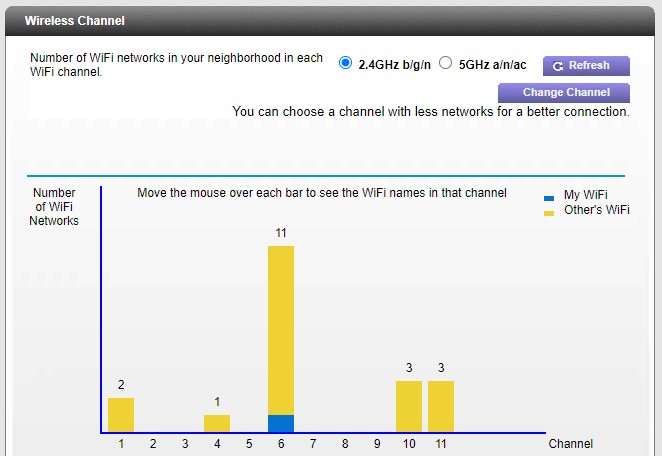
I've attached a look at the channels in use near me.
Where do I find the check box for the 20/40hz coexistence is enabled?
The interface I have is the NETGEAR genie C6250-100NAS.

plemans
Apr 19, 2022Guru - Experienced User
What device are you testing on?
What app are you testing with?
Have you tried other devices?
- l1955cApr 19, 2022Aspirant
Hi,
The reason I started checking was because the gen 2 Nest thermostat and new Nest doorbell were having trouble connecting to the Nest server. They both have excellent signal, plus the battery in the thermostat check good.
Most of the tests I've done using the iPhone XS and the Ookly speedtest app.
The first time I tried with the Dell it was very slow however now it's not too bad. Very odd... the iPhone still shows extremally slow...
- l1955cApr 20, 2022Aspirant
Good Morning plemans,
Now I'm a bit confused.
On the Dell PC the speed on the 2.4 gHz network is fine!
On the iPhone using the Ookla Speedtest app the 2.4 gHz network sucks!
On the iPhone using the browser version of Speedcheck.org the 2.4 gHz network is working fine!
What's going on with this???
Thanks,
l1955c
- plemansApr 20, 2022Guru - Experienced User
So it works fine on everything but the app version on the iphone.
Kind of points to that app. Maybe its connecting to a bad server when hosted in the app.
- l1955cApr 20, 2022Aspirant
It must be the app because the 1st time I tried AirLink in Miami and the 2nd time I used Frontier also in Miami, and the 3rd I used was Century Link in Orlando. All of them real poor download report, upload was okay but not great.
Well I guess we can call this resolved. I'll stop using the SpeedTest app from Ookla.
Cheers,