NETGEAR is aware of a growing number of phone and online scams. To learn how to stay safe click here.
Forum Discussion

Chaken
May 24, 2022Tutor
nighthawk c7000v2 dropping connection
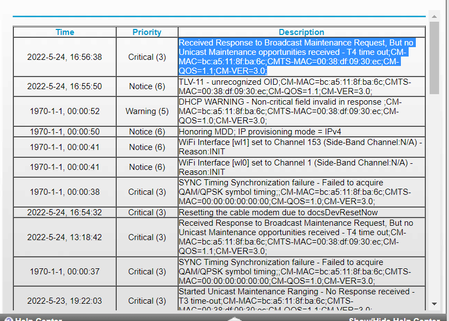
I have cox and they keep telling me to contact netgear to update the firmware or to pay for their premiere service...eyeroll I am pretty sure it is the line but can someone take a look at my logs an...
- May 26, 2022
your cable connection page isn't horrible. There is some errors and the power is a little out of spec but I've seen worse.
Start with removing any amplifiers, signal attenuators, or splitters from the coax.
From there check the line for kinks, damage, moisture in the line.
Check the connectors for improperly made ends, foil touching the copper coax line, bad/old/cheap connectors, or corroded connections. Replace them if you do.
If you can, simply connect the modem right where the coax comes into the home. This prevents wiring in the home from being the issue. And some ISP’s charge if the wiring issue is in the home. So this helps prevent this.
Chaken
May 25, 2022Tutor
mine is currently running firmware version V1.03.01 so more up to date that theirs anyway. I realize cox is just trying to upsell me on garbage i don't need but lots of people don't, so I appreciate it anyway.

plemans
May 25, 2022Guru - Experienced User
When you first log into the router, click on the internet icon. it'll take you to the cable connections page. It shows upstream/downstream info and helps us check the line.
- ChakenMay 26, 2022Tutor
- ChakenMay 26, 2022Tutor
- plemansMay 26, 2022Guru - Experienced User
your cable connection page isn't horrible. There is some errors and the power is a little out of spec but I've seen worse.
Start with removing any amplifiers, signal attenuators, or splitters from the coax.
From there check the line for kinks, damage, moisture in the line.
Check the connectors for improperly made ends, foil touching the copper coax line, bad/old/cheap connectors, or corroded connections. Replace them if you do.
If you can, simply connect the modem right where the coax comes into the home. This prevents wiring in the home from being the issue. And some ISP’s charge if the wiring issue is in the home. So this helps prevent this.