NETGEAR is aware of a growing number of phone and online scams. To learn how to stay safe click here.
Forum Discussion

Regor982
May 10, 2021Aspirant
Nighthawk Multiple Daily Disconnects from ISP
I've read as much as I can, with my situation seeming close to a lot of other folks, but I cannot nail down my soution, and continue to have multiple daily disconnects. I've worked with my Cable pro...

FURRYe38
May 10, 2021Guru - Experienced User
So this is the C7800 gateway modem?
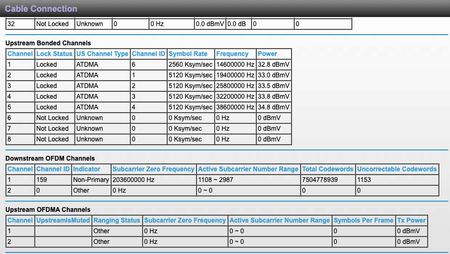
Please post a copy and paste of the modems connection status page. Use the Choose File button to attach any picture files to your post.
Have the ISP check the signal and line quality UP to the modem. Be sure the ISP provisions the modem correctly.
Be sure there are no coax cable line splitters in the between the modem and ISP service box.
Be sure your using good quality RG6 coax cable up to the modem.
Be sure to power OFF the modem for 1 minute them back ON.
https://community.netgear.com/t5/Cable-Modems-Routers/General-info-and-Troubleshooting-for-Cable-Modems/m-p/1530376#M12853
https://highspeed.tips/docsis-events/
Regor982
May 10, 2021Aspirant
- Regor982May 10, 2021Aspirant
Nighthawk
AC3200 WiFi Cable Modem Router
Model C7800
- plemansMay 10, 2021Guru - Experienced User
you have a lot of errors in your line, not all your channels are locked, and your power is a bit off.
If they've already ran a new line and are saying its not their equipment then
1. it might not be. It could be a modem issue
2. it could still ba a line issue, you might actually have to rent one of their modems to prove its still a line issue.
I've had to rent a modem from an ISP for a month to prove it wasn't a 3rd party modem issue.
If you did that for a month and your signal/speeds are great, then it could be the modem. if they still suck, then cox is obligated to say its the line since its all their equipment.
