NETGEAR is aware of a growing number of phone and online scams. To learn how to stay safe click here.
Forum Discussion

wmpooler
Feb 23, 2017Tutor
Opening Nat types for PS4 2017
I am trying to open my NAT type but I dont even have the option to change the type. I have followed the instructions but I dont have the option to change it. I followed the instructions @ https://k...
wmpooler
Mar 25, 2017Tutor
I have no idea how to do that
 TheEtherMar 25, 2017Guru
I didn't realize that you have a cable modem/router. I don't always pay attention to which board I'm reading. My bad.
The easiest thing to do is to go to ADVANCED > Advanced Setup > UPnP and turn on UPnP. This is basically automatic port forwarding. You should also go to ADVANCED > Setup > LAN Setup and assign an IP address to your PS4 to keep it from changing. Some people consider UPnP unsafe, so caveat emptor.
An alternatively, configure port forwarding manually under ADVANCED > Advanced Setup > Port Forwarding/Port Triggering. You'll have to find out which port to forward for each game.
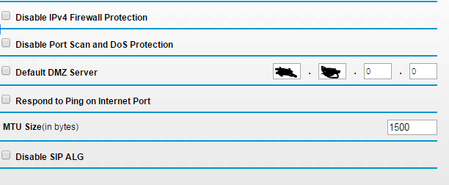
The last option is to put the PS4 in the router's DMZ. The picture you posted shows the DMZ Server setting. You would enter the IP address of your PS4, there. As with UPnP, you should to go ADVANCED > Setup > LAN Setup and assign an IP address to your PS4. Using the DMZ can also be considered unsafe for your PS4 since it will be unprotected by your router's firewall.