NETGEAR is aware of a growing number of phone and online scams. To learn how to stay safe click here.
Forum Discussion

ron352
Nov 17, 2024Aspirant
Orbi CBR750 drop connection wan side
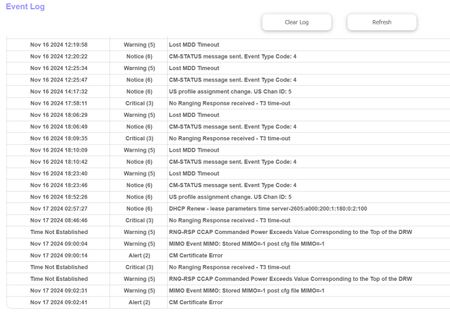
Recently a few weeks now I noticed internet connection drops. I have Spectrum cable to Orbi CBR750 Modem/Router. Not sure if there was a firmware update but it is currently V4.6.14.4_2.3.12 I have t...
ron352
Nov 18, 2024Aspirant
Ok will get in touch with Spectrum Thanks

FURRYe38
Nov 18, 2024Guru - Experienced User
Let us know how it goes.
- ron352Nov 19, 2024Aspirant
I called Spectrum, lady ran a test it showed no issue on the line. She could not see the event log since I had a Orbi modem/router she said she can only see the event log if their modem was connected.
She said she looked back the last 30 days and it showed no packet loss or other things wrong with the line.
So going to see if it goes out again I will have to switch back to the Spectrum modem and buy a router and see what happens.
The Orbi modem/router was like $550.00 a year ago and doubt it has issues or better not.
So for now going to see if it looses internet again and maybe switch back to their equipment so they can see the event log.
What a pain.
- FURRYe38Nov 20, 2024Guru - Experienced User
Ask them if you can send them the event log from the CBR for review.
- ron352Nov 21, 2024Aspirant
Old stats above in first message using a 6db attenuator
Today I got the -3db attenuator and the Downstream status is yellow.
With the 6db attenuator all status was green,
The speed is ok and to early to tell if the Event Log will give me critical messages.
Startup Procedure Procedure Status Comment Acquire Downstream Channel 261000000 Hz Locked Connectivity State Ok Operational Boot State Ok Operational Security Enabled BPI+ IP Provisioning Mode IPv6 Only ipv6Only(1) Downstream Bonded Channels Channel Lock Status Modulation Channel ID Frequency Power SNR Correctables Uncorrectable 1 Locked QAM 256 1 261000000 Hz 10.9 dBmV 38.9 dB 3 0 2 Locked QAM 256 2 267000000 Hz 10.9 dBmV 38.9 dB 0 0 3 Locked QAM 256 3 273000000 Hz 10.5 dBmV 38.9 dB 0 0 4 Locked QAM 256 4 279000000 Hz 10.1 dBmV 38.9 dB 0 0 5 Locked QAM 256 5 285000000 Hz 9.9 dBmV 38.6 dB 0 0 6 Locked QAM 256 6 291000000 Hz 9.8 dBmV 38.9 dB 0 0 7 Locked QAM 256 7 297000000 Hz 9.8 dBmV 38.9 dB 0 0 8 Locked QAM 256 8 303000000 Hz 9.6 dBmV 38.9 dB 0 0 9 Locked QAM 256 9 309000000 Hz 9.6 dBmV 38.9 dB 0 0 10 Locked QAM 256 10 315000000 Hz 9.5 dBmV 38.9 dB 0 0 11 Locked QAM 256 11 321000000 Hz 9.4 dBmV 38.6 dB 0 0 12 Locked QAM 256 12 327000000 Hz 9.3 dBmV 38.6 dB 0 0 13 Locked QAM 256 13 333000000 Hz 9.0 dBmV 38.9 dB 0 0 14 Locked QAM 256 14 339000000 Hz 8.9 dBmV 38.9 dB 0 0 15 Locked QAM 256 15 345000000 Hz 8.6 dBmV 38.9 dB 0 0 16 Locked QAM 256 17 357000000 Hz 8.5 dBmV 38.9 dB 0 0 17 Locked QAM 256 18 363000000 Hz 8.5 dBmV 38.9 dB 0 0 18 Locked QAM 256 19 369000000 Hz 8.3 dBmV 38.6 dB 0 0 19 Locked QAM 256 20 375000000 Hz 8.0 dBmV 38.9 dB 0 0 20 Locked QAM 256 21 381000000 Hz 8.0 dBmV 38.9 dB 0 0 21 Locked QAM 256 22 387000000 Hz 8.1 dBmV 38.6 dB 0 0 22 Locked QAM 256 23 393000000 Hz 8.0 dBmV 38.9 dB 0 0 23 Locked QAM 256 24 399000000 Hz 7.9 dBmV 38.9 dB 0 0 24 Locked QAM 256 26 405000000 Hz 7.6 dBmV 38.9 dB 0 0 25 Locked QAM 256 27 411000000 Hz 7.8 dBmV 38.6 dB 0 0 26 Locked QAM 256 28 417000000 Hz 7.8 dBmV 38.6 dB 0 0 27 Locked QAM 256 29 423000000 Hz 7.8 dBmV 38.6 dB 0 0 28 Locked QAM 256 30 453000000 Hz 7.5 dBmV 38.9 dB 0 0 29 Locked QAM 256 31 459000000 Hz 7.1 dBmV 38.6 dB 0 0 30 Locked QAM 256 32 465000000 Hz 7.1 dBmV 38.9 dB 0 0 31 Locked QAM 256 33 471000000 Hz 7.0 dBmV 38.6 dB 0 0 32 Not Locked N/A N/A 0 Hz 0.0 dBmV 0.0 dB 0 0 Upstream Bonded Channels Channel Lock Status US Channel Type Channel ID Symbol Rate Frequency Power 1 Locked ATDMA 6 5120 Ksym/sec 24200000 Hz 38.5 dBmV 2 Locked ATDMA 7 5120 Ksym/sec 30600000 Hz 39.0 dBmV 3 Locked ATDMA 8 5120 Ksym/sec 37000000 Hz 39.0 dBmV 4 Not Locked N/A Unknown 0 Ksym/sec 0 Hz 0.0 dBmV 5 Not Locked N/A Unknown 0 Ksym/sec 0 Hz 0.0 dBmV 6 Not Locked N/A Unknown 0 Ksym/sec 0 Hz 0.0 dBmV 7 Not Locked N/A Unknown 0 Ksym/sec 0 Hz 0.0 dBmV 8 Not Locked N/A Unknown 0 Ksym/sec 0 Hz 0.0 dBmV Downstream OFDM Channels Channel Lock Status Modulation/Profile ID Channel ID Frequency Power SNR/MER Active Subcarrier
Number RangeUnerrored
CodewordsCorrectable
CodewordsUncorrectable
Codewords1 Locked 2 25 624000000 Hz 8.0 dBmV 39.4 dB 388~3707 0 0 0 2 Not Locked 0 0 0 Hz 0.0 dBmV 0.0 dB 0~4095 0 0 0 Upstream OFDMA Channels Channel Lock Status Modulation/Profile ID Channel ID Frequency Power 1 Locked 0 5 6025000 Hz 36.5 dBmV 2 Not Locked 0 0 0 Hz 0.0 dBmV - FURRYe38Nov 21, 2024Guru - Experienced User
I should have said to put the 2nd attenuator in line with the other one. Power levels are too high now.
See if you get a -10dbm attenuator and try that behind the CBR. This should bring down the power to mid levels.
- ron352Nov 21, 2024Aspirant
Ok will try that later after the kid is done with his PS5 stuff.
Ron
- ron352Nov 21, 2024Aspirant
Ok I put the 6 and -3 and also Spectrums old splitter 2db in line and now have power at 1.7dBmv and the downstream went from yellow to green. I also ordered a -10 just in case putting all 3 of these inline isn't good. But internet seems good.
Startup Procedure Procedure Status Comment Acquire Downstream Channel 261000000 Hz Locked Connectivity State Ok Operational Boot State Ok Operational Security Enabled BPI+ IP Provisioning Mode IPv6 Only ipv6Only(1) Downstream Bonded Channels Channel Lock Status Modulation Channel ID Frequency Power SNR Correctables Uncorrectable 1 Locked QAM 256 1 261000000 Hz 1.7 dBmV 38.9 dB 0 0 2 Locked QAM 256 2 267000000 Hz 1.7 dBmV 38.6 dB 0 0 3 Locked QAM 256 3 273000000 Hz 1.5 dBmV 38.9 dB 0 0 4 Locked QAM 256 4 279000000 Hz 1.2 dBmV 38.9 dB 0 0 5 Locked QAM 256 5 285000000 Hz 0.9 dBmV 38.6 dB 0 0 6 Locked QAM 256 6 291000000 Hz 0.7 dBmV 38.6 dB 0 0 7 Locked QAM 256 7 297000000 Hz 0.5 dBmV 38.9 dB 0 0 8 Locked QAM 256 8 303000000 Hz 0.4 dBmV 38.9 dB 0 0 9 Locked QAM 256 9 309000000 Hz 0.2 dBmV 38.9 dB 0 0 10 Locked QAM 256 10 315000000 Hz 0.2 dBmV 38.9 dB 1 0 11 Locked QAM 256 11 321000000 Hz 0.2 dBmV 38.6 dB 0 0 12 Locked QAM 256 12 327000000 Hz 0.2 dBmV 38.6 dB 0 0 13 Locked QAM 256 13 333000000 Hz 0.0 dBmV 38.9 dB 0 0 14 Locked QAM 256 14 339000000 Hz -0.2 dBmV 38.6 dB 0 0 15 Locked QAM 256 15 345000000 Hz -0.5 dBmV 38.9 dB 0 0 16 Locked QAM 256 16 351000000 Hz -0.7 dBmV 38.9 dB 0 0 17 Locked QAM 256 17 357000000 Hz -1.0 dBmV 38.6 dB 0 0 18 Locked QAM 256 18 363000000 Hz -1.0 dBmV 38.9 dB 0 0 19 Locked QAM 256 19 369000000 Hz -1.0 dBmV 38.9 dB 0 0 20 Locked QAM 256 20 375000000 Hz -1.2 dBmV 38.6 dB 0 0 21 Locked QAM 256 21 381000000 Hz -1.2 dBmV 38.6 dB 0 0 22 Locked QAM 256 22 387000000 Hz -1.0 dBmV 38.6 dB 0 0 23 Locked QAM 256 23 393000000 Hz -1.2 dBmV 38.9 dB 0 0 24 Locked QAM 256 24 399000000 Hz -1.4 dBmV 38.9 dB 0 0 25 Locked QAM 256 26 405000000 Hz -1.5 dBmV 38.6 dB 0 0 26 Locked QAM 256 27 411000000 Hz -1.7 dBmV 38.9 dB 0 0 27 Locked QAM 256 28 417000000 Hz -1.5 dBmV 38.6 dB 0 0 28 Locked QAM 256 29 423000000 Hz -1.5 dBmV 38.6 dB 0 0 29 Locked QAM 256 30 453000000 Hz -1.9 dBmV 38.6 dB 0 0 30 Locked QAM 256 31 459000000 Hz -2.2 dBmV 37.3 dB 0 0 31 Locked QAM 256 32 465000000 Hz -2.2 dBmV 37.6 dB 0 0 32 Not Locked N/A N/A 0 Hz 0.0 dBmV 0.0 dB 0 0 Upstream Bonded Channels Channel Lock Status US Channel Type Channel ID Symbol Rate Frequency Power 1 Locked ATDMA 6 5120 Ksym/sec 24200000 Hz 47.8 dBmV 2 Locked ATDMA 7 5120 Ksym/sec 30600000 Hz 47.8 dBmV 3 Locked ATDMA 8 5120 Ksym/sec 37000000 Hz 48.0 dBmV 4 Not Locked N/A Unknown 0 Ksym/sec 0 Hz 0.0 dBmV 5 Not Locked N/A Unknown 0 Ksym/sec 0 Hz 0.0 dBmV 6 Not Locked N/A Unknown 0 Ksym/sec 0 Hz 0.0 dBmV 7 Not Locked N/A Unknown 0 Ksym/sec 0 Hz 0.0 dBmV 8 Not Locked N/A Unknown 0 Ksym/sec 0 Hz 0.0 dBmV Downstream OFDM Channels Channel Lock Status Modulation/Profile ID Channel ID Frequency Power SNR/MER Active Subcarrier
Number RangeUnerrored
CodewordsCorrectable
CodewordsUncorrectable
Codewords1 Locked 2 25 624000000 Hz -1.2 dBmV 39.1 dB 388~3707 0 0 0 2 Not Locked 0 0 0 Hz 0.0 dBmV 0.0 dB 0~4095 0 0 0 Upstream OFDMA Channels Channel Lock Status Modulation/Profile ID Channel ID Frequency Power 1 Locked 0 5 6025000 Hz 45.5 dBmV 2 Not Locked 0 0 0 Hz 0.0 dBmV - FURRYe38Nov 22, 2024Guru - Experienced User
There we go.
Looks good now.If you get the -10db, then that one will be all that you need. Won't need the others in line as it would drop the power too much. Levels are good here with the two inline that you have. Your right in the middle of the spec and thats good.
- ron352Nov 22, 2024Aspirant
- ron352Nov 22, 2024Aspirant
Monday the -10 will be here later in the day.
I had 3 connected a -3db 6db and another splitter -3db spectrum originally installed with 1 of the outs capped off.
I got a critical and thought maybe the voltage 1.7dBmv so I took Spectrums off the -3 splitter and only have the -3db and 6db connected now and it is reading 5.0dBmv now
Startup Procedure Procedure Status Comment Acquire Downstream Channel 261000000 Hz Locked Connectivity State Ok Operational Boot State Ok Operational Security Enabled BPI+ IP Provisioning Mode IPv6 Only ipv6Only(1) Downstream Bonded Channels Channel Lock Status Modulation Channel ID Frequency Power SNR Correctables Uncorrectable 1 Locked QAM 256 1 261000000 Hz 5.0 dBmV 38.6 dB 0 0 2 Locked QAM 256 2 267000000 Hz 5.0 dBmV 38.9 dB 0 0 3 Locked QAM 256 3 273000000 Hz 4.8 dBmV 38.9 dB 0 0 4 Locked QAM 256 4 279000000 Hz 4.4 dBmV 38.9 dB 0 0 5 Locked QAM 256 5 285000000 Hz 4.0 dBmV 38.9 dB 0 0 6 Locked QAM 256 6 291000000 Hz 3.9 dBmV 38.9 dB 0 0 7 Locked QAM 256 7 297000000 Hz 3.7 dBmV 38.6 dB 0 0 Nov 21 2024 21:26:10 Warning (5) RNG-RSP CCAP Commanded Power in Excess of 6 dB Below the Value Corresponding to the Top of the DRW Nov 21 2024 21:26:12 Notice (6) CM-STATUS message sent. Event Type Code: 2 Nov 21 2024 21:26:13 Critical (3) No Ranging Response received - T3 time-out Nov 21 2024 21:26:20 Notice (6) CM-STATUS message sent. Event Type Code: 23 Nov 21 2024 21:28:52 Warning (5) MIMO Event MIMO: Stored MIMO=-1 post cfg file MIMO=-1 Nov 21 2024 21:29:02 Alert (2) CM Certificate Error Nov 21 2024 21:29:49 Critical (3) SYNC Timing Synchronization failure - Loss of Sync Nov 21 2024 21:29:51 Notice (6) CM-STATUS message sent. Event Type Code: 2 Nov 21 2024 21:29:53 Warning (5) Lost MDD Timeout Nov 21 2024 21:29:55 Critical (3) No Ranging Response received - T3 time-out Nov 21 2024 21:29:56 Warning (5) RNG-RSP CCAP Commanded Power in Excess of 6 dB Below the Value Corresponding to the Top of the DRW Nov 21 2024 21:29:56 Critical (3) SYNC Timing Synchronization failure - Loss of Sync Nov 21 2024 21:30:01 Warning (5) Lost MDD Timeout Nov 21 2024 21:30:01 Critical (3) No Ranging Response received - T3 time-out Nov 21 2024 21:30:02 Warning (5) Lost MDD Timeout Nov 21 2024 21:30:02 Notice (6) CM-STATUS message sent. Event Type Code: 1 Nov 21 2024 21:30:02 Warning (5) Lost MDD Timeout Nov 21 2024 21:30:02 Critical (3) No Ranging Response received - T3 time-out Nov 21 2024 21:30:06 Warning (5) RNG-RSP CCAP Commanded Power in Excess of 6 dB Below the Value Corresponding to the Top of the DRW Nov 21 2024 21:30:06 Notice (6) CM-STATUS message sent. Event Type Code: 16 Nov 21 2024 21:30:08 Critical (3) No Ranging Response received - T3 time-out Nov 21 2024 21:30:18 Notice (6) CM-STATUS message sent. Event Type Code: 4 Nov 21 2024 21:30:19 Critical (3) No Ranging Response received - T3 time-out Nov 21 2024 21:30:26 Notice (6) CM-STATUS message sent. Event Type Code: 24 Nov 21 2024 21:30:27 Critical (3) No Ranging Response received - T3 time-out Nov 21 2024 21:30:29 Notice (6) CM-STATUS message sent. Event Type Code: 23 Nov 21 2024 21:30:33 Notice (6) US profile assignment change. US Chan ID: 5 Nov 21 2024 21:32:21 Critical (3) No Ranging Response received - T3 time-out Nov 21 2024 21:50:41 Notice (6) US profile assignment change. US Chan ID: 5 Nov 22 2024 02:44:59 Warning (5) MIMO Event MIMO: Stored MIMO=-1 post cfg file MIMO=-1 Nov 22 2024 02:45:03 Warning (5) RNG-RSP CCAP Commanded Power in Excess of 6 dB Below the Value Corresponding to the Top of the DRW Nov 22 2024 02:45:08 Alert (2) CM Certificate Error - FURRYe38Nov 22, 2024Guru - Experienced User
Ok.
Let it run. If you continue to see issues, have the ISP check the event logs, Any Criticals, Errors or Warnings seen in the event logs needs to be reviewed and resolved by the ISP. Indicates a signal issue on the ISP line up to the modem.
- ron352Nov 22, 2024Aspirant
Ok yea, most likely I will have to hook their modem up and buy a router to connect to it so they can see the logs then after they get it right switch back to the Orbi router modem. To bad they don't do a remote desktop rather then switching modems back and forth
- FURRYe38Nov 22, 2024Guru - Experienced User
👍
- ron352Nov 22, 2024Aspirant
Going to be a few days. The original modem I had from Spectrum was only rated 900MBPS and I pay for Gigabit service, so the lady said they can't provision it and have to ship out a new modem.
Will update once it is in and see if they see the errors
- FURRYe38Nov 22, 2024Guru - Experienced User
If the ISP modem is a 1Gb or lessor modem then ya. Most speeds you'll see is around 900Mpbs on typical 1Gb modems along with a 1Gb router. Anything beyond that, you'll need a modem and router that has 2.5Gb or higher WAN and LAN ports.
Possible that the ISP modem may or may not show same event log details. Not sure if those are standard across branded modems or not. I presume they should be.
- ron352Nov 22, 2024Aspirant
The lady said she will be able to see critical errors and stuff with their modem. I just bought a TP-Link router good for 1.8 gigs. She said her equipment would not allow her to activate the old modem since it was not rated gigabit speed. So all set with the router matter of time when they deliver the new modem.
- ron352Nov 25, 2024Aspirant
Well I have Spectrum Modem in connected direct to the Coax cable no attinuators between. It is running good getting 930Mbps speed and unable to see any errors or critical errors since it is their modem.
So at this point it was a lot of time and no final resolution and my Orbi sitting on a shelf now.
I appreciate the help and did learn something.
If I get any drops in service I will respond down the road, but for now just going to be Idle.
- FURRYe38Nov 25, 2024Guru - Experienced User
What brand model# modem are you using?
Could use the TP Link router as a router, disable it's wifi radios and then configure the CBR for faux AP mode and connect it to the TP Link router using one of the CBRs LAN ports. Then connect up any RBS to the CBR.
Otherwise, ya, let it run.
- ron352Nov 25, 2024Aspirant
The router I just bought is a TP Link AX1800
I can only access and login to the TP Link.
The Spectrum modem I do not think there is a way to login to that.
- FURRYe38Nov 25, 2024Guru - Experienced User
Ya modems do have web pages.
Just a suggestion if you wanted to continue to use the CBR system for wireless abilities.
- ron352Nov 25, 2024Aspirant
What is the CBR system? Bad with abbreviations. Is that the Orbi?
- FURRYe38Nov 25, 2024Guru - Experienced User
Yes.
- ron352Nov 25, 2024Aspirant
I had already tried using the Orbi Modem/Router with the Spectrum Modem and it did not seem to work.
That is why I bought the TP Link
- FURRYe38Nov 26, 2024Guru - Experienced User
For the faux AP mode on the CBR, you'll need the TP Link router.
- ron352Nov 26, 2024Aspirant
Ok thanks. Might try it but don't need it. I wish Spectrum would of just let me send the log I had on the Orbi on critical errors it would of made things so much easier.
- FURRYe38Nov 26, 2024Guru - Experienced User
Should send it anyways. Seems like the Event logs read out would be same as other branded modems since the modem side is all DOCSIS information and diagnostics.
Maybe at some point put the CBR back ON and check it. Other wise, good luck.