NETGEAR is aware of a growing number of phone and online scams. To learn how to stay safe click here.
Forum Discussion

ron352
Nov 17, 2024Aspirant
Orbi CBR750 drop connection wan side
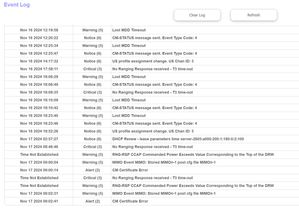
Recently a few weeks now I noticed internet connection drops. I have Spectrum cable to Orbi CBR750 Modem/Router. Not sure if there was a firmware update but it is currently V4.6.14.4_2.3.12 I have t...
ron352
Nov 22, 2024Aspirant
Ok yea, most likely I will have to hook their modem up and buy a router to connect to it so they can see the logs then after they get it right switch back to the Orbi router modem. To bad they don't do a remote desktop rather then switching modems back and forth

FURRYe38
Nov 22, 2024Guru - Experienced User
👍
- ron352Nov 22, 2024Aspirant
Going to be a few days. The original modem I had from Spectrum was only rated 900MBPS and I pay for Gigabit service, so the lady said they can't provision it and have to ship out a new modem.
Will update once it is in and see if they see the errors
- FURRYe38Nov 22, 2024Guru - Experienced User
If the ISP modem is a 1Gb or lessor modem then ya. Most speeds you'll see is around 900Mpbs on typical 1Gb modems along with a 1Gb router. Anything beyond that, you'll need a modem and router that has 2.5Gb or higher WAN and LAN ports.
Possible that the ISP modem may or may not show same event log details. Not sure if those are standard across branded modems or not. I presume they should be.
- ron352Nov 22, 2024Aspirant
The lady said she will be able to see critical errors and stuff with their modem. I just bought a TP-Link router good for 1.8 gigs. She said her equipment would not allow her to activate the old modem since it was not rated gigabit speed. So all set with the router matter of time when they deliver the new modem.
- ron352Nov 25, 2024Aspirant
Well I have Spectrum Modem in connected direct to the Coax cable no attinuators between. It is running good getting 930Mbps speed and unable to see any errors or critical errors since it is their modem.
So at this point it was a lot of time and no final resolution and my Orbi sitting on a shelf now.
I appreciate the help and did learn something.
If I get any drops in service I will respond down the road, but for now just going to be Idle.
- FURRYe38Nov 25, 2024Guru - Experienced User
What brand model# modem are you using?
Could use the TP Link router as a router, disable it's wifi radios and then configure the CBR for faux AP mode and connect it to the TP Link router using one of the CBRs LAN ports. Then connect up any RBS to the CBR.
Otherwise, ya, let it run.
- ron352Nov 25, 2024Aspirant
The router I just bought is a TP Link AX1800
I can only access and login to the TP Link.
The Spectrum modem I do not think there is a way to login to that.
- FURRYe38Nov 25, 2024Guru - Experienced User
Ya modems do have web pages.
Just a suggestion if you wanted to continue to use the CBR system for wireless abilities.
- ron352Nov 25, 2024Aspirant
What is the CBR system? Bad with abbreviations. Is that the Orbi?
- FURRYe38Nov 25, 2024Guru - Experienced User
Yes.
- ron352Nov 25, 2024Aspirant
I had already tried using the Orbi Modem/Router with the Spectrum Modem and it did not seem to work.
That is why I bought the TP Link
- FURRYe38Nov 26, 2024Guru - Experienced User
For the faux AP mode on the CBR, you'll need the TP Link router.
- ron352Nov 26, 2024Aspirant
Ok thanks. Might try it but don't need it. I wish Spectrum would of just let me send the log I had on the Orbi on critical errors it would of made things so much easier.
- FURRYe38Nov 26, 2024Guru - Experienced User
Should send it anyways. Seems like the Event logs read out would be same as other branded modems since the modem side is all DOCSIS information and diagnostics.
Maybe at some point put the CBR back ON and check it. Other wise, good luck.