NETGEAR is aware of a growing number of phone and online scams. To learn how to stay safe click here.
Forum Discussion

Jetguy
Sep 13, 2021Aspirant
c7000_v2 SSID Broadcast Issue
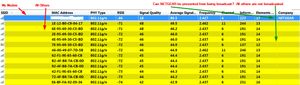
Hello All, I am using a Netgear AC1900 C7000v2 CableModem. When I run a windows utility that shows/detects wireless connections in my area one of the field is COMPANY. This field shows the name o...

FURRYe38
Sep 13, 2021Guru - Experienced User
Does this happen when you turn OFF the modem for a few minutes? This SSID name disappear?
Go into the modems web page and under Basic tab/Wireless settings, you can change the SSID broadcast name to most anything. Somethign unique. Apply and save the setting. The new SSID name should appear in your detected broadcast list.

Jetguy
Sep 13, 2021Aspirant
Hi FURRYe38,
No matter what I do the Company name still shows. I powered the modem off for a few mins then powered back on. No-go. I enabled, disabled, renamed SSID and it still showed. I did noticed another NETGEAR company name in my list(those not broadcasting SSID like myself) just now. So maybe there is no way to prevent it. I am using the Nirsoft WiFi Info View portable utiilty: https://www.nirsoft.net/utils/wifi_information_view.html
Thanks again!