NETGEAR is aware of a growing number of phone and online scams. To learn how to stay safe click here.
Forum Discussion
AP747
Jan 17, 2025Aspirant
Re: Signal Level Check for Xfinity Connected CM1200
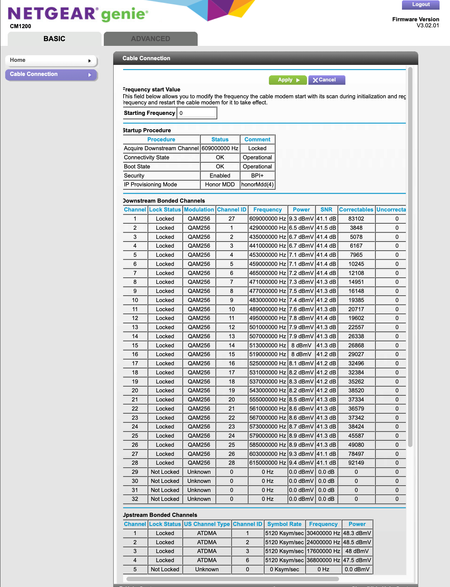
Hi can someone advise on whether the downstream signals look acceptable? Ive had occasional drops (few times per month) tied to SYNC Timing Synchronization Failure errors. I read that +/- 7 is the ra...
FURRYe38
Jan 17, 2025Guru - Experienced User
Power levels are too high:
https://kb.netgear.com/24311/Power-level-guidelines-for-a-NETGEAR-cable-modem-router
You have too many Correctables that should be zeros like the Uncorrectables.
Please post a copy and paste of the modems event log page.
https://kb.netgear.com/30008/How-do-I-view-or-clear-the-event-logs-on-my-NETGEAR-cable-modem-or-modem-router
AP747
Jan 17, 2025Aspirant
Thanks, Please see Attached is a snapshot of the log file
- FURRYe38Jan 17, 2025Guru - Experienced User
Any Criticals, Errors or Warnings seen in the event logs needs to be reviewed and resolved by the ISP. Indicates a signal issue on the ISP line up to the modem.
Be sure your using a good quality LAN cable between the modem and router. CAT6 is recommended.Find you a -6dbm coax line attenuator to help reduce the power.
Have the ISP check the signal and line quality UP to the modem. Be sure the ISP provisions the modem correctly.
Be sure there are no coax cable line splitters in the between the modem and ISP service box.
Be sure your using good quality RG6 coax cable up to the modem.
Start with removing any amplifiers, or splitters from the coax.
From there check the line for kinks, damage, moisture in the line.
Check the connectors for improperly made ends, foil touching the copper coax line, loose connections, bad/old/cheap connectors, or corroded connections. Replace them if you do.
Be sure to power OFF the modem for 1 minute then back ON.
https://community.netgear.com/t5/Cable-Modems-Routers/General-info-and-Troubleshooting-for-Cable-Modems/m-p/1530376#M12853
https://kb.netgear.com/24311/Power-level-guidelines-for-a-NETGEAR-cable-modem-router
https://www.duckware.com/tech/solving-intermittent-cable-modem-issues.html
https://highspeed.tips/docsis-events/- AP747Jan 17, 2025Aspirant
Thank you. I note that the levels I showed you are with a 6 FPA attachment. I just added a -10 FPA on top and the numbers now look like this as a result. It’s definitely a signal with too much power downstream. Thanks for confirming my suspicions. I also have the cable company (OPTIMUM) coming over tmw to replace the exposed coax outside my house (extreme cold cracked the coax and can see the metal sheath) and the splitter connections that they are responsible for is corroded. They DONT maintain anything unless they have to 🙂 Go figure.
- FURRYe38Jan 17, 2025Guru - Experienced User
Way better now.
Have them check it all out.
Good Luck.