NETGEAR is aware of a growing number of phone and online scams. To learn how to stay safe click here.
Forum Discussion

MAYDAYTAY
Mar 21, 2022Tutor
Slow speeds with C7000V2
Hello, I am using a C7000v2 – Nighthawk AC1900 WiFi Cable Modem Router on Firmware V1.03.03 with windows and I am not getting the correct download speeds. I tried looking through a lot of t...
MAYDAYTAY
Mar 21, 2022Tutor
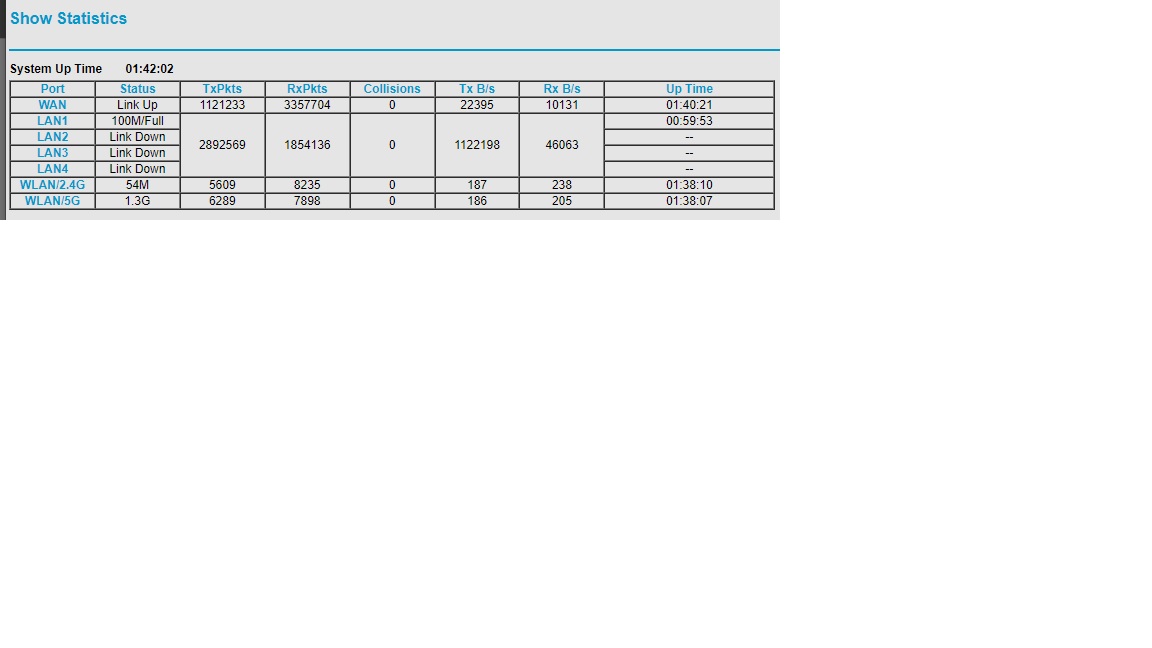
Is this what you need? I am using the Genie. Not sure where event logs or cable connections are. Let me know if you can see the picture or not. And I am using a desktop PC

plemans
Mar 21, 2022Guru - Experienced User
Looks like your desktop is only connected at 10/100mbps speed and not gigabit.
If the pc is gigabit capable, try replacing the cable between the router/pc with a cat 6 cable.
- MAYDAYTAYMar 21, 2022Tutor
I had a sparklight guy come out today to test the connection and he was also getting slow speeds with his device from the router.
This is the current cable I am using. https://www.amazon.com/gp/product/B07QFDY7YC/ref=ppx_yo_dt_b_asin_title_o08_s00?ie=UTF8&th=1
- MAYDAYTAYMar 21, 2022Tutor
I found the event log. Want a screen shot of it?
- plemansMar 21, 2022Guru - Experienced User
Your port statistics page is showing a connection speed of 100mbps.
If its not negotiating a gigabit connection, then you're not going to get faster speeds.
it could be the cable (which is why I said try a different one), it could be device you're testing with.All I know 100%, is that your ethernet connection is only 100mbps.
That's going to limit your speed.