NETGEAR is aware of a growing number of phone and online scams. To learn how to stay safe click here.
Forum Discussion

tobiasrubin
Dec 05, 2022Aspirant
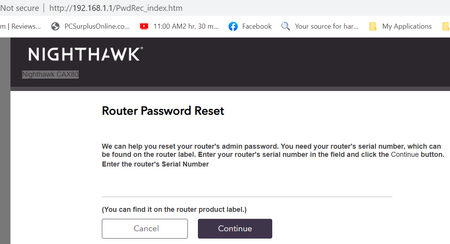
Unable to log into CAX80 it reverts back to PwdRec
When I try to access the CAX80 at 192.168.1.1 it reverts back to 192.168.1.1/PwdRec_index.htm. The only way I can get rid of this is to reboot, but that becomes annoying over time. Any help would b...
My_Username
Dec 08, 2022Apprentice
In my case this behavior *may* have had something to do with password requirements. If so - inconsistent coding is also involved.
Plemans says that at least 1 special character is required. The password change page lists every requirement plemans listed except special characters. The PW change page accepted passwords without special characters but then returned immediately to the PW change page.
If I factory reset the system would accept my PW sans special characters and appear to run fine. I could change setting, restart etc. When I removed the coax the modem tried to enter its stupid boot loop and came back to the PW reset page.
The CAX80 appears to have a half-baked requrement for special characters in the PW. I never noticed any of this before 2.1.5.2
-----------------
I need the connection now so I haven't pulled the cable to test. The unit *did* do s normal start after entering a PW with a special character.
- FURRYe38Dec 08, 2022Guru - Experienced User
I use two upper case letters, 5 lower case letters and 3 numbers. I've not seen any issues thus far with this kind of PW config on v21.5.2. The only time I did was when the browser kept using a old save PW profile that I though was correct and once I cleared this profile, the issue hasn't re-appeared.
- ThomasDWMar 15, 2023Aspirant
Have you ever found solution to this? I am also having this issue. Resetting my cable modem every time this happens is not an option. My password has all the marks Upper, Lower, Number, and Special (hyphen).
- FURRYe38Mar 16, 2023Guru - Experienced User
I don't use special characters, only Upper, Lower and numbers.
Be sure to clear out all browser caches and remove any saved PW profiles for the modem from the browser, then re-install the PW profile.
I use MS-Edge.
