NETGEAR is aware of a growing number of phone and online scams. To learn how to stay safe click here.
Forum Discussion

Gdurney
Sep 26, 2021Apprentice
Wifi disconnection
Hello all. For about the past 2 months my modem/router has lost connection/restarted itself every night. The problem has gotten progressively worse as now it does it between 5-10 times a night sometim...
Brettmcm
Sep 28, 2021Apprentice
This I can agree with. I printed out the entire manual for my device (AX6 AX 2700 Model CAX30) which is 132 pages long of information I would not otherwise have. After trying and changing every possible concivable problem I am convinced the main problem is the ISP and acutally do to the problem I'm having I'm surprised my device works at all. When I check my cable connection it always shows my ISP address and DNS as 0.0.0.0. I am getting a Dynamic IP adress for them otherwise I would make a static address. My modem/router was activated by them and myself on 3 seperate occasions and now thier app doesn't even give me the option to activate equipment anymore. It's suspcious to say the least. I have noticed that the disconnects come when the device is busy doing something, im guessing trying to obtain an IP and DNS address because of the 0.0.0.0 (or a new device was being scanned by armor). See if you can download the manual and follow the Trouble shooter chapter. My guess is your probably going to see the same thing "0.0.0.0"
Gdurney
Sep 28, 2021Apprentice
I hope that doesn’t happen but I guess we’ll see. Tonight will be my first test home again to see if my internet shuts off after some of the minor changes I’ve made with the above listed advice. We shall see.
- plemansSep 28, 2021Guru - Experienced User
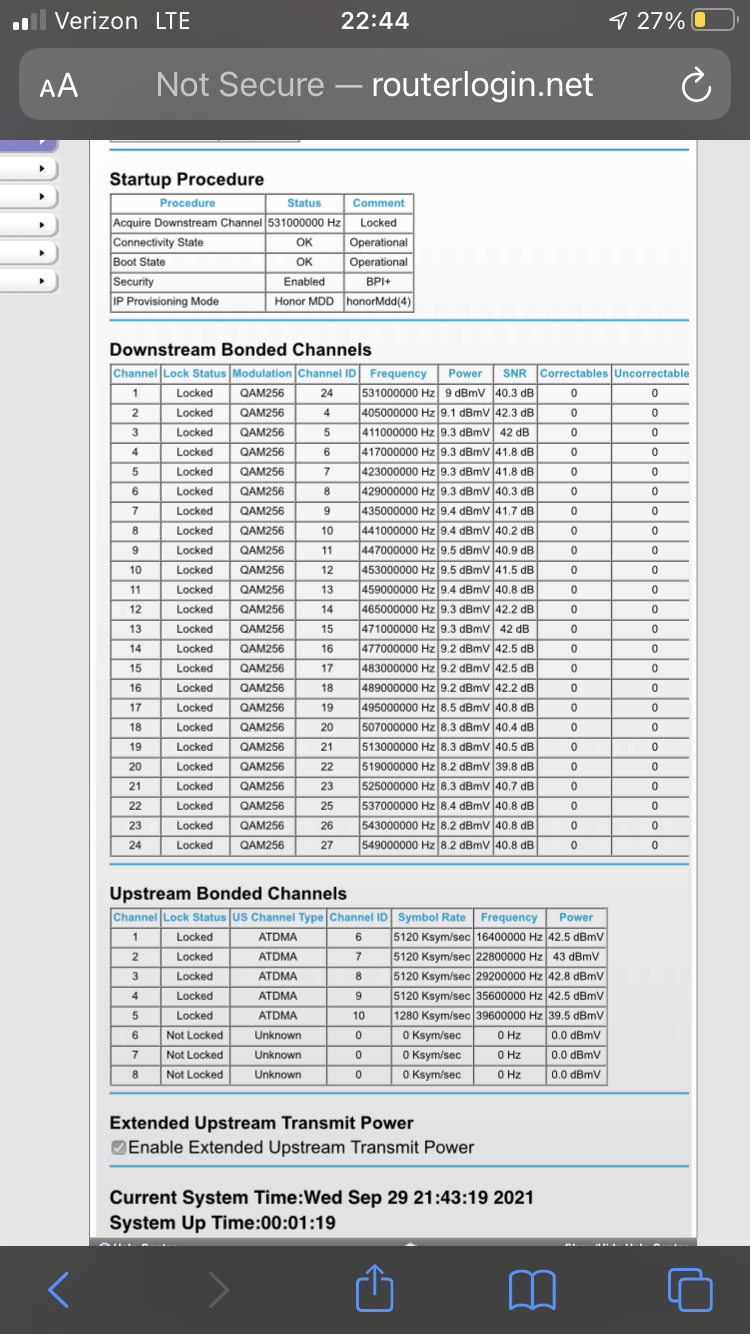
What changes did you make?
Did you rerun the screen snip of the cable connections page and logs? with as many as you had, we should see shortly how good the connection is.