NETGEAR is aware of a growing number of phone and online scams. To learn how to stay safe click here.
Forum Discussion

Chadwycke
Apr 27, 2019Aspirant
WNDR3400V3 will not connect to modem
I am no longer able to connect devices wirelessly or wired to this router.
I have already tried:
rebooting and resetting both the modem and router
updating to the latest firmware (1.0.67)
...
Chadwycke
Apr 27, 2019Aspirant
I have always had three devices connected to it: the PC on port one, an Android TV box on port two, and a Samsung smart TV on port three. I have not changed anything in this configuration since I installed it. The router worked for months until suddenly it stopped working. While I seldom used the wi-fi, I can confirm it ceased working at the same time.
Per the manual on page 12, the presence of the internet LED in solid amber would indicate "The IP address was not acquired." I can perhaps screenshot the Genie program if it might help.

additude
Apr 28, 2019Virtuoso
I promote isolate, divide and conquer and validate.
Get your LAN down to it's simplest form...
In your case, probably Modem/Router --> device
Verify that you have a working LAN with the simplest of configurations.
Add pieces of equipment individually one at a time confirming that each operates properly.
In this respect, you are verifying Internet>Cables>Equipment Operation and it's easy enough to do.
Once you are convenced that you have all good equipment and cables and signals up to the WNDR and that it is the isolated problem, save a copy of the configuration, download local a copy of the latest firmware, reset the WNDR via the reset button, get back into the WNDR, do a firmware update from the local file, then try again.
Is the cable from your modem going into the yellow port on the back?
You may need to do some port forwarding on the Modem/Router and set the WNDR up for a static WAN IP.
- ChadwyckeApr 28, 2019Aspirant
My understanding from Charter Spectrum's tech service is that the Arris is configured so that only Port 1 actually works on it. I have verified that hooking devices to any of the other ports on the Arris does not receive signal.
A networking cable goes from that port 1 to the WNDR and then the three devices are hooked up to it.
This configuration worked for months until it suddenly ceased. I've reset the Arris using the reset button, as well as leaving it unplugged for hours. It has no battery back up.
I've disconnected all the devices from the WNDR and reset it. I've reset it with all the devices connected. I've replaced the yellow cable with a brand new length of cable.
I still only get signal when the device is hooked directly to Port 1 of the Arris.
- antinodeApr 28, 2019Guru
> [...] the Arris is configured so that only Port 1 actually works on
> it. [...]It could be configured in a modem-only ("bridge") mode.
> [...] A networking cable goes from that port 1 to the WNDR [...]
The WNDR3400v3 has multiple Ethernet ports. Do you mean to its
WAN/Internet port?> [...] I've reset the Arris using the reset button, [...]
Actually resetting it might put the TG1862G back to its default(?)
modem+router mode.> [...] I still only get signal when the device is hooked directly to
> Port 1 of the Arris.Depending on exactly what "get signal" means to you, that suggests
that your "using the reset button" did not change its mode.
When you connect a device directly to the TG1862G, what does that
device get as its IP address? You probably shouldn't publish your
(whole) public IP address, but you could report at least the first two
octets of anything ("a.b" out of "a.b.c.d").> [...] I've replaced the yellow cable with a brand new length of cable.
> [...]Replacing one bad cable with another bad cable might not help.
Actually testing a cable would be more definitive. See "For a quick
cable test, [...]", above. Do any of the LED indicators on either of
these devices indicate a good physical link when you use either cable to
connect them?As a test, what happens if you connect (only) a known-good cable from
the WNDR3400v3 WAN/Internet port to one of its LAN ports?
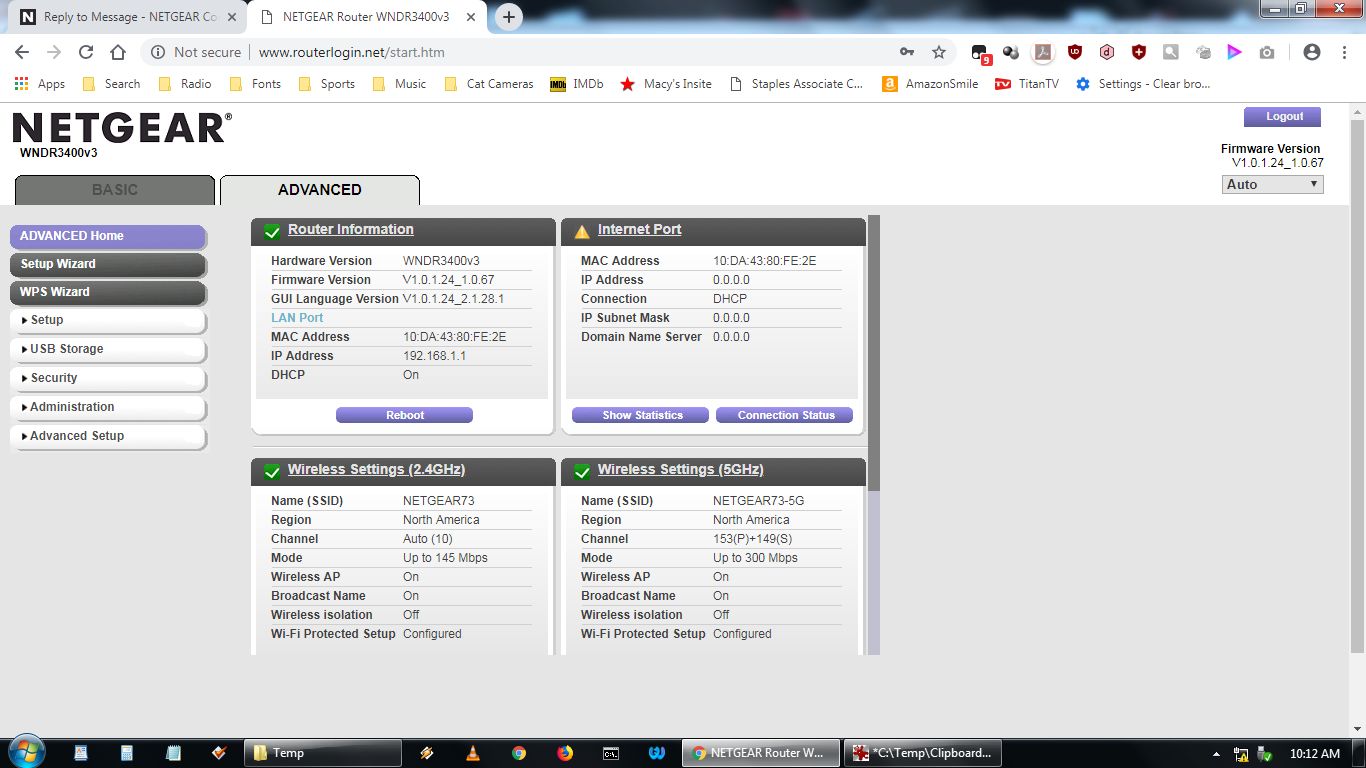
"IP Address 0.0.0.0" in your attached picture suggests that the
WNDR3400v3 WAN/Internet port is not connected to any cooperating device,
which could be the fault of the TG1862G, the cable, or the WNDR3400v3
WAN/Internet port. If a different device, using the same cable, works
with the TG1862G, then that suggests a problem with the WNDR3400v3
WAN/Internet port. In that case, if it's a hardware problem, then I'd
expect an LED indicator on the TG1862G to indicate a problem with the
physical link. So far, reports on any LEDs (other than the one) have
been disappointingly absent. The LED indicators on all these devicesare present for a reason, and, with my weak psychic powers, I can't see
them from here.
- ChadwyckeApr 28, 2019AspirantMy IP Address Is:IPv6: 2603:9004:ff00:x:xxxx:xxx:xxxx:xxxx
IPv4: 66.25.xxx.xxxI'm sorry for bothering anyone with this. I've worked with computers for 35 years but have virtually no experience with networking.
Here's a picture of the router with all three devices hooked up to it. I reset it again with the pinhole button just before taking this picture. All three devices appear to show as connected on the router.
I verified the networking cable between the router and modem is working by swapping it with a neighbor's working cable.
All three devices will connect to the internet when hooked into Arris Port 1, so the cables to the devices are not the problem. The router simply will not connect whereas until about a month ago it did.