NETGEAR is aware of a growing number of phone and online scams. To learn how to stay safe click here.
Forum Discussion

Dugite
Aug 04, 2015Guide
A6200 timing out Windows 10
Hi All, hope I'm not starting a new thread, surely I can't be the only one here with this issue. After upgrading (???) to WX I have found that my WiFi Network icon gets a red X on the top left hand...

JamesGL
Sep 10, 2015NETGEAR Employee Retired
Please follow the steps below and provide feedback if it resolves.
- With the A6200 plugged in, uninstall the old NETGEAR software and drivers. To do this, open Control Panel.
- Click on “Uninstall a program”.
- Click on “NETGEAR A6200 Genie” and click Uninstall
- Once uninstall has completed, unplug your A6200 adapter and restart your PC.
- If you are using USB 3.0, you will need to upgrade the USB host controller.
- To determine if you are using USB 3.0, see Microsoft’s support article USB 3.0 Devices.
- For information on how to update the USB host controller driver, visit your motherboard manufacturer’s website.
For more information on updating drivers in Windows 10, see Microsoft’s support article: How to Install and Update drivers in Windows 10.
- Ensure that you have installed all of the necessary updates for Windows 10 before proceeding. For more information on installing Windows updates, see Microsoft’s support article Service Pack and Update Center.
- Download and extract the A6200 softwareto a convenient place such as your desktop.
- Choice one of listed execution file and run.
- standalone-V1.0.011-win8.1_win10_signed.exe (with NETGEAR Genie )
- setup-V1.0.0.26-win8.1_win10_signed.exe (Driver Only)
- Follow the on-screen installation instructions (insert the adapter when prompted)
- When the installation has completed, restart your PC.
Regards,
JamesGL
Community Team
Dugite
Sep 16, 2015Guide
Update for me only, after weeks of trying all suggestions, downloading drivers, removing reinstalling software I have given up. Windows X has been on the board for developers for at least two years now and has been officially released. I can't believe that a company like netgear can't be bothered to beta test their hardware with a developers release of windows X which I'm sure MS would have made available to Netgear. Such is my dissapointment and the need for a stable internet (I do a lot of data crunching at night which is uploaded and downloaded all the time), I went out to day and purchased a D-Link AC1900 11AC Wi-Fi USB 3.0 Adaptor. Installation was simple, and my download speeds are now back to fantastic. No packet loss, no disconnects. My OLD A6200 really is now, just a paper weight. I know I'm only one user, but I'm sure I'm not the only one who has left Netgear for good over this issue.
Good luck people, FWIW, the DWA-192 is awesome...
- FatalArchetypeSep 22, 2015Initiate
Same issue happening here. A bit disheartened to see that these issues are still going on and no update has been released yet. Might be time to switch to a different manufacturer for my wireless gear.
- What model of adaptor are you having issues with? A6200
- Is the Win10 install a fresh install or an upgrade? Upgrade
- If an upgrade, from what version of Windows? Windows 8.1
- What is the H/W model of the PC/tablet/netbook? Custom built pc.
- What driver version are you attempting to install? A6200-V1.0.0.26-1_Software-version
- Did you try installing with AV / Firewall disabled? No effect.
- What error messages do you see? No error messages.
- If no error messages what failure of functionality do you see? Just disconnects/uninstalls under heavy data usage as well as intermittent other times.
- PlattfishSep 24, 2015Guide
Same issue as everyone else, my a6200 constantly dropping connection forcing a hard reset. It's clearly a driver issue, as no amount of uninstalling and reinstalling them makes any difference. I think we just need to wait for Netgear to get their act together and put out some functioning Windows 10 drivers. Unfortuantely, my adapter is all but useless in the meantime, which is pretty frustrating. I've had no other driver issues since the upgrade, I wonder why Netgear is having such a miserable time getting their products to work...
- JamesGLSep 29, 2015NETGEAR Employee Retired
Hi Plattfish,
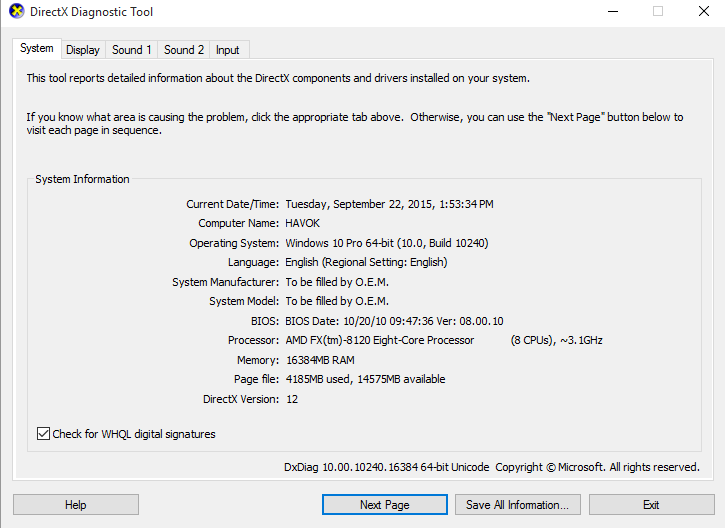
Please provide the System information of your computer just like what FatalArchetype provided.
Regards,
JamesGL
Community Team
- DustregaSep 30, 2015Star
To assist in the most rapid and complete solutions Netgear engineers would be most grateful if people could provide some specific information. This thread is now somewhat confused as it deals with three different adaptors, and each has its own driver.
Please answer as much of the following as possible in a reply to this thread;
- What model of adaptor are you having issues with?
- Is the Win10 install a fresh install or an upgrade?
- If an upgrade, from what version of Windows?
- What is the H/W model of the PC/tablet/netbook?
- What driver version are you attempting to install?
- Did you try installing with AV / Firewall disabled?
- What error messages do you see?
- If no error messages what failure of functionality do you see?
1. A6200
2. Upgrade to Windows 10 Pro 64-bit
3. Updated from Windows 7 Ultimate
4. Custom Desktop PC w/ ASUS Z-37 Plus Intel Motherboard (DXDiag information)
5. All Windows 10 compatible driver versions both standalone and with Genie software
6. AV / Firewall were both disabled during install attempts
7. No errors,drivers will install and device will show up in Device Manager, and networks are discoverable.
8. Device will intermittently disconnect from wireless network at random (router has been ruled out as other wireless devices stay connected on both 2.4 and 5 GHz frequencies). Event 10400 prevalent in Windows System Event Viewer when disconnection occurs.