NETGEAR is aware of a growing number of phone and online scams. To learn how to stay safe click here.
Forum Discussion

ally6868
Dec 31, 2018Aspirant
NightHawk
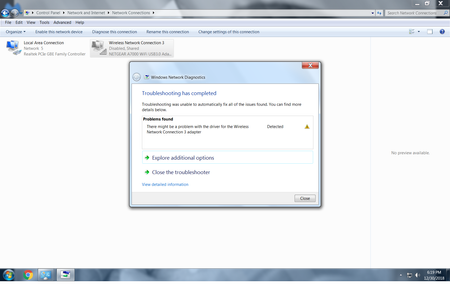
nighthawk ac1900 will not connect. The usb ports are working. It does show up on the network connection . It says it's disable. I enable it but nothing happens. Please help


michaelkenward
Jan 01, 2019Guru - Experienced User
Does everything else work on the router? THe LAN? Can anything else see the wifi? A mobile phone?
It looks like the problem could be with Windows and the USB Adapter. Have you installed the software and drivers for it?
There is support for the A7000, including a manual and software, somewhere at the end of this link:
>> Click here >> A7000 | Product | Support | NETGEAR << Click here <<
ally6868
Jan 02, 2019Aspirant
The adapter does get picked up by the computer. I do think it's a window issue because this it my 3rd adapter and having the same issue. Any suggetions on how to fix it
- michaelkenwardJan 03, 2019Guru - Experienced User
Windows version?
Did you install the software I linked to earlier?
Some people find that they do not need any extra software and drivers to get a USB adapter to work. The bundled drivers in Windows 10 do the job.
Have you done any troubleshooting in Windows? Does everything look OK (no warning icons) in Device Manager? (Get at that from the "Winkey" menu.)
- ally6868Jan 03, 2019Aspirant
Did you install the software I linked to earlier? yes
Have you done any troubleshooting in Windows? yes
Does everything look OK (no warning icons) in Device Manager? yes
- michaelkenwardJan 03, 2019Guru - Experienced User
Sounds like a Windows issue.
Unplug the adapter.
In Device Manager, look in Network Adapters.
Tell it to Show hidden devices.
Look for anything that might be related to the adapter.
Uninstall it.
Try the same move in Universal Serial Bus Controllers.
It might help to reboot.
Plug in the adapter. See if leaving Windows to install its native drivers works.
I assume that your Windows drivers are up to date. Windows Update will not do that for you. This is a chipset thing. You need to work out who made the PC, or its motherboard, and seek out the latest drivers there.