NETGEAR is aware of a growing number of phone and online scams. To learn how to stay safe click here.
Forum Discussion

davidcasper1
Sep 28, 2016Follower
WNCE4004 will not connect
This problem has already been raised - but was closed with no answer. See: https://community.netgear.com/t5/WiFi-Adapters/WNCE4004-will-not-connect-with-AC1750-router-despite-multiple/td-p/976279 ...
sulton
Mar 08, 2017Aspirant
I have exactly the same problem described by Davidcasper1.
I upgraded to a SuperHub 3.0 router, which provides Wi-Fi access perfectly fine to all my devices (Mobile Phones and Laptop), but unfortunately it is unable to connect to my Netgear gaming adaptor (Model: WNCE4004).
Both my Netgear gaming adaptor and my SuperHub 3.0 router have been reset, but I am not able to connect the two devices together by Push ‘N’ Connect button (WPS) or by connecting the Netgear gaming adaptor to my laptop via an Ethernet cable and connecting the device up by the web set up page www.mywifiext.com. In the latter case when I go through set up my SuperHub 3.0 Wi-Fi signal is found by my Netgear gaming adaptor and it has 100% signal but when I go to complete the process I get the message stating device is not close enough to the Router when I am in the same room.
I have tried the advice given on this thread and changed the security settings on the SuperHub 3.0’s config pages to WPA2, but unfortunately this does not work.
Can you let me know if there are any other setting available I can change on the Netgear gaming adaptor to gain access to my Wi-Fi?
Please get back to me.

JamesGL
Mar 09, 2017NETGEAR Employee Retired
Hi sulton.
Check the firmware of the adapter. Make sure it has the latest one.
http://kb.netgear.com/app/answers/detail/a_id/23920?cid=wmt_netgear_organic
- sultonMar 11, 2017Aspirant
Hi JamesGL,
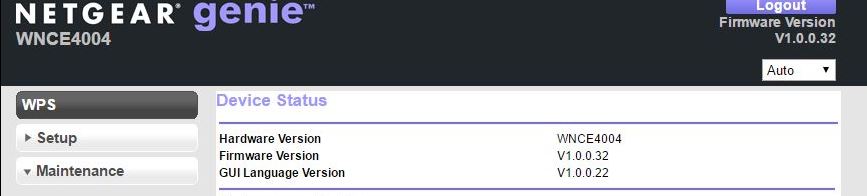
I am currently running V1.0.0.32, which I believe is the latest version.
Do you have any further suggestions?
- JamesGLMar 16, 2017NETGEAR Employee Retired
Hi sulton.
Can you try to reset the adapter and reconfigure.
- sultonMar 18, 2017Aspirant
Hi JamesGL,
I have reset the adaptor and gone through the process of reconfiguration, but unfortunately this has not resolved the issue.
- JamesGLMar 20, 2017NETGEAR Employee Retired
Hi sulton,
When did you purchase the device? If it is just brand new, I would suggest contacting support team for assistance and isolation.