NETGEAR is aware of a growing number of phone and online scams. To learn how to stay safe click here.
Forum Discussion

RobinB
Aug 26, 2015Initiate
EX 6200 as ethernet wired access point
I have purchased an EX 6200 to use as a wired WiFi access point. Before I did this I called Netgear Support to make sure it supported this type of operation. I was assured it did. I was very clea...

nhann
Oct 30, 2015NETGEAR Employee Retired
Please try configuring your antivirus firewall and let us know how it works for you.
jpmerron
Oct 31, 2015Aspirant
I don't think it is a firewall issue - the problem I am having is communications between devices that are all behind the router firewall - and there is no firewall in the EX 6200 Access Point.
The problem seems to be with the interface between the AP and the router.
It is strange how a device connected to the AP can access the internet but cannot communicate with a device on the same network segment as the default gateway.
- nhannNov 03, 2015NETGEAR Employee Retired
Hi jpmerron,
Please note in your screenshot that you are not on the latest firmware. Update to latest firmware v1.0.3.68_1.1.104
Also perform a factory reset to defaults after updating your firmware.
- Insert a straightened paper clip into the hole of the Restore Factory Settings button and hold it for about seven seconds
- Release the button. The extender resets and restarts. This process takes about one minute
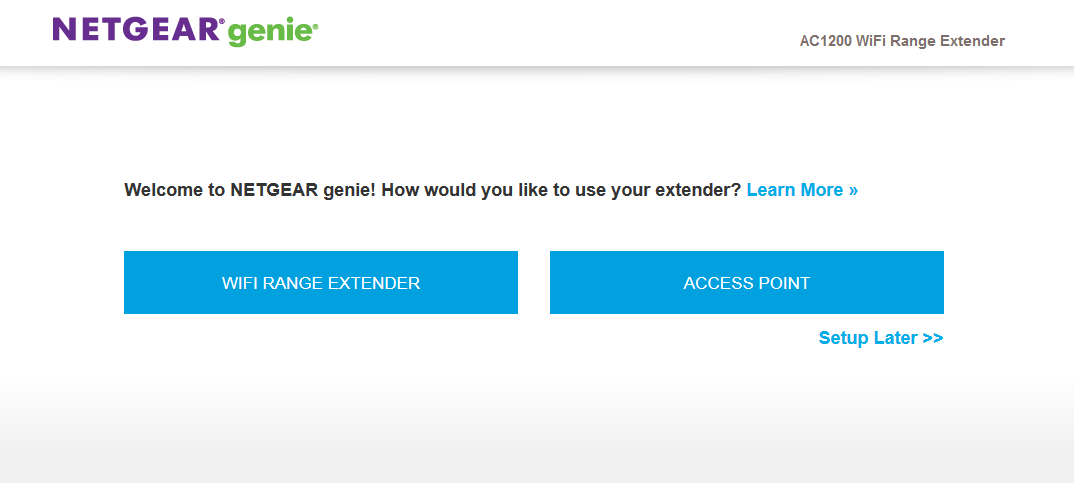
Setup the EX6200 and select AP mode.
When on your computer that is connected to the extender, do a trace route to a device connected to the router and see if you can see when/where the communication fails.
- jpmerronNov 03, 2015Aspirant
Yes, I am aware I am not on the latest firmware. As I stated in my post on October 30th with regard to the latest firmware " I installed it the GUI was different and I couldn't see an option for Access Point(Wired) so I down graded again."
If anyone can tell me how to select Access POint(Wired) in the latest software I will gladly install it
Thanks
- nhannNov 03, 2015NETGEAR Employee Retired
Yes, I understand.
Please update to latest firmware, then reset to factory defaults.
Then when logging into mywifiext.net and creating login credentials, you will see this page: