NETGEAR is aware of a growing number of phone and online scams. To learn how to stay safe click here.
Forum Discussion

Rugae
Apr 26, 2020Aspirant
Need help connecting to 5GHz on the EX7500 Wifi Extender
Hello,
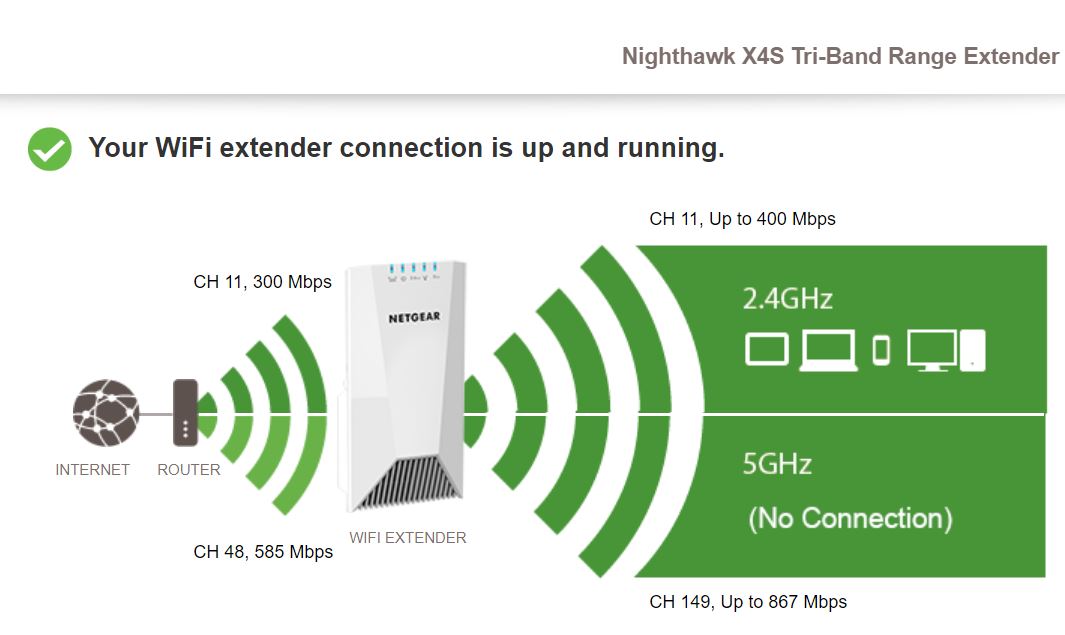
I have a problem connecting to the 5 GHz with the EX7500 Wifi Extender. On mywifiext, it indicates that the extender is connected to my router. My router is Netgear RAX40. However, under 5 GHz, it indicates that there is no connection.
Some details that I thought would make it easier for you to understand my problem:
Router: RAX40 2.4 GHz channel is 11; 5 GHz channel is 48
Extender 2.4 GHz channel is auto; 5 GHz channel is 149
On the extender, solid blue light on Link status, Power, 2.4 GHz, WPS. No light at all on 5 GHz even thought mywifiext indicates it is connected. When I first set up, the extender was able to find both of the 2.4 GHz & 5 GHz network and signal strength were 100% for both. Please help, thank you!
10 Replies
- plemansGuru - Experienced User
the EX7500 is a triband extender. so you have 1x 2.4ghz radio and 2x 5ghz radios. so one is connected to the router (which is showing). the other is for devices to connect to. If a device is connected to the 5ghz, the 5ghz led will light up. If nothings connected to it, it stays off. Your status page you linked it showing 5ghz broadcasting with nothing connected to it. So the lights off.
If you're using the "onessid" function, it bandsteers devices between 2.4ghz and 5ghz. your devices must be on the 2.4ghz.
- RugaeAspirantThank you for your response.
The thing is I have multiple devices connected to 5 GHz but the light is still off, though I can still use the internet on these devices. The light is not broken because when factory reset the extender, all the lights showed up normally. Not sure what the problem is.- plemansGuru - Experienced User
so you're using it in mesh mode? using the single ssid function?
Are you sure they're not connected to the routers 5ghz?
They don't show up in the connected devices page? for the extender