NETGEAR is aware of a growing number of phone and online scams. To learn how to stay safe click here.
Forum Discussion

acam6146
Dec 11, 2018Aspirant
Powerline 2000 connected. Printer working, but not internet.
Hi,
I have created the following setup to extend internet from the living room to a home office:
internet - Netcomm NF18AC Modem Router - two cables - PLP2000 - through walls - PLP2000 - (1) ...
acam6146
Dec 14, 2018Aspirant
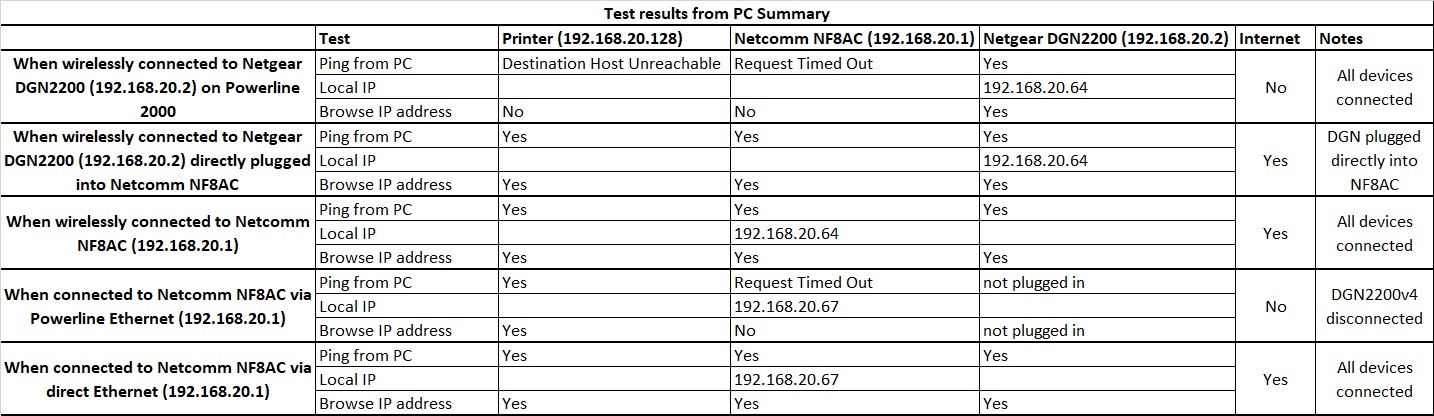
The IP address of the main router is 192.168.20.1. The second router is set to 192.168.20.2 and this has been reserved on the main router. The IP range for DHCP on the main router has been set to 192.168.20.64 to 192.168.20.127.
local IP address is 192.168.20.64 when connected wirelessly to the main router.
local IP address is 192.168.20.67 when connected by powerline ethernet to the main router.

StephenB
Dec 15, 2018Guru - Experienced User
acam6146 wrote:
The IP address of the main router is 192.168.20.1. The second router is set to 192.168.20.2 and this has been reserved on the main router. The IP range for DHCP on the main router has been set to 192.168.20.64 to 192.168.20.127.
local IP address is 192.168.20.64 when connected wirelessly to the main router.
local IP address is 192.168.20.67 when connected by powerline ethernet to the main router.
Thx, this is helpful.
So the PC is getting a DHCP address when connected by powerline, but it cannot ping 192.168.20.1?
Is ping disabled in the router? If it is, ping would also time out when you are connected wirelessly.
- acam6146Dec 16, 2018Aspirant
That's right. When using powerline ethernet, the PC is allocated an ip address but I cannot ping the main router.
I can ping the router when connected wirelessly.
Not sure if this helps but I can also ping my printer from Command Promp when connected wirelessly to the router, however, I cannot ping the printer when using the routers diagnostic interface.